EasyManua.ls Logo

Philips MX5100VR/37 - Speaker Balance

Philips MX5100VR/37
165 pages
Print Icon
To Next Page IconTo Next Page
To Previous Page IconTo Previous Page
Loading...
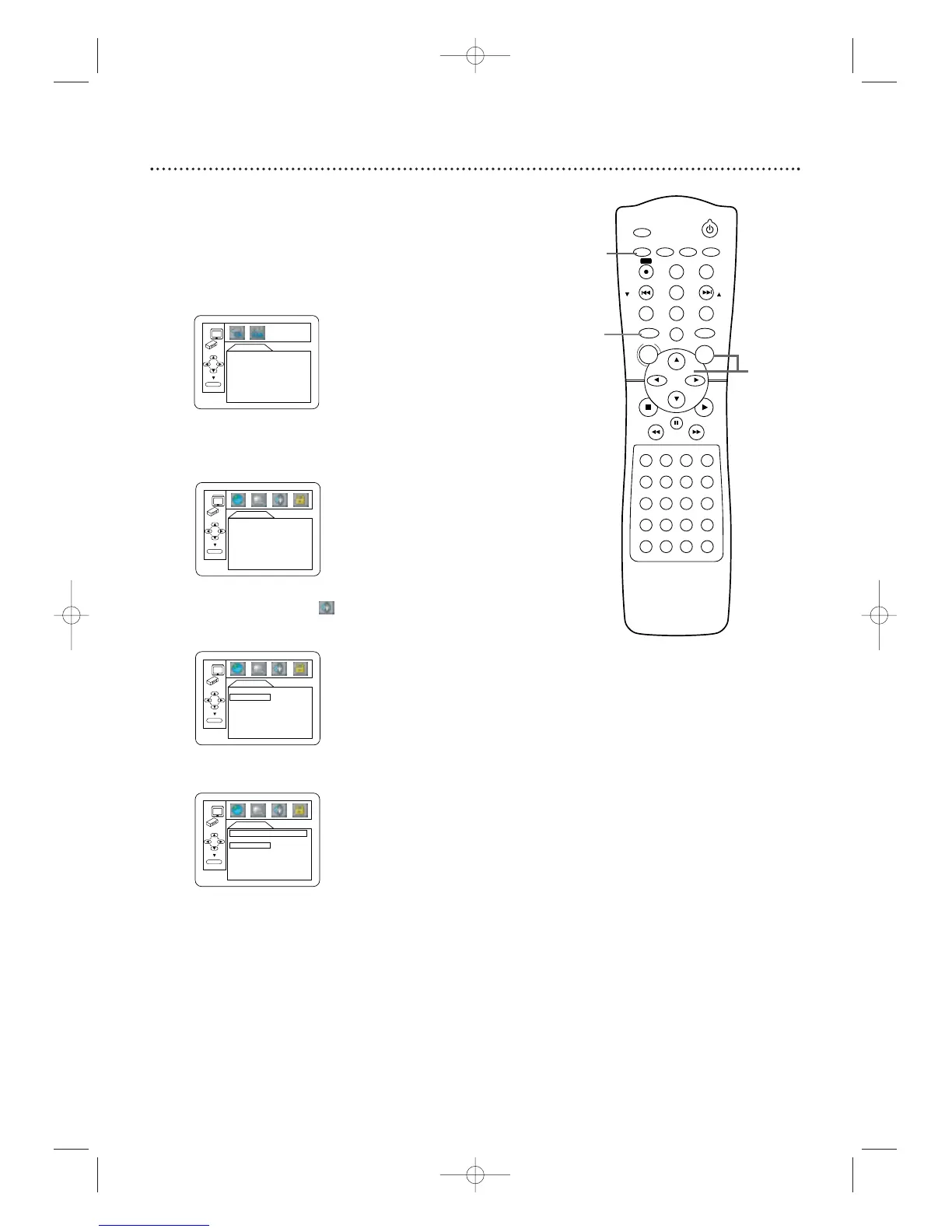
You can test the volume balance of each speaker with this procedure.
1
Press DVD to put the System in DVD mode. The red
DVD light will appear on the front of the System.Press STOP
C to stop Disc play if necessary.
2
Press SETUP/PROG. The QUICK SETUP screen will
appear.
3
Press B to select CUSTOM at the top of the menu,
then press OK.This menu will appear.
4
Press B to select (AUDIO) at the top of the
menu,then press OK.
5
Press p to select 5.1CH, then press OK.

AUDIO
5.1CH
DELAY TIME
BALANCE
OK
AUDIO
DRC ON
DOLBY DIGITALON
DOWN SAMPLING
ON
5.1CH
OK
LANGUAGE
AUDIO ORIGINAL
SUBTITLE OFF
DISC MENU ENGLISH
PLAYER MENU ENGLISH
OK
QUICK SETUP
PLAYER MENU ENGLISH
TV ASPECT 4:3 LETTER BOX
DOLBY DIGITALON
OK
52 Speaker Balance
STANDBY-ON
TIMER SET
VCR/TV
SEARCH MODE
REPEAT
TUNER
3
456
789
SLOW
0
+10
2
1
VCRDVD
CLEAR
DISPLAY
SETUP/
PROG
TITLE RETURNMODE/SPEED
C-RESET
AUDIO/
BAND
ANGLE
SUBTITLE
ZOOM
DISC
MENU
OK
PAUSE
REW FF
PLAYSTOP
SKIP/
CH
SKIP/
CH
REPEAT
SOUNDSURROUND
+–
VOLUME
REC
A-B
PHILIPS
1
2
3-5
MX5100VR.qxd 6/04/2004 3:37 PM Page 52

Table of Contents

Related product manuals