EasyManua.ls Logo

Philips MX5100VR/37 - Page 31

Philips MX5100VR/37
165 pages
Print Icon
To Next Page IconTo Next Page
To Previous Page IconTo Previous Page
Loading...
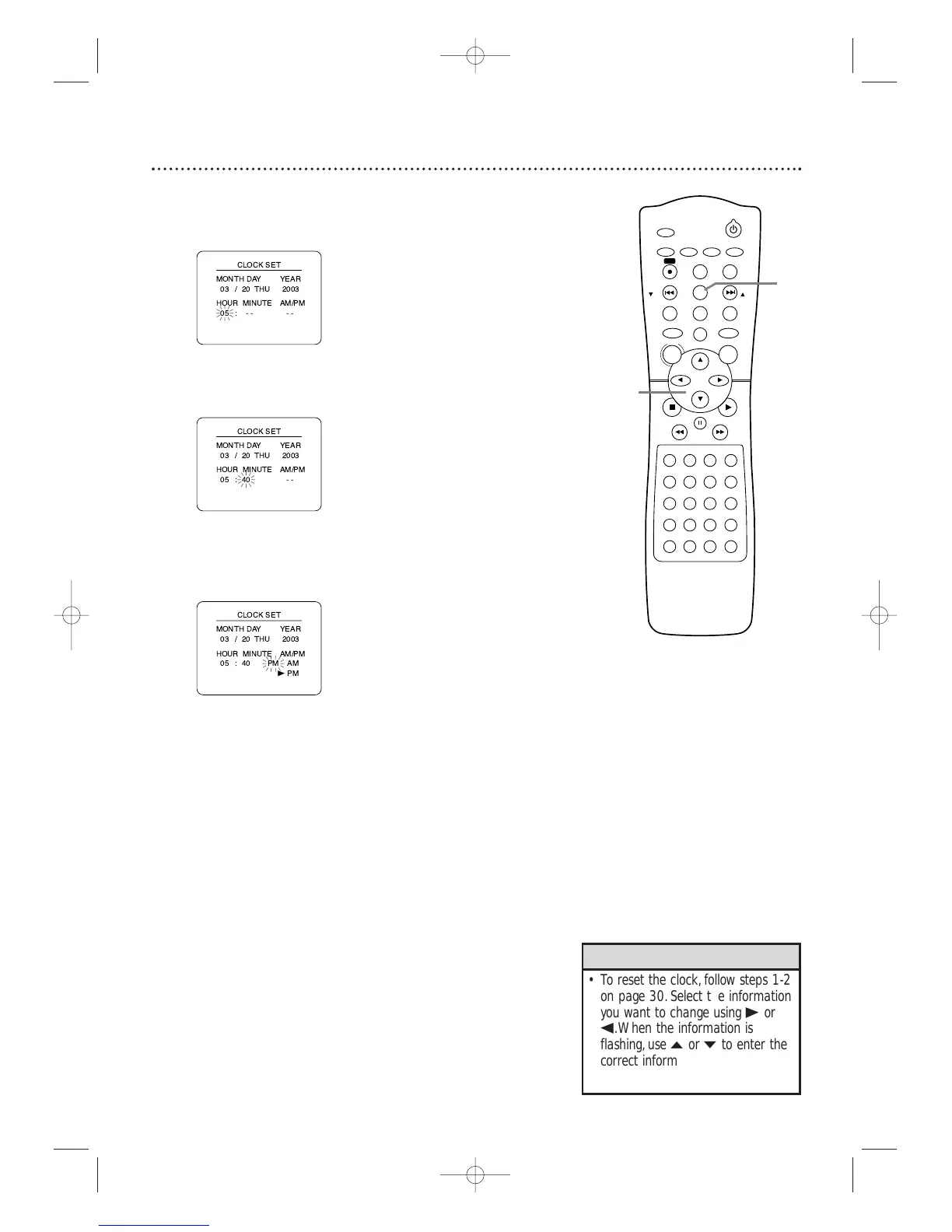
Clock (VCR) (cont’d) 31
6
While the HOUR space is flashing, press o or p until
the hour appears. Then, press B.
7
While the MINUTE space is flashing, press o or p
until the minute appears. Then, press B.
8
While the AM or PM space is flashing, press o or p to
select AM or PM.
Your selection will flash on the screen in the AM/PM space.
9
Press C-RESET/CLEAR or B to start the clock.
 
 
 
 




 
B

 
 
 
 





 
 
 
 





•To reset the clock, follow steps 1-2
on page 30.Select the information
you want to change using
B or
s.When the information is
flashing,use
o or p to enter the
correct information.Press
C-RESET/CLEAR to set the clock.
Helpful Hints

STANDBY-ON
TIMER SET
VCR/TV
SEARCH MODE
REPEAT
TUNER
3
456
789
SLOW
0
+10
2
1
VCRDVD
CLEAR
DISPLAY
SETUP/
PROG
TITLE RETURNMODE/SPEED
C-RESET
AUDIO/
BAND
ANGLE
SUBTITLE
ZOOM
DISC
MENU
OK
PAUSE
REW FF
PLAYSTOP
SKIP/
CH
SKIP/
CH
REPEAT
SOUNDSURROUND
+–
VOLUME
REC
A-B
PHILIPS
6-9
9
MX5100VR.qxd 6/04/2004 3:37 PM Page 31

Table of Contents

Related product manuals