Hookups (cont’d) 9
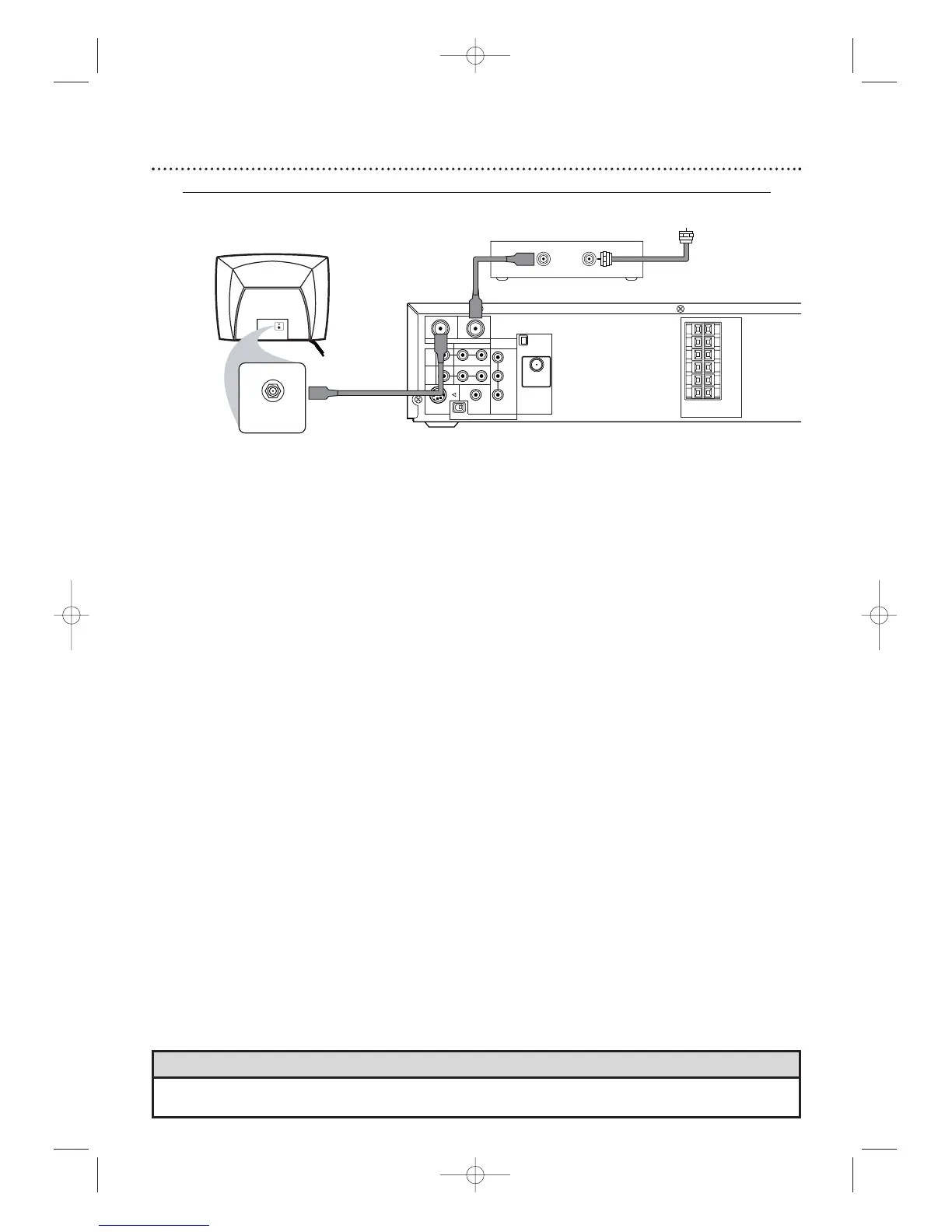
Connecting the Cable Bo
x/Satellite Receiver to the System and to a TV
This connection will let you use the features of both the VCR and the DVD Player.
• If your Cable Box/Satellite Receiver has Audio/Video Out jacks,use audio/video cables to connect them to the
AUDIO and VIDEO (VCR IN) jacks on the System.You will not need the RF coaxial cable as described at step 2.
Helpful Hint
1
Connect a Cable TV or Satellite signal to the IN jack on the Cable Box/Satellite Receiver.
2
Use an RF coaxial cable to connect the OUT Jack on the Cable Box/Satellite Receiver to
the System’s TV ANTENNA IN jack.
3
Use a second RF coaxial cable (one is supplied) to connect the System’s TV ANTENNA
OUT jack to the TV’s Antenna In jack.
4
Set the P/I PROGRESSIVE switch on the rear of the System to I (Interlace).
5
You are ready to connect the AM and FM antennas and the Speakers. Go to pages 16-17 to
connect these items.
6
When all connections are complete,plug in the power cords of the TV,Cable Box/Satellite
Receiver, and the System.
7
Set your TV to channel 3. If you cannot use channel 3 at your TV,you can change the System’s output
channel to channel 4.See step 6 on page eight for details.
8
If you have not turned on the System already,go to page 19 to complete the VCR’s First-
Time Setup.
With this connection ...
● Select TV channels at the Cable Box/Satellite Receiver,not the System.To record or view TV channels:
1) Press VCR to put the System in VCR mode.The red VCR light will appear on the front of the System.
2) Press SKIP i /CH o or SKIP j /CH p to set the System to the Cable Box/Satellite Receiver
output channel (03 or 04).
3) Set the TV to the System’s output channel (03 or 04).
4) Select the channel you want to view/record at the Cable Box/Satellite Receiver.
● You may not view a channel other than the one you are recording.
● Program a timer recording for one channel at a time. Set your Cable Box/Satellite Receiver to the channel
you want to record.When you enter the channel you want to record in a timer recording,select channel 03
or 04 (the Cable Box/Satellite Receiver output channel).(This is step 8 on page 39.) Leave the Cable
Box/Satellite Receiver on for a timer recording.








 To Next Page