12 EN
Note
• Shufeplaycannotbeselectedwhenyouplaythe
programmed tracks.
Program tracks
You can program a maximum of 20 tracks.
1 In Disc or USB A mode, press to stop
playing.
2 Press PROG to activate the program
mode.
» Anumberashesonthescreen.
3 For MP3 tracks, press ALB/PRESET+/- to
select an album.
4 Press or to select a track number,
then press PROGtoconrmselection.
5 Repeat steps 3 to 4 to program other tracks.
6 Press to play the programmed track.
• To erase the program, press twice.
Note
• The function is not available in USB B mode.
Play audio through Bluetooth
The product can stream music from your
Bluetooth device to the system through
Bluetooth.
Connect a device
Note
• Before pairing a device with this product, read its user
manual for Bluetooth compatibility.
• Make sure that Bluetooth function is enabled on your
device, and your device is set as visible to all other
Bluetooth devices.
• The operational range between this product and a
Bluetoothdeviceisapproximately10meters(30feet).
• Any obstacle between this product and a Bluetooth
device can reduce the operational range. Keep away
from any other electronic device that may cause
interference.
Option 1: Connect a device through
NFC
NearFieldCommunication(NFC)isa
technology that enables short-range wireless
communication between various NFC
compatible devices, such as mobile phones and
IC tags.
If your Bluetooth device supports NFC, you can
connect it with this speaker easily.
1 Enable NFC on your Bluetooth device
(refertoitsusermanual).
2 Press Bluetooth to select BT source.
» [BT] (BT)isdisplayed,then[SEARCH]
(search)beginstoash.
» TheBluetoothindicatorashes.
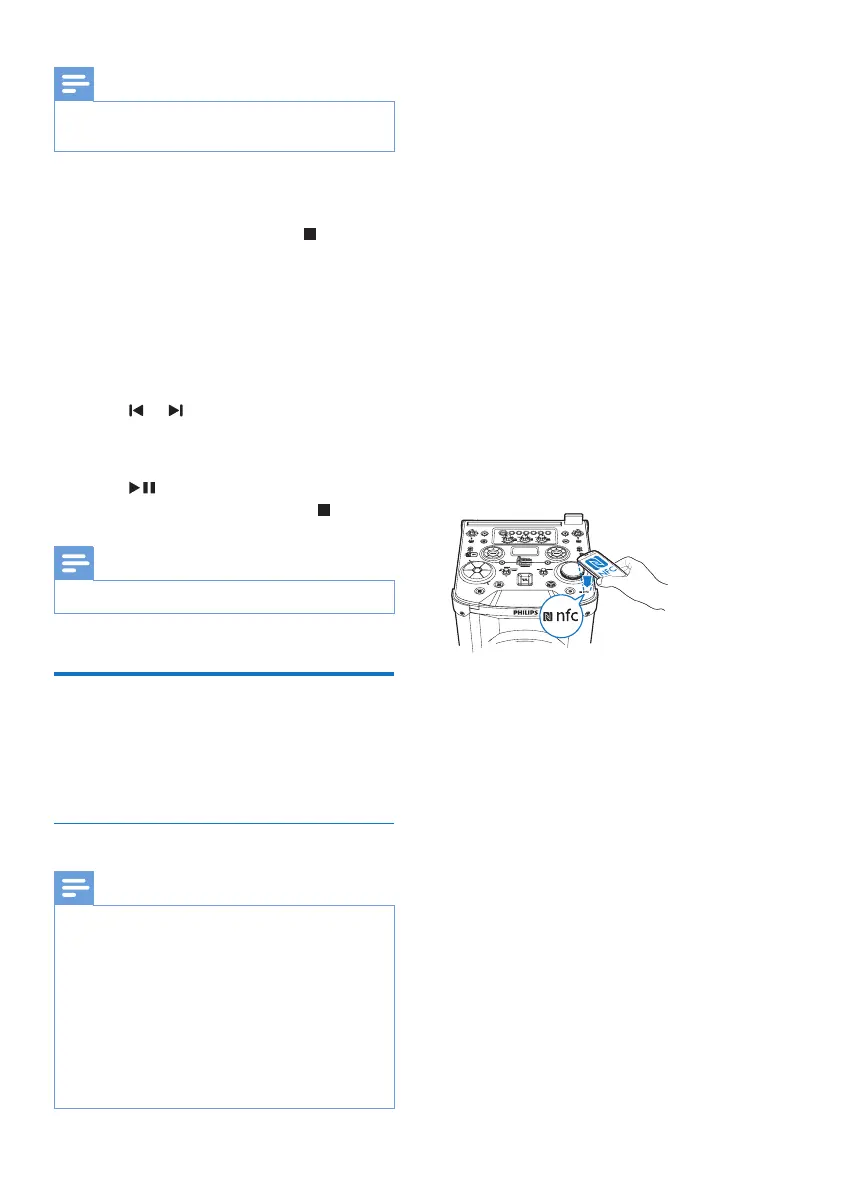
3 Tap the NFC tag on the top of the product
with the NFC area of your Bluetooth
device.
4 Follow the on-screen instructions to
complete the pairing and connection.
» After successful connection, the
Bluetooth indicator turns solid blue.
Option 2: Connect a device manually
1 Slide CROSS FADER to the far left.
2 On your Bluetooth device, enable
Bluetooth and search for Bluetooth devices
that can be paired (see the user manual of
thedevice).
3 Press Bluetooth repeatedly to select BT
source.
» [BT] (BT)isdisplayed,then[SEARCH]
(search)beginstoash.
» TheBluetoothindicatorashes.


 To Next Page