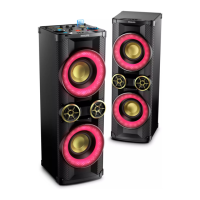
1EN
Contents
1 Important 2
Safety 2
2 Your Mini Hi-Fi System 4
Introduction 4
What's in the box 4
Overview of the main unit 5
Overview of the remote control 7
3 Get started 8
Prepare the remote control 8
Connect 8
Turn on 9
Turn demo mode on or off 9
4 Play 10
Play from a disc or USB 10
Play audio through Bluetooth 12
Play from an external device 13
5 Listen to radio 15
Tune to a radio station 15
Program radio stations automatically 15
Program radio stations manually 15
Select a preset radio station 15
Change AM tuning grid 15
6 Adjust volume level and sound
effect 16
Adjust volume level 16
Mute sound 16
Apply AUTO DJ effect 16
Apply DJ effects manually 16
Select a preset sound effect 16
Enhance bass 16
Apply NX Bass effect 17
Adjust equalizer settings 17
7 Other features 18
Mix sound 18
Speak or sing with a microphone 18
Turn the decorative light on or off 18
Reverse the display 18
Listen through a headphone 18
8 Product information 19
Specications 19
USB playability information 20
Supported MP3 disc formats 20
Maintenance 20
9 Troubleshooting 21
General 21
About Bluetooth device 22
10 Notice 23
Care of the environment 23
Trademark notice 23


 To Next Page