13EN
4 Select [PHILIPS NTX600] displayed on
your device for pairing. If necessary, input
“0000” as the pairing password.
» After successful connection, the
Bluetooth indicator turns solid blue.
Play from Bluetooth device
After successful Bluetooth connection, play
audio on the Bluetooth device.
» Audio streams from your Bluetooth
device to this product.
Disconnect a device
• Disable Bluetooth on your device; or
• Move the device beyond the
communication range.
Note
• Before connecting another Bluetooth device, disconnect
thecurrentdevicerst.
Play from an external device
You can play audio from an external device
through the speakers of this product.
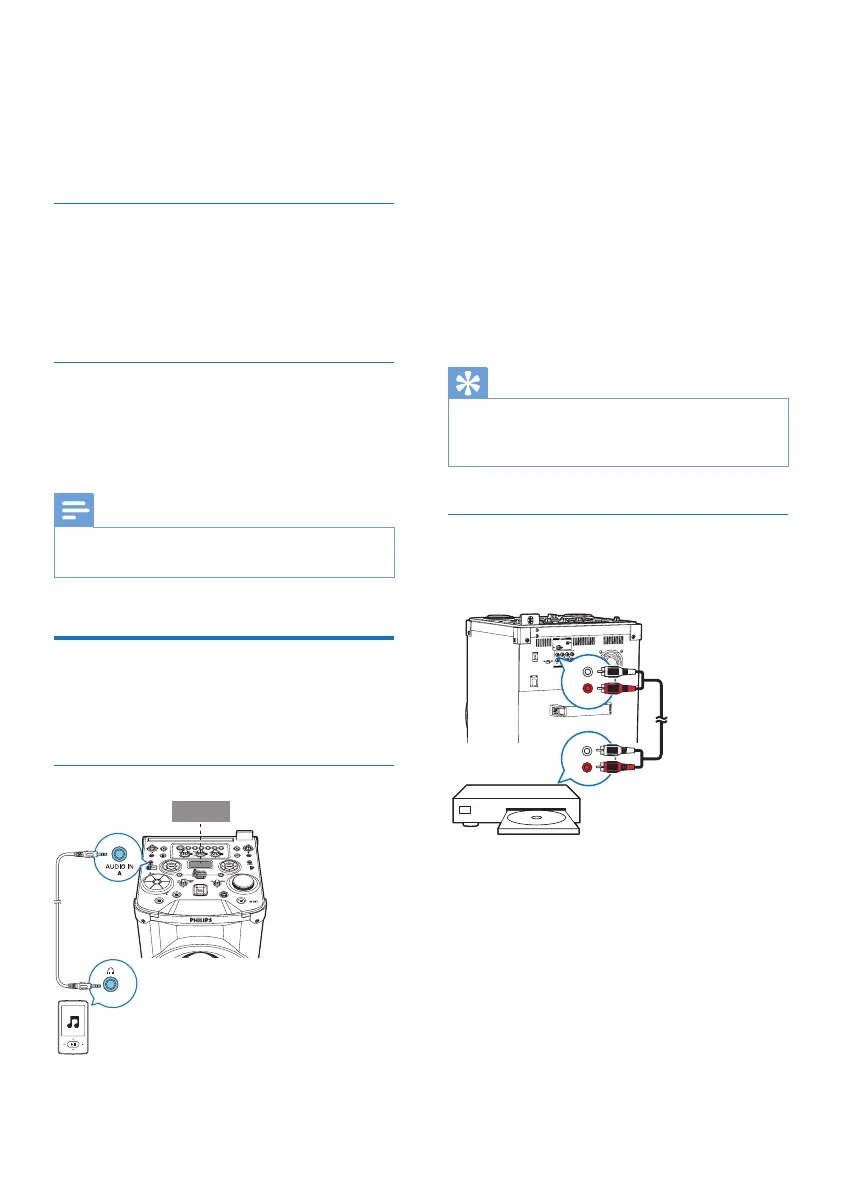
Play from an MP3 player
1 Slide CROSS FADER to the far left.
2 Press AUDIO A to select the [AUD-A]
source.
3 Connect an audio input cable (not
supplied)witha3.5mmconnectoron
both ends to:
• the AUDIO IN A socket on the unit,
and
• the headphone socket on the MP3
player.
4 Play audio on the MP3 player (refer to its
usermanual).
Tip
• If the MP3 player is connected to the AUDIO IN B
socket, rotate the source selector on the main unit to
select the [AUD-B] source.
Play from other audio device
You can connect a PC or other audio devices
to this unit.
1 Press AUX repeatedly to cycle through
GAME, PC IN, TV and DVD sources.
2 Connect the white and red audio cables
(notsupplied)to:
• the AUX sockets on the back of the
main unit, and
• the headphone socket on a PC, or the
AUDIO OUT socket on an external
device.
DVD
L
R


 To Next Page