14 EN
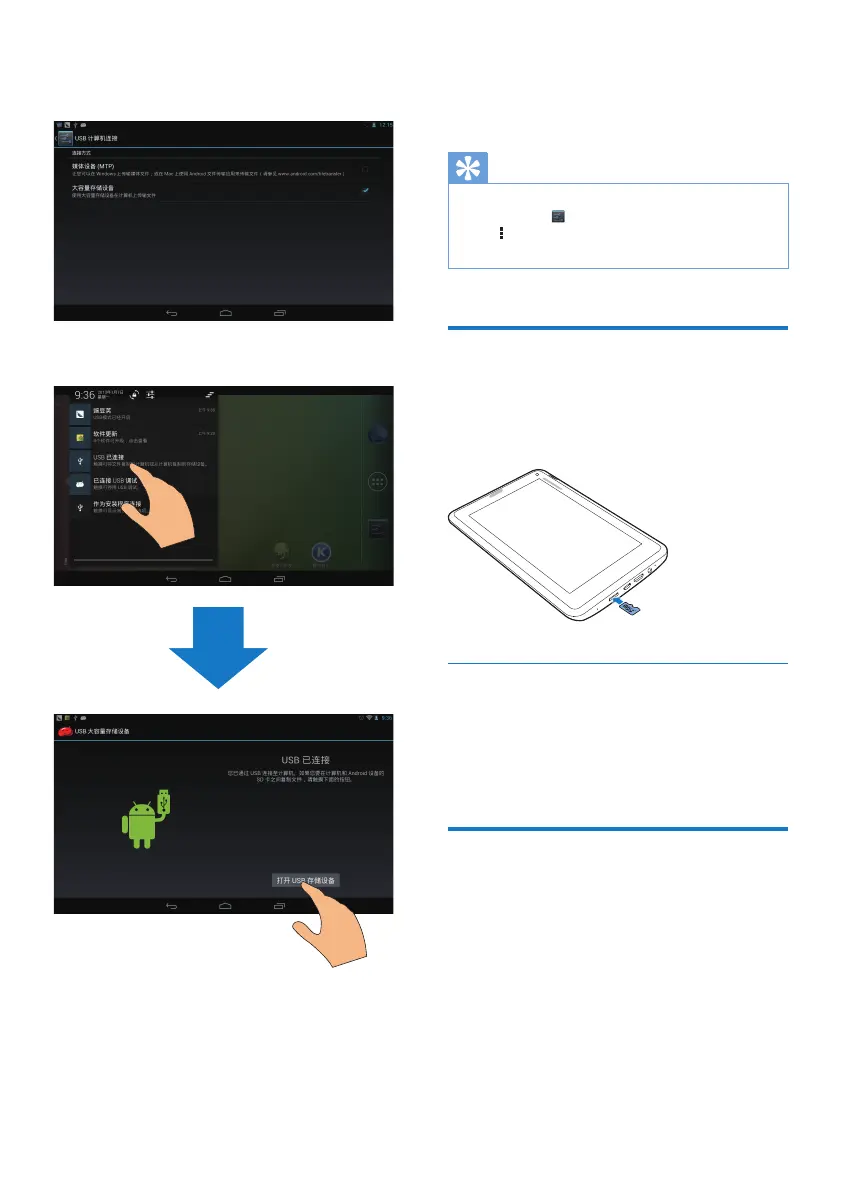
a Drag down the top bar to select Mass
storage as the USB connection mode.
b Turn on the USB mass storage.
$OWHUQDWLYHO\WUDQVIHUPHGLDÀOHVWRPi3900
through media management software, such
as Windows Media Player 11.
Drag down the top bar to select Media
device (MTP) as the USB connection
mode.
Tip
You can also select the mode of USB computer
connection in
Settings > Storage. On the top bar,
tap
> USB computer connection, and then, select
Mass Storage or Media device (MTP).
Use a Micro SD card
Insert a Micro SD card (up to 32 GB) into
Pi3900. You can expand the memory size of
Pi3900.
Move apps to the SD card
Move some apps from the internal storage
to the SD card. You can expand the internal
storage of Pi3900 (see 'Manage apps' on page
18).
Connect to an HDTV
Connect Pi3900WRDKLJKGHÀQLWLRQ79
(HDTV). You can watch on the HDTV the
photos and videos that play on Pi3900.
1 On Pi3900,
a Connect an HDMI cable (sold
separately) to:
the MINI HDMI socket on Pi3900, and
the HDMI input socket on the TV.



 To Next Page