6 Philips · PicoPix Micro 2
l
• Press and hold for one second to switch
the projector on.
• Press twice to switch the projector off.
• When the projector is switched on, the
LED turns white. When the projector is
switched off, the LED turns off.
• When charging the projector, the LED
turns red regardless of the projector
switching on or off.
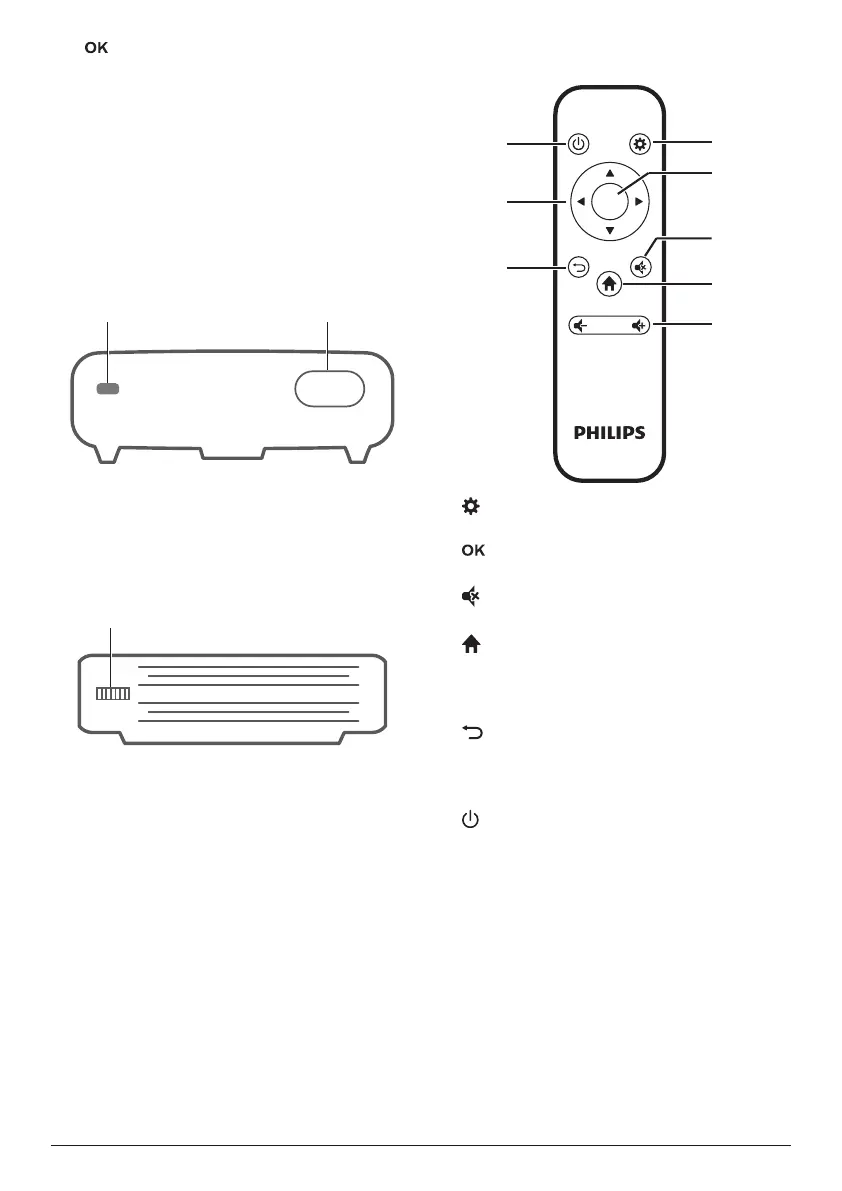
Front view
a
IR sensor
b
Projection lens
Side view
a
Focus adjustment knob
Adjust image sharpness.
Remote control
OK
a
Access the settings menu.
b
Confirm a selection or entry.
c
Mute or restore volume.
d
Access the home menu.
e
Volume control
Increase or decrease volume.
f
Return to a previous menu screen.
g
Navigation buttons
Navigate menu options.
h
• Press and hold for one second to switch
the projector on.
• Press twice to switch the projector off..













 To Next Page