6 Philips · PicoPix Micro
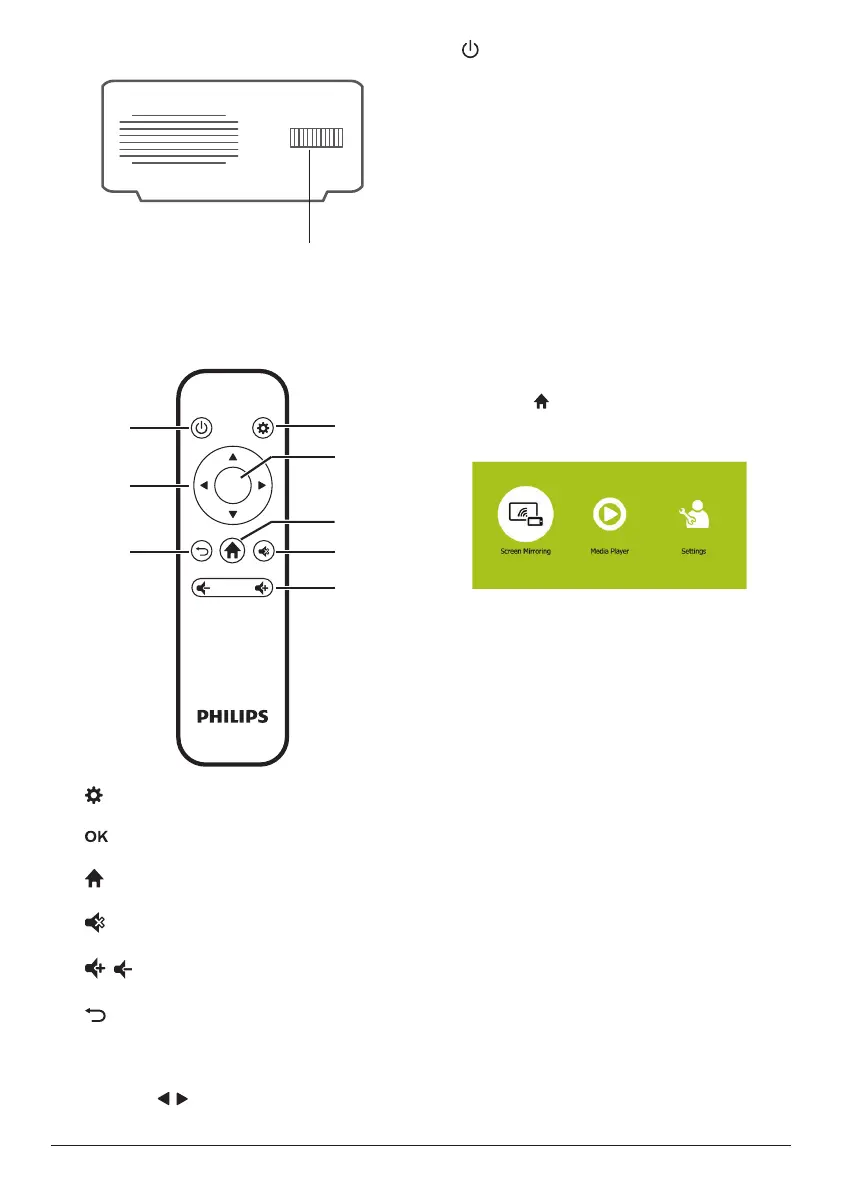
Side view
a
a
Focus adjustment knob
Adjust image sharpness.
Remote control
OK
a
d
e
b
c
f
g
h
a
Access the settings menu.
b
Confirm a selection or entry.
c
Access the home menu.
d
Mute or restore volume.
e
/
Increase or decrease volume.
f
Return to a previous menu screen.
g
Navigation buttons
• Navigate menu options.
• Press / to change a selection.
h
• Press and hold for one second to switch
the projector on or off.
• When the projector is switched on, the
LED turns blue. When the projector is
switched off, the LED turns off.
• When charging the projector, the LED
turns red regardless of the projector
switching on or off.
Access home menu
The home menu provides easy access to
system setup and other useful features in the
projector.
1 Turn on the projector. The home menu is
displayed.
• Or when the projector is in operation,
press to display the home menu.
2 Press the Navigation buttons and OK to
select the following.
• Screen Mirroring: Access screen
mirroring function for iPhone and
Android device.
• Media Player: Access media players for
photo, music and video.
• Settings & Preferences: Access menus
to change settings on the projector.













 To Next Page