Identifying the parts EN - 5
Philips Digital Photo Frame
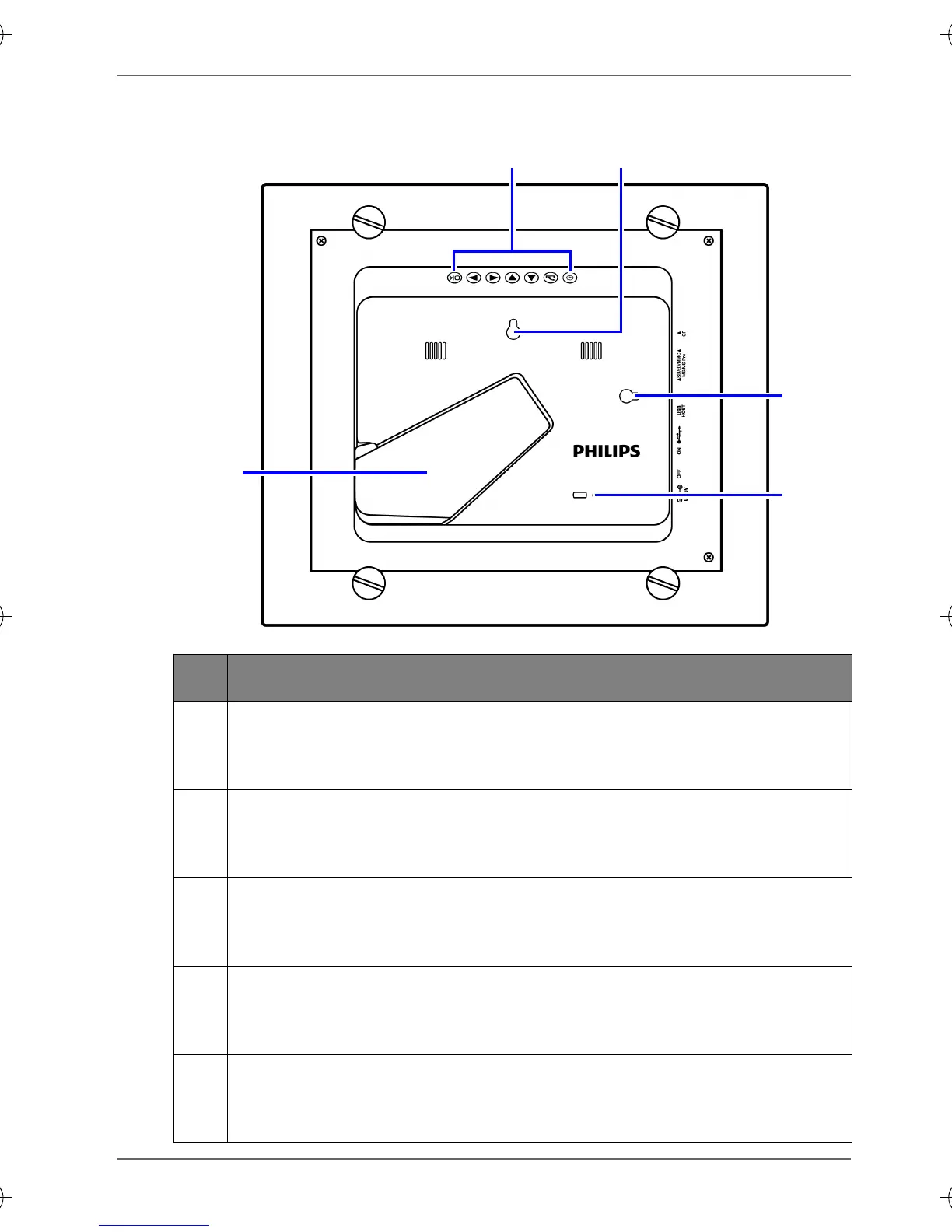
Rear view
No. Description
1
Control buttons
Use the control buttons to operate the PhotoFrame. See
"Using the control buttons" on page 6 for details.
2
Hanging slot (for landscape wall mounting)
Allows you to hang the PhotoFrame horizontally on a wall
without extending the adjustable foot stand.
3
Hanging slot (for portrait wall mounting)
Allows you to hang the PhotoFrame vertically on a wall
without extending the adjustable foot stand.
4
Adjustable foot stand
See "Using the adjustable foot stand" on page 11 for
details.
5
Kensington security slot
You can attach an anti-theft Kensington lock and cable to
this slot to help prevent possible theft.
12
3
5
4
GN104F00_GN-A18-G7_UM_en.book Page 5 Monday, September 14, 2009 10:57 PM


 To Next Page