— 3 —
D
ESCRIPTION
OF
C
ONTROLS
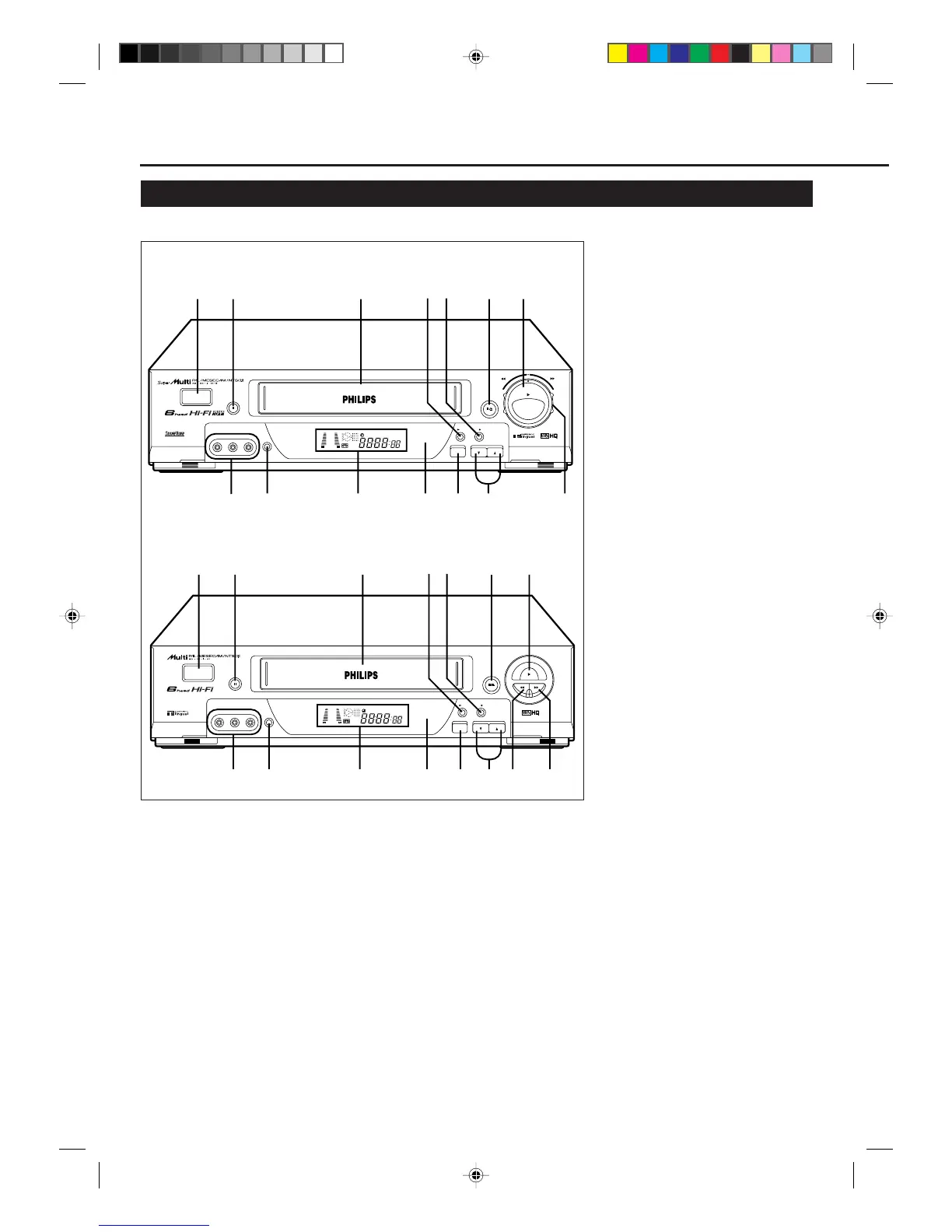
Front Panel
1 POWER button
• Turns the VCR on or off.
• Sets the VCR for an unattended
recording (timer recording) after
timer settings are completed. (✈P.20,
P.21)
2 STILL/PAUSE 8 button
Stops the tape during recording (pause)
or playback (still picture). (✈P.16, P.19)
Press again to resume normal recording.
Press PLAY 3 to resume normal
playback.
Activates slow motion picture when
pressed for more than 2 seconds during
playback.
3 Cassette Compartment
Where a video cassette is inserted.
4 3/OK button
Changes the selection when using the
menus. (✈P.13)
5 REC (record)/OTR ¶ button
• Starts recording when pressed once.
(✈P.16)
• Starts a recording for 30 minutes to 9
hours long when pressed for more
than once. The shut-off time
increases in 30 minute intervals.
(✈P.17)
VR888/55
6 STOP/EJECT 7 / 0 button
Stops the tape when the tape is running.
(✈P.16)
Press again to eject the cassette when
the tape is not running. (✈P.16)
7 PLAY 3 button
Starts normal playback. (✈P.16)
8 AUDIO/VIDEO input jacks
For connecting another VCR or a
portable video camera. (✈P.22, P.23)
9 COLOUR MODE button
Selects the colour mode both for
playback and recording. (✈P.15)
10 Display window
See page 9.
11 IR (infrared) remote sensor
Receives the signal from the (IR)
remote control.
12 MENU/EXIT button
Display the main menu.
Press again to exit from the menu
operations. (✈P.13)
13 CHANNEL ∞ /5 buttons
• Changes the channels on the VCR.
Release at a desired channel.
• Moves the cursor up and down when
using the menus. (✈P.13)
• Adjusts the tracking during playback,
still picture, and slow motion picture.
(✈P.19)
14 REW (Rewind) 1 button
ONLY FOR VR788/55:
• Rewinds the tape when the tape is
not running. (✈P.16)
• Starts reverse rapid visual search
during playback. (✈P.16)
15 FF (Fast forward) ¡ button
ONLY FOR VR788/55:
• Fast forwards the tape when the tape
is not running. (✈P.16)
• Starts forward rapid visual search
during playback. (✈P.16)
16 Shuttle Ring
ONLY FOR VR888/55:
• Rewinds or fast forwards the tape
when the tape is not running. (✈P.16)
• Starts reverse or forward rapid visual
search during playback or still
picture mode. (✈P.16)
VR788/55
23645
10 14
9
8
1
151311 12
7
POWER
COLOUR
MODE
CHANNELMENU/EXIT
/OK REC/OTR
REW FF
STOP/EJECT
PLAY
STILL/PAUSE
VIDEO AUDIOLR
VCR
SP SLP
NORM
-15dB
6
0
4
+8
12
PAL NTSC
POWER
VIDEO AUDIO
COLOUR
MODE
LR
CHANNELMENU/EXIT
/OK REC/OTR
REW FF
STOP/EJECT
PLAY
STILL/PAUSE
VCR
SP SLP
NORM
-15dB
6
0
4
+8
12 3 645 7
10 12 13 16
9
8
11
12
PAL NTSC
/ G
-
CODE
VR788/888-55 NEW 6/3/99, 11:49 PM3



 To Next Page