— 23 —
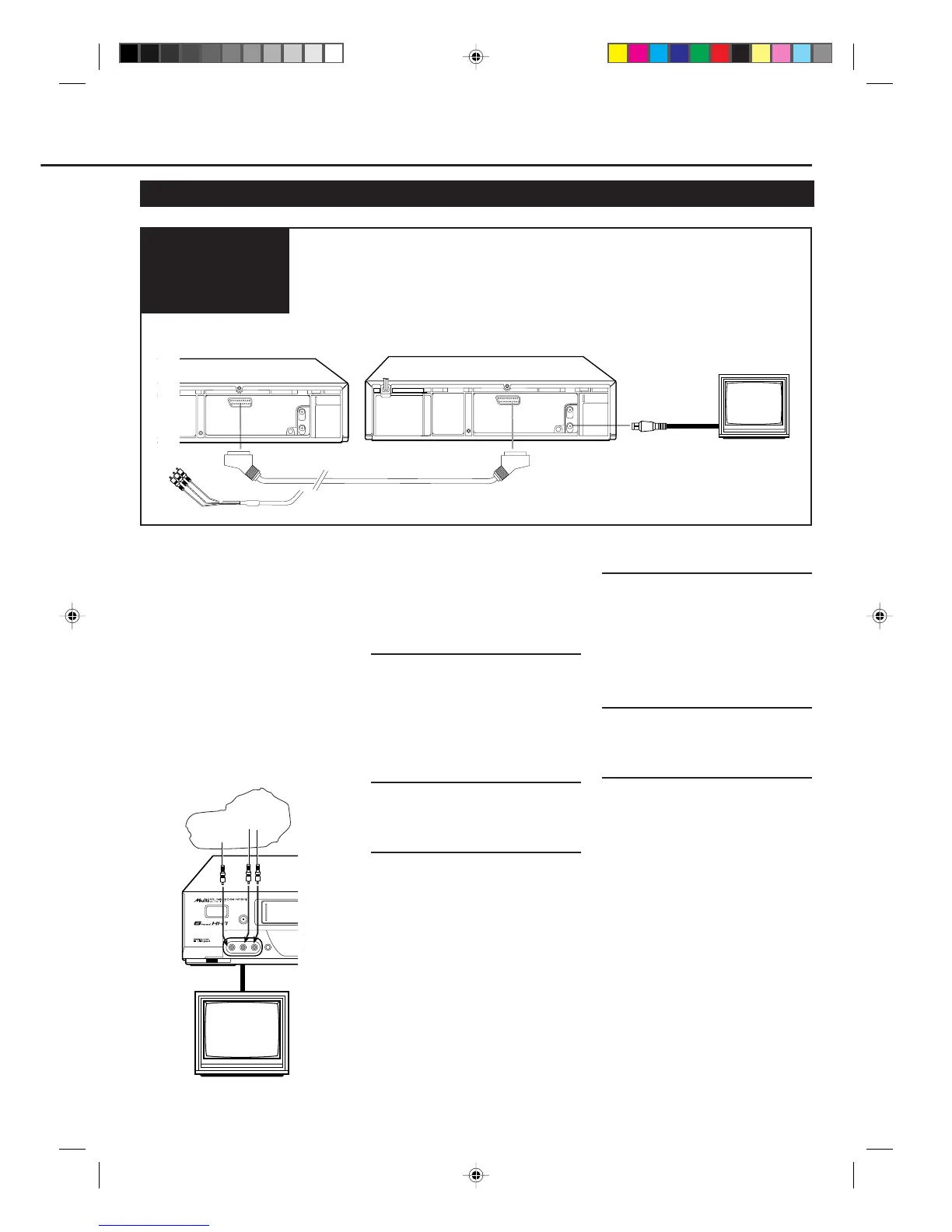
OUT
ANT. IN
RF OUT
AV1. IN /OUT
OUT
ANT. IN
RF OUT
AV1. IN /OUT
1 Connect the recording VCR (this VCR) and the playing
VCR.
2 Connect the recording VCR (this VCR) to the TV.
Connection
Diagram
Dubbing from any VHS VCR (or video
camera) to another is simple.
Explanations on this page uses this
VCR as the recording VCR.
Refer also to the manual supplied with
the other VCR (for playback).
You can also use the AUDIO/VIDEO
input jacks on the front panel to
connect another VCR or video camera
using the audio/video cable (RCA pin-
type).
Make sure....
• Use the appropriate SCART cable
depending on the other VCR’s AV
terminal.
1At VCRs
Insert a source tape in the playing VCR
and a blank tape in the recording VCR.
• If a tape without the record tab is inserted
in the playing VCR, playback automati-
cally starts. In this case, press the STOP
button.
2At TV
Turn the channel on the TV to your
video channel.
3Select Line Input
Press CH 5 or ∞, pointing the remote
control at this VCR, to select the
external line input.
• For rear jacks,
Select “L-1” on the display panel.
• For front jacks,
Select “L-F” on the display panel.
Tape Duplication (For VR788/55 only)
POWER
COLOUR
MODE
STILL/PAUSE
VIDEO AUDIOLR
To video
output
To audio
output
4Select Tape Speed
Press SPEED, pointing the remote
control at this VCR, until the desired
tape speed (SP, LP, or SLP) appears on
the display.
SP, LP : For PAL signal
SP, SLP : For NTSC signal
5Play Back Tape
Press the PLAY button on the playback
VCR.
6Record (Copy) Tape
Press REC/OTR (¶), pointing the
remote control at this VCR.
Remember: press the buttons in steps 5
and 6 simultaneously to avoid missing
any of the recording.
Playback VCR
Recording VCR (this VCR)
To AV1 IN/OUT terminal
To AV1 IN/OUT terminal
SCART cable
To RF OUT
TV
IN
VR788/888-55 NEW 6/3/99, 11:52 PM23



 To Next Page