— 8 —
D
ESCRIPTION
OF
C
ONTROLS
(CONTINUED)
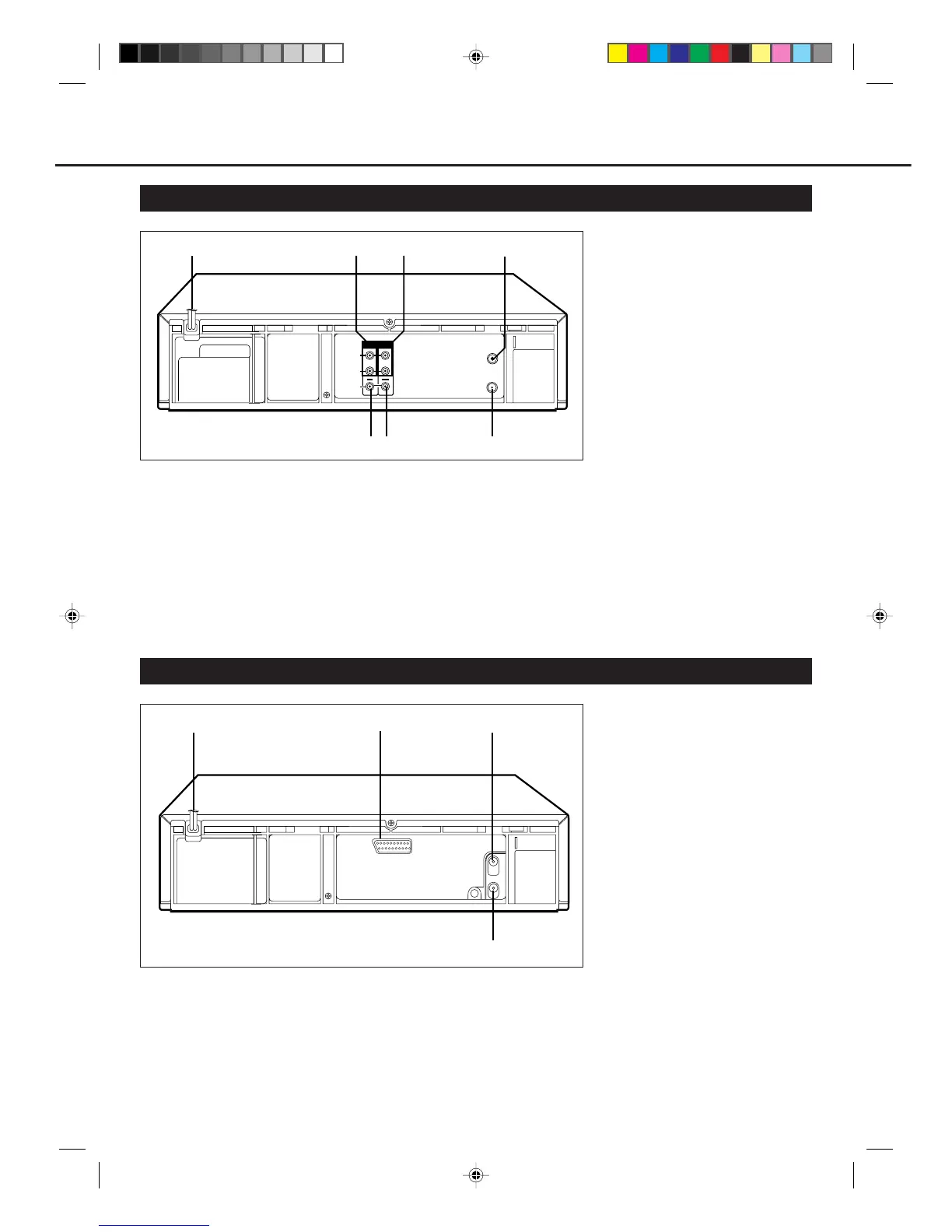
1 AC (alternating current)
power cord
Connect the AC power cord to an AC
outlet.
2 AUDIO IN (input) jack
For connecting to the audio output jack
on another VCR or a portable video
camera. (✈P.22)
Rear Panel (For VR888/55 only)
5 VIDEO IN (input) jack
For connecting to the video output jack
on another VCR or a portable video
camera. (✈P.22)
6 VIDEO OUT (output) jack
For connecting to the video input jack
on a TV or another VCR. (✈P.10)
7 RF OUT (output) terminal (to
TV)
Use the supplied RF coaxial cable to
connect this terminal to the UHF/VHF
input terminal on the TV. (✈P.10)
3 AUDIO OUT (output) jack
For connecting to the audio input jack
on a TV or another VCR. (✈P.10)
4 ANT. (antenna) IN (input)
terminal (from Antenna)
Connect your antenna or Cable to this
terminal. (✈P.10)
Rear Panel (For VR788/55 only)
3 ANT. (antenna) IN (input)
terminal (from Antenna)
Connect your antenna or Cable to this
terminal. (✈P.11 )
4 RF OUT (output) terminal (to
TV)
Use the supplied RF coaxial cable to
connect this terminal to the UHF/VHF
input terminal on the TV. (✈P.11 )
2 AV1 IN/OUT terminal
(SCART)
For connecting to the AV terminal on
TV or another VCR. (✈P.11, P.23)
1 AC (alternating current)
power cord
Connect the AC power cord to an AC
outlet.
OUT
ANT. IN
RF OUT
AV1. IN /OUT
1
2
3
4
1
4
7
5
6
23
ANT. IN
VIDEO
L
R
AUDIO
(MONO)
IN OUT
RF OUT
VR788/888-55 NEW 6/3/99, 11:49 PM8



 To Next Page