— 4 —
D
ESCRIPTION
OF
C
ONTROLS
(CONTINUED)
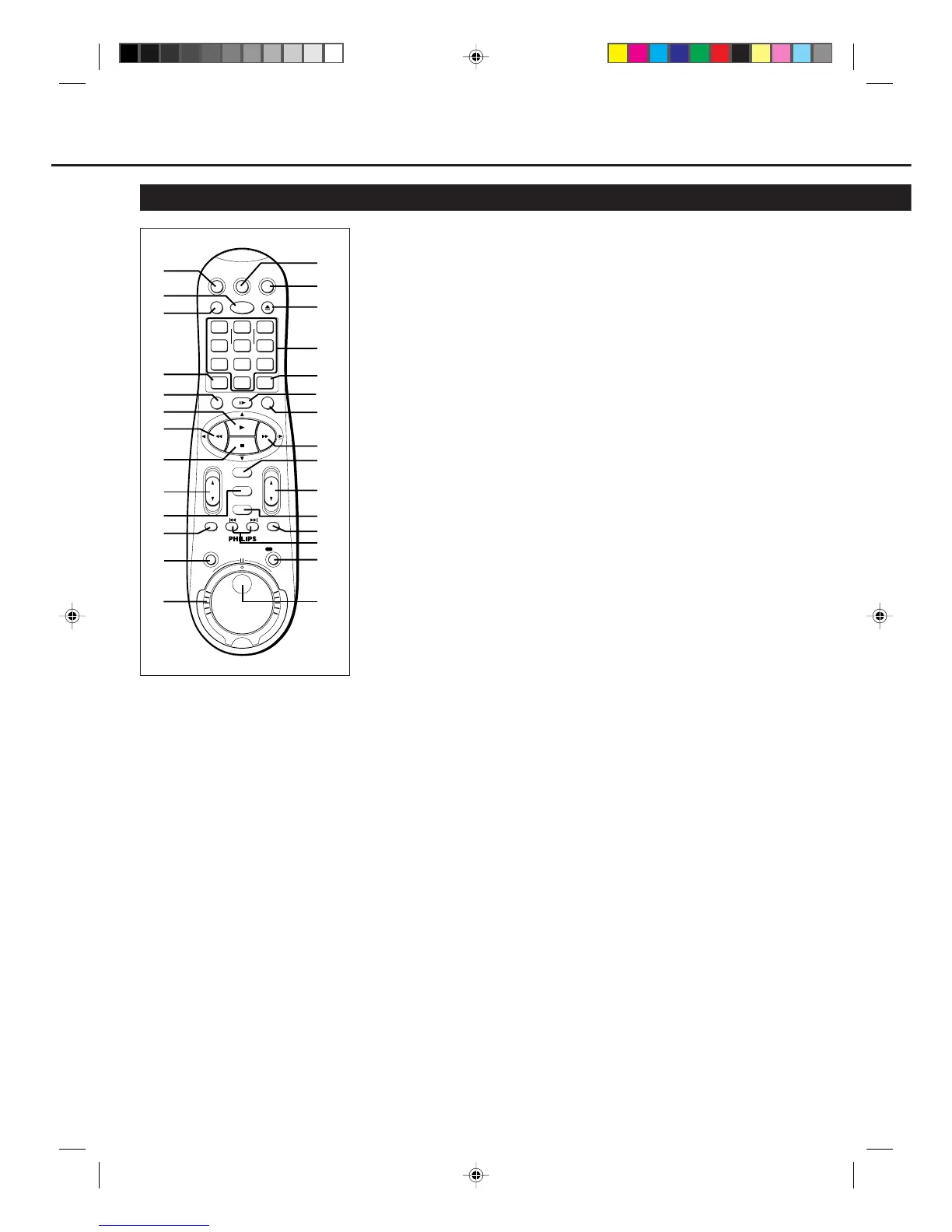
8 STOP 7 /
∞∞
∞∞
∞ button
• Stops the tape. (✈P.16)
• Moves down the cursor when using
the menus. (✈P.13)
9 VOL (volume)
55
55
5 /
∞∞
∞∞
∞ buttons
Changes the TV volume.
Release at desired volume.
10 EXIT/STATUS button
Before using this button, press VCR or
TV to select your target component.
• After pressing VCR:
– Displays the time counter, present
time, channel number, and
remaining tape length. (✈P.18)
– Exits from menu operations when
using the menus. (✈P.13)
• After pressing TV:
For some PHILIPS TVs:
– Displays the TV’s on-screen
information.
– Exits from TV’s menu operations
when using the TV’s menus.
For other manufacturers’ TVs:
Functions as the ENTER button if
your TV requires pressing ENTER
after selecting a channel number.
11 SKIP SEARCH button
Skips playback for 30 seconds by time
counter reading.
When pressed more than once up to 4
times, the search time increase in 30-
second intervals up to 2 minutes.
(✈P.18)
12 JOG/SHTL (Shuttle) button
and lamp
Activates the jog dial and shuttle ring
on the remote control when the lamp
(the button itself) is lit. (✈P.19)
13 Shuttle ring
Starts reverse or forward rapid visual
search during playback or still picture
mode. (✈P.16, P.19)
14 TV button
Makes the remote control ready for
operating the TV.
15 VCR button
Makes the remote control ready for
operating the VCR.
Using this remote control to
operate TV
You can use this remote control to
operate PHILIPS TV and other
manufacturers’ TV, see page 24.
1 CBL/DBS button
Does not function for this model.
2 POWER button
Before using this button, press VCR or
TV to select your target component.
• After pressing VCR:
– Turns the VCR on or off.
– Sets the VCR for an unattended
recording (timer recording) after
timer settings are completed.
(✈P.20, P.21)
• After pressing TV, turns the TV on or
off.
3 VCR/TV button
Does not function for this model.
4 SPEED button
Selects the tape speed for recording SP,
LP or SLP. During playback, the tape
speed is automatically selected (SP, LP
or SLP). (✈P.16, P.20, P.21,P.22)
SP, LP : For PAL signal
SP, SLP : For NTSC signal
5 STILL/SLOW – button
During a slow motion picture, adjust the
playback speed in the reverse direction.
(✈P.19)
6 PLAY 3 / 5 button
Before using this button, press VCR or
TV to select your target component.
• After pressing VCR:
– Starts normal playback. (✈P.16)
– Moves up the cursor when using
the menus. (✈P.13)
• For some PHILIPS TVs:
After pressing TV, operates the TV’s
menus.
7 1 (Rewind) / 2 button
Before using this button, press VCR or
TV to select your target component.
• After pressing VCR:
– Rewinds the tape. Also, during
playback, starts rapid reverse
visual search. (✈P.16)
– Goes back to the previous menu
screen when using the menus.
(✈P.13)
• For some PHILIPS TVs:
After pressing TV, operates the TV’s
menus.
Remote Control (For VR888/55 ONLY)
VCRTV
VCR/TV
QUICK PROGRAMMING
POWER
STILL/SLOW
EJECT
CHVOL
EXIT/STATUS
TIMER
JOG/SHTL
SKIP
INDEX AUDIO/MUTE
MENU
-
+
CBL / DBS
123
456
789
START STOP DATE
DBS DAILY
PLAY
REW FF
OK
STOP
WEEKLY
REV
/OTR
REC
FWD
-
+
-
+
SPEED
0
CLEAR
3
1
2
4
12
13
15
14
16
17
19
10
11
9
8
20
22
23
24
25
27
28
26
21
18
5
7
6
SEARCH
VR788/888-55 NEW 6/3/99, 11:49 PM4



 To Next Page