— 6 —
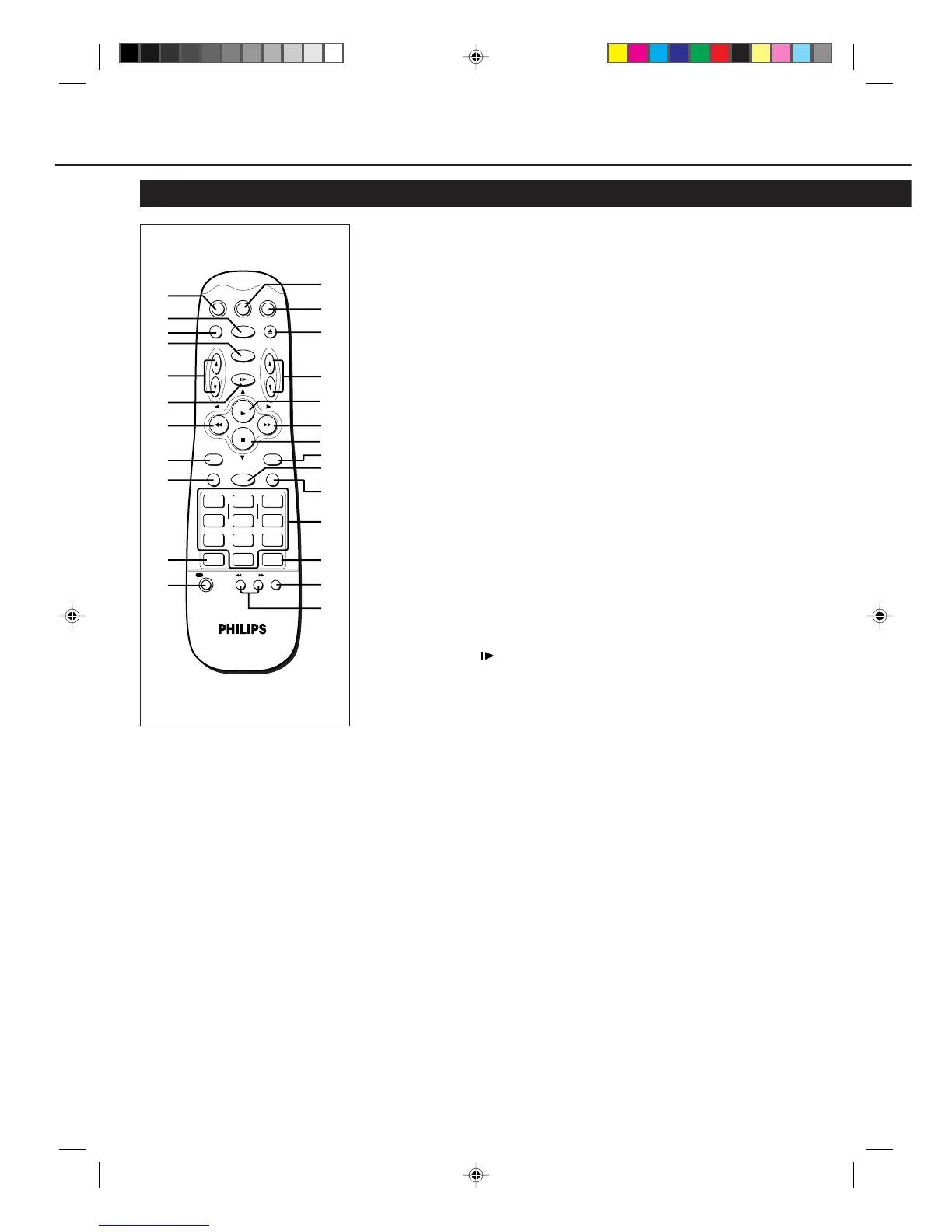
Remote Control (For VR788/55)
VCR
TV
VCR/TV POWER EJECT
CHVOL
SKIP SEARCH
STILL/SLOW
EXIT/STATUS
START
DAILYDBS
SPEED CLEAR
123
456
78
0
9
WEEKLY
STOP DATE
INDEX/OTR
TIMER
SLOW/
FORWARD
SLOW/BACK
MENU
-
+
/OK
PLAY
STOP
CBL / DBS
QUICK PROGRAMMING
-
+
-
+
REC
AUDIO/MUTE
3
1
2
4
5
6
7
8
9
10
11
13
12
14
15
16
17
18
19
20
21
22
24
23
25
Using this remote control to
operate other components
You can use this remote control to
operate most of the PHILIPS TVs.
D
ESCRIPTION
OF
C
ONTROLS
(CONTINUED)
9 EXIT/STATUS button
Before using this button, press VCR.
• After pressing VCR:
– Displays the time counter, present
time, channel number, and
remaining tape length. (✈P.18)
– Exits from menu operations when
using the menus. (✈P.13)
10 SPEED button
Selects the tape speed for recording SP,
LP, or SLP. During playback, the tape
speed is automatically selected (SP, LP
or SLP). (✈P.16, P.20, P.21)
SP, LP : For PAL signal
SP, SLP : For NTSC signal
11 REC (record)/OTR button
• Start recording when pressed once.
(✈P.16)
• Starts a recording for 30 minutes to 9
hours long. When pressed more than
once, the shut-off time increases in
30-minute intervals. (✈P.17)
12 TV button
Makes the remote control ready for
operating the TV.
13 VCR button
Makes the remote control ready for
operating the VCR.
14 EJECT 0 button
Ejects the cassette. (✈P.16)
15 CH (channel) 5 / ∞ button
Before using this button, press VCR or
TV.
• After pressing VCR, changes the
channels on the VCR. Release at a
desired channel.
For some Philips TV only:
• After pressing TV, changes the
channels on the TV. Release at a
desired channel.
16 PLAY 3 / 5 button
Before using this button, press VCR.
• After pressing VCR:
– Starts normal playback. (✈P.16)
– Moves up the cursor when using
the menus. (✈P.13)
1 CBL/DBS button
Does not function for this model.
2 POWER button
Before using this button, press VCR or
TV to select your target component.
• After pressing VCR:
– Turns the VCR on or off.
– Sets the VCR for an unattended
recording (timer recording) after
timer settings are completed.
(✈P.20, P.21)
(For some Philips TV only:)
• After pressing TV, turns the TV on or
off.
3 VCR/TV button
Does not function for this model.
4 SKIP SEARCH button
Skips playback for 30 seconds by time
counter reading.
When pressed more than once up to 4
times, the search time increase in 30-
second intervals up to 2 minutes.
(✈P.18)
5 VOL (volume)
55
55
5 /
∞∞
∞∞
∞ buttons
For some Philips TV only:
Changes the TV volume.
Release at desired volume.
6 STILL/SLOW button
Stops the tape during recording (pause)
or playback (still picture) temporarily.
(✈P.16, P.18)
Press again to resume normal recording.
Press PLAY 3 to resume normal
playback.
Activates slow motion picture when
pressed for more than 2 seconds during
playback.
7 1 (Rewind) / 2 button
Before using this button, press VCR.
• After pressing VCR:
– Rewinds the tape. Also, during
playback, starts rapid reverse
visual search. (✈P.16)
– Goes back to the previous menu
screen when using the menus.
(✈P.13)
8 SLOW/BACK – button
During a slow motion picture, adjust the
playback speed in the reverse direction.
(✈P.19)
VR788/888-55 NEW 6/3/99, 11:49 PM6



 To Next Page