52 EN
Please note the instructions in this section when you make
the first video recording with your Voice Tracer!
5 Video Recording
(1)On the Preview interface, press the “Video Record” button
to start recording. The device will vibrate twice briey, and
the state indicator ickers red.
(2)Long press “ ” or “ ” to zoom in and out the preview
interface.
(3)When recording at night, in a low light environment or of
the infrared is in manual mode, please press the "IR" button
to change to night recording mode. The screen will become
black/white.
(4)When recording at night or in a low light environment,
press the " " button to gain more light.
(5)Press the "Capture" button to capture the current video
recording picture.
(6)Press the " " button to mark the le as an important
document, so the le will not be covered when loop
recording or be deleted on the device. It can only be
deleted by formatting the device or through computer.
(7)Long press voice recording button to transfer from video
recorder to voice recorder.
(8)Press the “Video Record” button again to end the
recording. The device will vibrate twice briey, the red light
goes out, and the device returns to the preview interface.
The state indicator turns green.
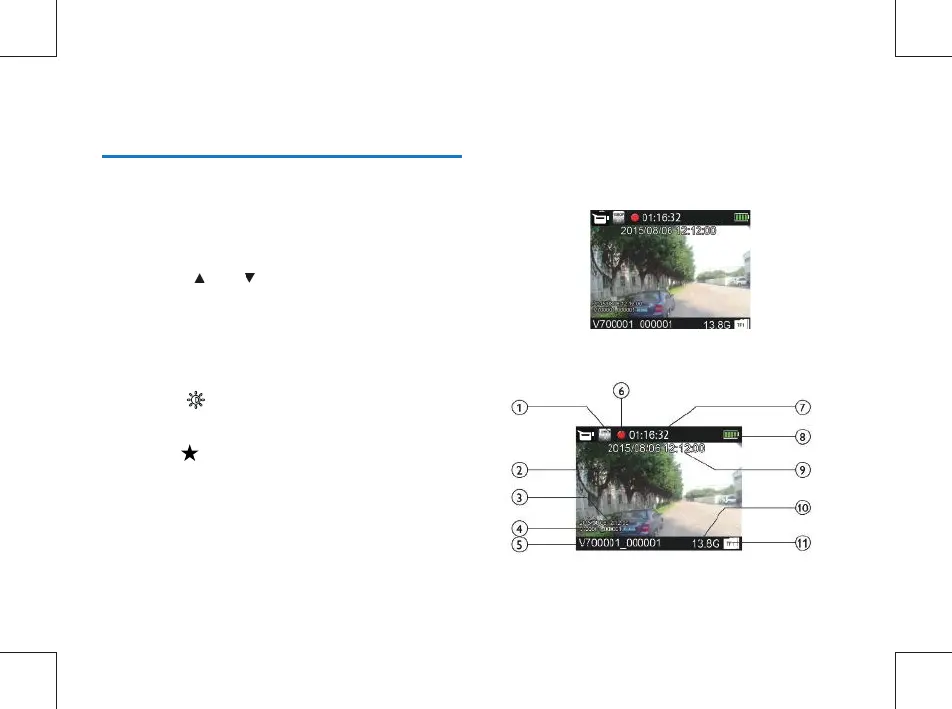
Recording Interface Reference:
Illustration of Video Recording Interface:



 To Next Page