EN 75
15.3 The Application of FMS
15.3.1 Connect to PC
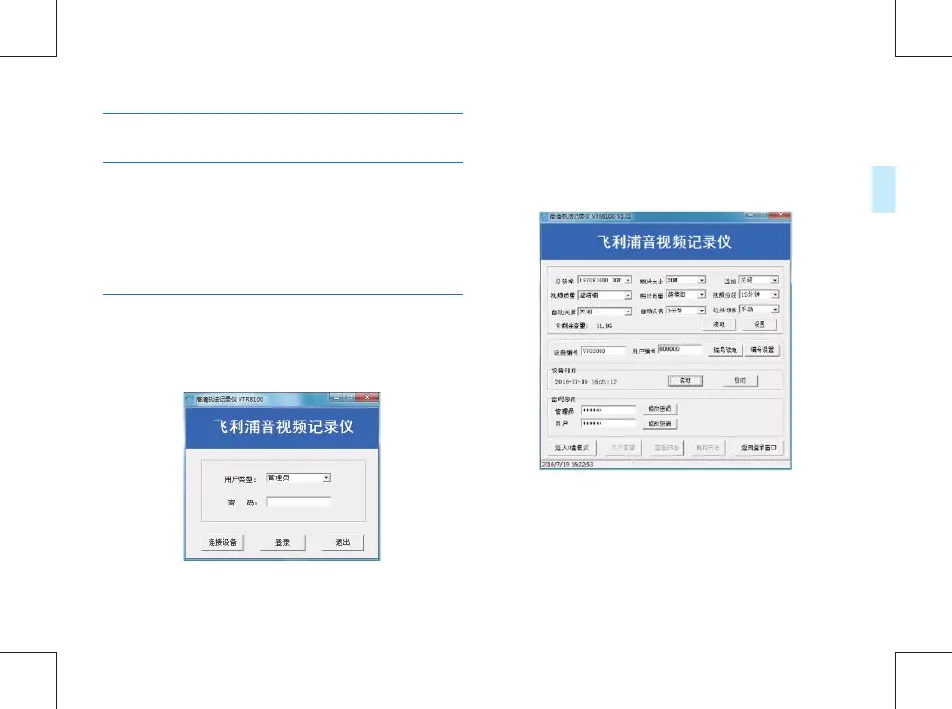
15.3.2 Log in FMS
Please turn on the device and then connect the device to PC
via USB cable, or user can connect the device to PC rstly via
USB cable and then press power on button for 3 seconds to
turn on the device.
“
用户类型
”choose“
管理员
”or“
普通用户
”
,
“
普通用
户
”is only able to access to
的权限只能是进入
removable
disc mode. Choose
管理员
”, and then input password. The
default password is
:
123456. Then click“
连接设备
”and“
登
陆
”. The below management interface will appear:
Double click the shortcut to appear the log in interface as
below:



 To Next Page