English
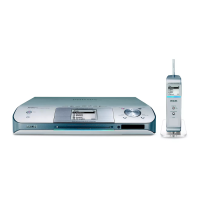
Controls (illustrations on page 3)
Controls on the Center (Top and
front panels)
1
STANDBY-ON/ ECO POWER
– press briefly to switch Center on or
to standby mode;
– press and hold to switch Center to
Eco Power mode or on
– Green indicator: flashes during CD ripping /
MP3 conversion
2 Display
– shows status of Center
3 RECORD
– CD/AUX: starts the recording to hard disk
4 1 / 2 / 3 / 4
–navigation controls (left, right, up, down) to scroll
through the option list
1
– HD/CD: returns to previous option lists
3 / 4
– HD/CD: skips/searches tracks/passage
backward/forward (in playback screen);
fast scrolls the option list
2 / OK
– confirms selection
OK
– HD/CD: starts or pauses playback
– CD: selects or deselects tracks to be recorded
on hard disk
5 STOP • MENU
– stops playback or recording;
– enters or exits setup menu
6 MUSIC FOLLOWS ME
– HD: moves music playback between Center and
Station
7 IR
– sensor for the infrared remote control
Helpful hints: Always point the remote control
towards this sensor.
8 MUSIC BROADCAST
– HD: broadcast music from Center to Station
9 EJECT
– ejects a disc from the slot loader
0 CD slot loader
! Blue indicator
– lights up when the set is working or ready for
working
@ SOURCE
– selects sound source HD, CD or AUX
– In standby mode: switches Center on and selects
sound source HD, CD or AUX
# Wi-Fi antenna
WACS5_Eng/37 8/3/2005, 15:1214






 To Next Page