English
Preparation
Using the remote control
WACS5 are equipped with two remote
controls, one for Center and the other for
Station. By using either of the remote controls,
you can operate both Center and Station.
IMPORTANT!
– Always point the remote control directly
towards IR area on the Center or Station
you wish to operate.
– Some functional keys on Center’s remote
control are exclusively used for Center (for
example, CD/MP3-CD, MARK/UNMARK,
MUSIC BROADCAST etc.)
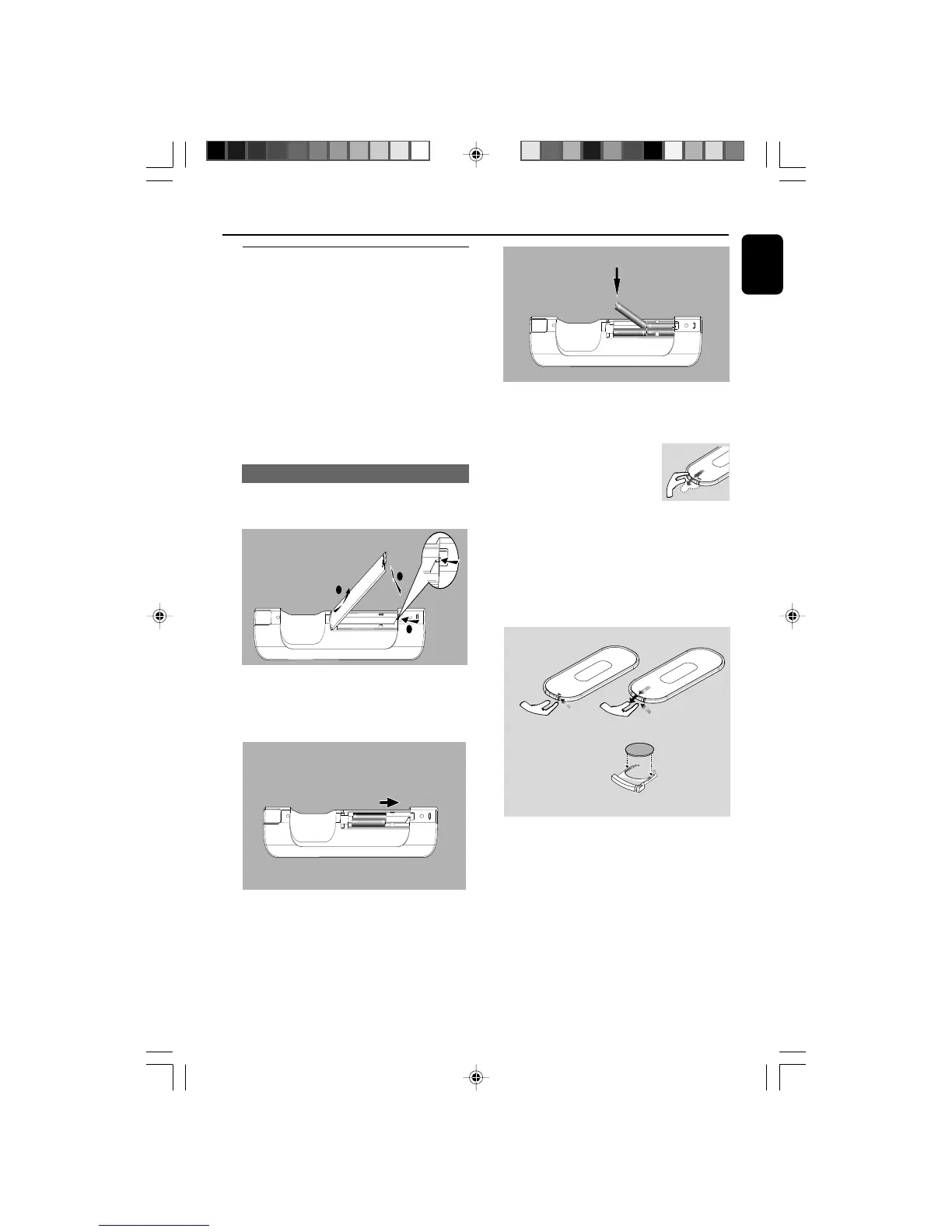
Putting batteries in place
Center’s remote control:
1 Open the battery compartment .
1
3
2
Station’s remote control:
● Remove the protective plastic tab
before using the Station’s remote
control.
To replace the batteries
1 Press and hold 1 as indicated.
2 Simultaneously, pull the battery tray at 4.
3 Remove the old battery and put a new CR2025
battery in place.
4 Put back the battery tray.
CAUTION!
– Remove batteries if they are
exhausted or will not be used for a long
time.
– Do not use old and new or different
types of batteries in combination.
– Batteries contain chemical substances,
so they should be disposed of properly.
3 Put back the compartment door.
2 Insert 4 batteries type R03 or AAA into the
remote control with the correct polarity as
indicated by the "+" and "-" symbols inside
the battery compartment.
WACS5_Eng/37 8/3/2005, 15:1223














 To Next Page