Set the day with the «SET» button. Push the «CLOCK» button again and the month
numbers start flashing.
Set the month with the «SET» button. Push the «CLOCK» button again and the year
numbers start flashing.
Set the year with the «SET» button. Press the «CLOCK » button again for 4 seconds
to exit the adjustment menu.
During the reset process, not pressing any buttons for a period longer than 8 seconds
ends the process automatically and the display shows the modified time.
01_05
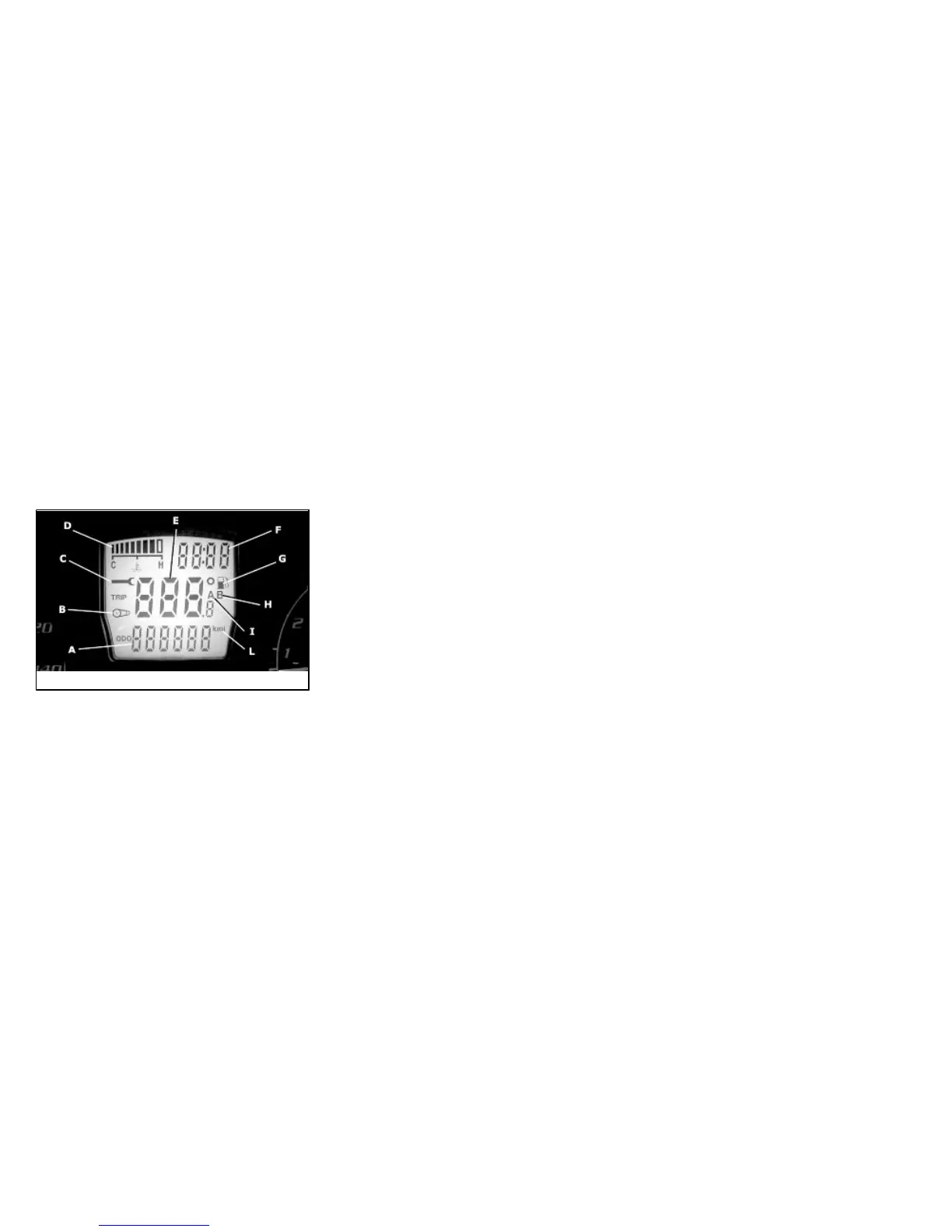
Digital lcd display (01_05)
A = Total odometer gauge
B = «BELT» maintenance icon
C = «SERVICE» maintenance icon
D = Engine coolant temperature indicator
E = Trip odometer (A-B) and ambient temperature gauge (selected with the MODE
button)
F = TIME-DATE indicator
G = Low fuel warning light
H = Trip odometer gauge (B)
I = Trip odometer gauge (A)
L = Kilometre - mile indicator
Maintenance icons
The icons signal the user that scheduled maintenance operations should be carried
out. A flashing «SERVICE» icon signals the need to carry out the scheduled mainte-
13




 To Next Page