Connecting up02
32
En
Chapter 2
Connecting up
Rear panel
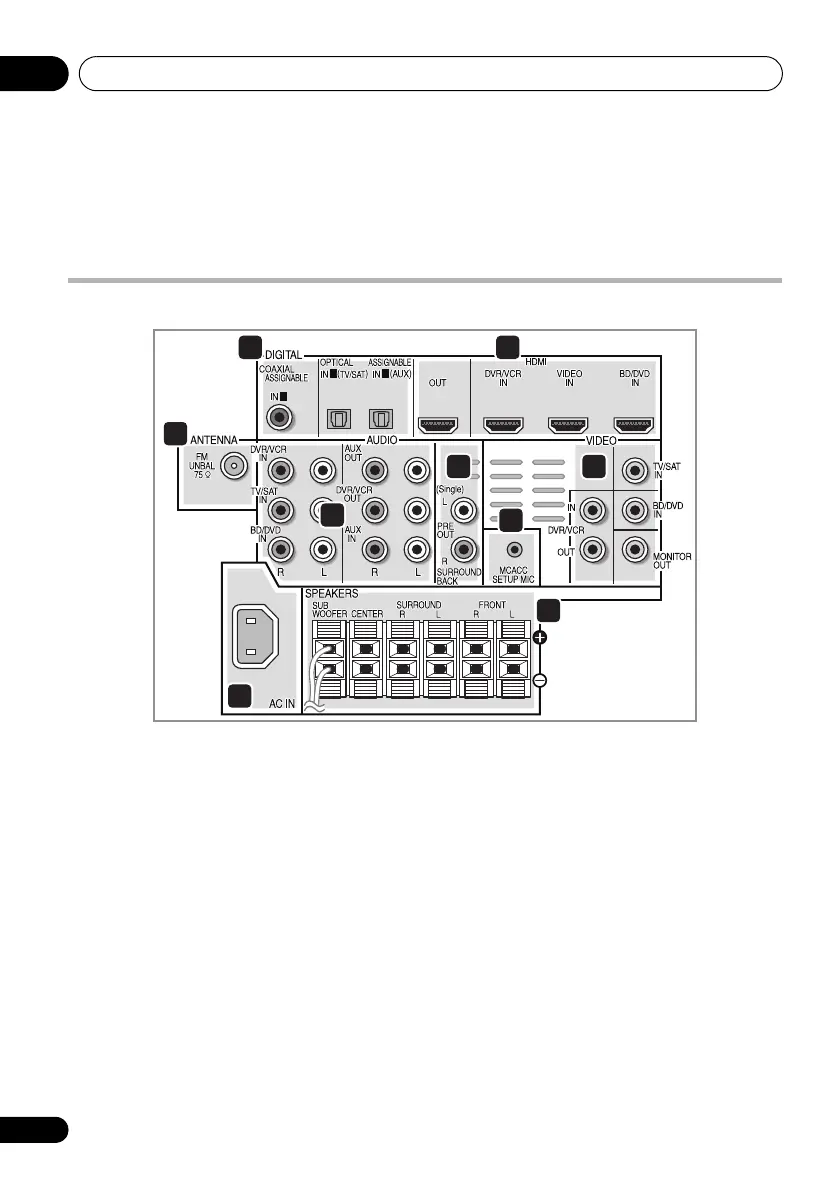
1 Coaxial/Optical digital audio inputs (x3)
Use the supplied optical digital cable to
connect the DIGITAL OPTICAL IN 1 (TV/SAT)
input to the television’s optical digital output
terminal.
Use for digital audio sources, including DVD
players/recorders, digital satellite receivers,
CD players, etc.
2 HDMI inputs (x3)/output (x1)
Multiple inputs and one output for high-quality
audio/video connection to compatible HDMI
devices.
3
FM
antenna socket
4 Stereo analog audio inputs/outputs
Use for connection to audio sources such as
CD players, tape decks, turntables, etc.
5 Surround back pre-amplifier outputs
Use to connect separate amplifiers for
surround back channels.
6
MCACC SETUP MIC
jack
Use to connect the supplied microphone for
the Auto MCACC setup (page 51).
7 Video inputs/outputs
Use the supplied video cable to connect the
MONITOR OUT terminal to the television’s
video input terminal.
Use for connection to video sources, such as
DVD players/recorders, VCRs, etc.
8
AC IN
– Power inlet
9
SPEAKERS
terminals
Match the colors of the speaker cables to their
respective connectors.
HTP-710_VYXCN_En.book 32 ページ 2010年8月23日 月曜日 午後6時47分


 To Next Page