Connecting up 02
39
En
English Deutsch Italiano EspañolFrançais
Nederlands
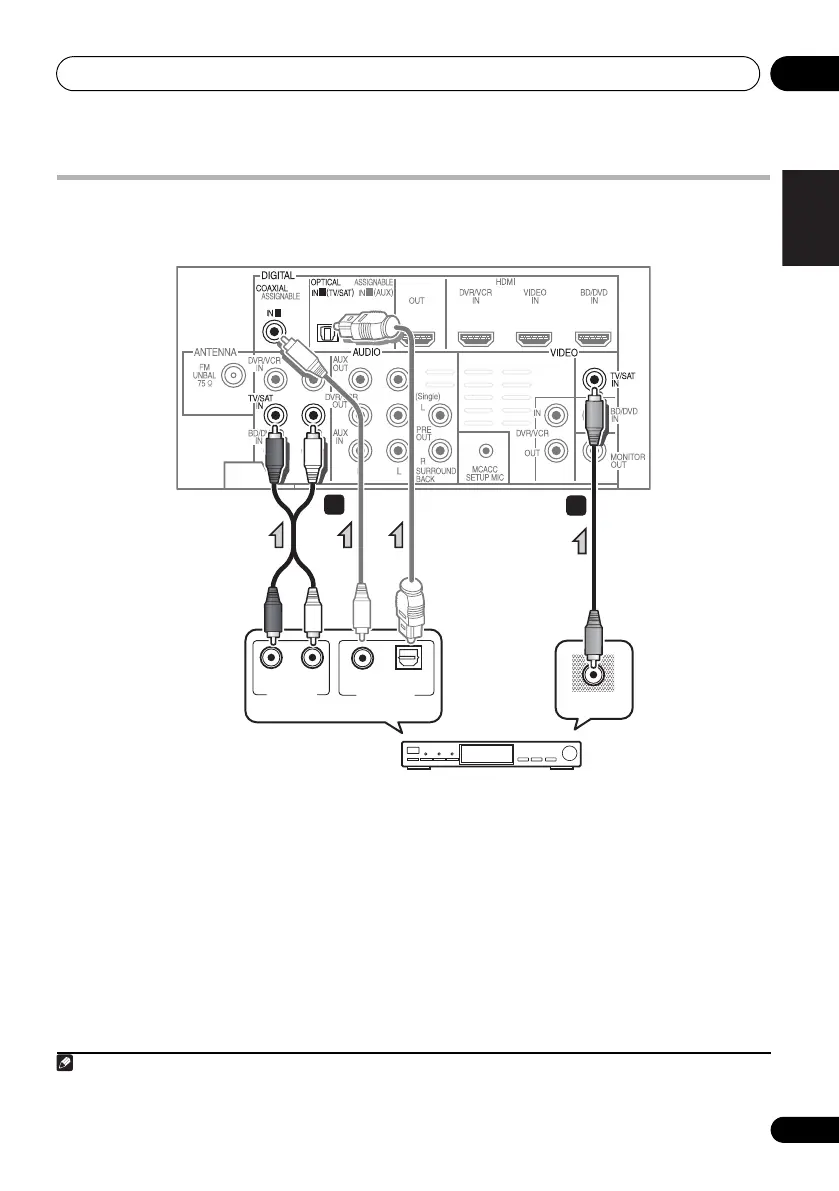
Connecting a satellite receiver or other digital set-top box
Satellite and cable receivers, and terrestrial digital TV tuners are all examples of so-called ‘set-top
boxes’.
1 Connect the composite video output on
your set-top box to the VIDEO TV/SAT input
on this system.
Use a standard RCA video cable.
2 Connect the audio output on your set-top
box to the AUDIO TV/SAT IN inputs on this
system.
Use a stereo RCA phono cable. If your
component has a digital output, you can also
use an optical cable or coaxial cable for the
connection.
1
1
1 2
ANALOG
RL
AUDIO OUT
DIGITAL OUT
COAXIAL OPTICAL
VIDEO OUT
1
2
1 In this case, you’ll need to tell the system which digital input you connected the TV to (see Choosing the input signal
on page 54).
HTP-710_VYXCN_En.book 39 ページ 2010年8月23日 月曜日 午後6時47分


 To Next Page