Connecting up02
40
En
Connecting other audio components
The number and kind of connections depends on the kind of component you’re connecting.
1
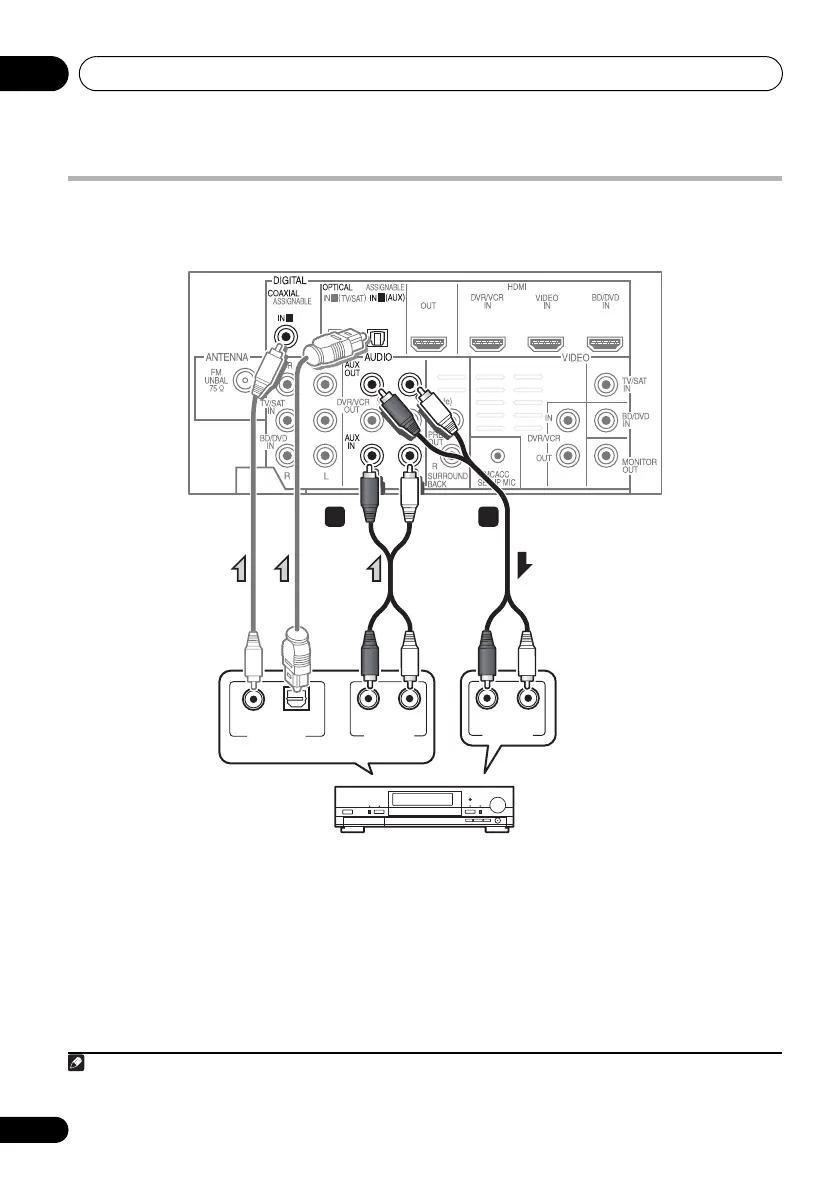
Follow the steps below to connect a CD-R, MD, DAT, tape recorder or other audio component.
1 Connect the analog audio outputs of the
component to a set of spare audio inputs on
this system.
Use a stereo RCA phono cable. If your
component has a digital output, connect this
to a digital input on the system as shown.
2 If you’re connecting a recorder, connect
the analog audio outputs to the analog audio
inputs on the recorder.
The example shows an analog connection to
the AUX OUT analog output jack using a
stereo RCA phono cable.
1 Note that you must connect digital components to analog audio jacks if you want to record to/from digital compo-
nents (like an MD) to/from analog components.
1
2
1
ANALOG
RL
AUDIO IN
ANALOG
RL
AUDIO OUT
DIGITAL OUT
COAXIAL OPTICAL
1 2
Select one
CD-R, MD, DAT, etc.
HTP-710_VYXCN_En.book 40 ページ 2010年8月23日 月曜日 午後6時47分


 To Next Page