EasyManua.ls Logo

Pioneer RX-310 - Page 13

Pioneer RX-310
20 pages
Print Icon
To Next Page IconTo Next Page
To Previous Page IconTo Previous Page
Loading...
BASIC
OPERATIONS
LISTENING
TO
THE
BROADCASTS
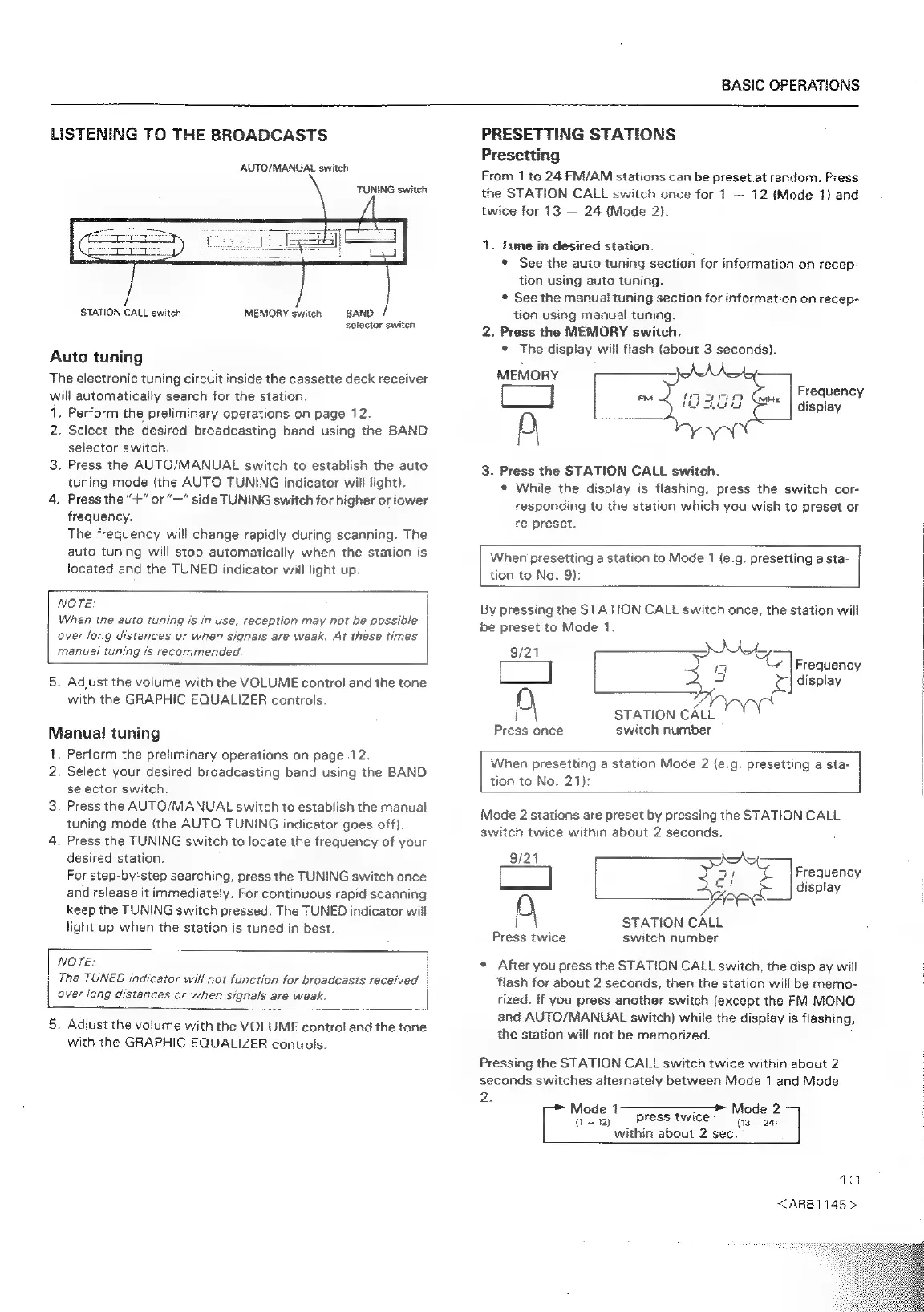
AUTO/MANUAL
switch
TUNING
switch
STATION
CALL
switch
MEMORY
switch
BAND
selector
switch
Auto
tuning
The
electronic
tuning
circuit
inside
the
cassette
deck
receiver
will
automatically
search
for
the
station.
1.
Perform
the
preliminary
operations
on
page
12.
2,
Select
the
desired
broadcasting
band
using
the
BAND
selector
switch,
3.
Press
the
AUTO/MANUAL
switch
to
establish
the
auto
tuning
mode
(the
AUTO
TUNING
indicator
will
light).
4.
Press
the
“+”
or
“—"
side
TUNING
switch
for
higher
or
lower
frequency.
The
frequency
will
change
rapidly
during
scanning.
The
auto
tuning
will
stop
automatically
when
the
station
is
Jocated
and
the
TUNED
indicator
will
light
up.
NOTE:
|
When
the
auto
tuning
is
in
use,
reception
may
not
be
possible
|
aver
long
distances
or
when
signals
are
weak.
At
these
times
|
manual
tuning
is
recommended.
|
5.
Adjust
the
volume
with
the
VOLUME
control
and
the
tone
with
the
GRAPHIC
EQUALIZER
controls.
Manual
tuning
1.
Perform
the
preliminary
operations
on
page
12.
2.
Select
your
desired
broadcasting
band
using
the
BAND
selector
switch.
3.
Press
the
AUTO/MANUAL
switch
to
establish
the
manual
tuning
mode
(the
AUTO
TUNING
indicator
goes
off).
4.
Press
the
TUNING
switch
to
focate
the
frequency
of
your
desired
station.
For
step-by‘step
searching,
press
the
TUNING
switch
once
and
release
it
immediately.
For
continuous
rapid
scanning
keep
the
TUNING
switch
pressed.
The
TUNED
indicator
will
light
up
when
the
station
is
tuned
in
best.
NOTE:
|
The
TUNED
indicator
will
not
function
for
broadcasts
received
over
long
distances
ar
when
signals
are
weak.
5.
Adjust
the
volume
with
the
VOLUME
control
and
the
tone
with
the
GRAPHIC
EQUALIZER
controls.
PRESETTING
STATIONS
Presetting
From
1
to
24
FM/AM
stations
can
be
preset.at
random.
Press
the
STATION
CALL
switch
once
for
1
12
(Mode
1}
and
twice
for
13
24
(Mode
2).
1.
Tune
in
desired
station.
©
See
the
auto
tuning
section
for
information
on
recep-
tion
using
auto
tuning.
¢
See
the
manual
tuning
section
for
information
on
recep-
tion
using
manual
tuning.
2.
Press
the
MEMORY
switch.
e
The
display
will
flash
(about
3
seconds).
MEMORY
S
=
aes
a)
She
Frequency
D
display
3.
Press
the
STATION
CALL
switch.
While
the
display
is
flashing,
press
the
switch
cor-
responding
to
the
station
which
you
wish
to
preset
or
re-preset.
When
presetting
a
station
to
Mode
1
(e.g.
presetting
a
sta-
tion
to
No.
9):
By
pressing
the
STATION
CALL
switch
once,
the
station
wilt
be
preset
to
Mode
1.
Frequency
display
a
i
=
When
presetting
a
station
Mode
2
(e.g.
presetting
a
sta-
uD
once
switch
number
STATION
CALL
tion
to
No.
21):
Mode
2
stations
are
preset
by
pressing
the
STATION
CALL
switch
twice
within
about
2
seconds.
9/21
Frequency
]
display
PD
STATION
CALL
Press
twice
switch
number
e
After
you
press
the
STATION
CALL
switch,
the
display
will
‘flash
for
about
2
seconds,
then
the
station
will
be
memo-
rized.
if
you
press
another
switch
(except
the
FM
MONO
and
AUTO/MANUAL
switch)
while
the
display
is
flashing,
the
station
will
not
be
memorized.
Pressing
the
STATION
CALL
switch
twice
within
about
2
seconds
switches
alternately
between
Mode
1
and
Mode
2.
~
12)
press
twice
(13
-
24)
>
Mode
1
—_,
&
Mode
2
within
about
2
sec.
;
13
<ARB1145>

Related product manuals