EasyManua.ls Logo

Pioneer RX-310 - Remote Control Unit Facilities

Pioneer RX-310
20 pages
Print Icon
To Next Page IconTo Next Page
To Previous Page IconTo Previous Page
Loading...
REMOTE
CONTROL
UNIT
FACILITIES
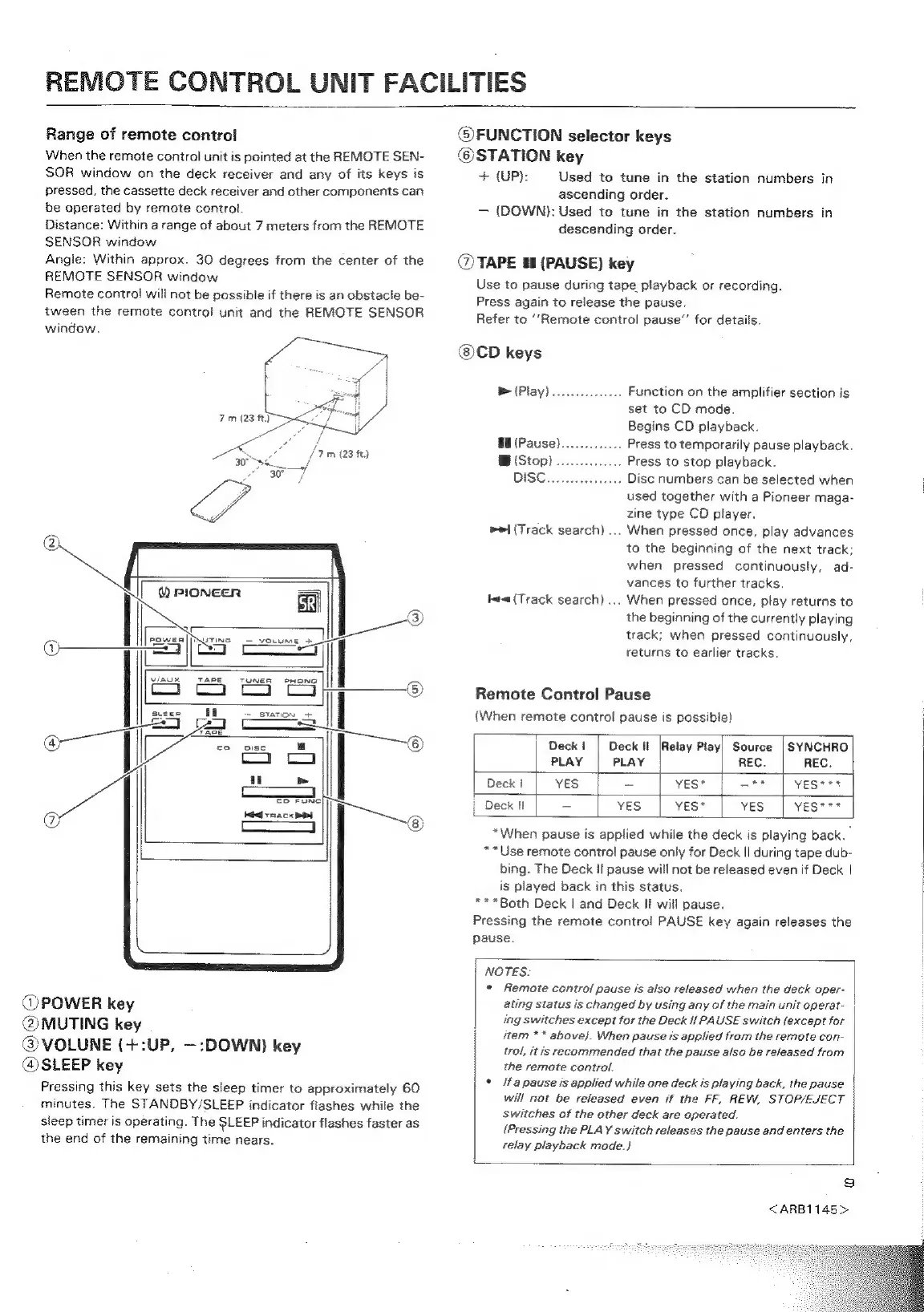
Range
of
remote
control
When
the
remote
control
unit
is
pointed
at
the
REMOTE
SEN-
SOR
window
on
the
deck
receiver
and
any
of
its
keys
is
pressed,
the
cassette
deck
receiver
and
other
components
can
be
operated
by
remote
control.
Distance:
Within
a
range
of
about
7
meters
from
the
REMOTE
SENSOR
window
Angle:
Within
approx.
30
degrees
from
the
center
of
the
REMOTE
SENSOR
window
Remote
contro!
will
not
be
possible
if
there
is
an
obstacle
be-
tween
the
remote
controf
unit
and
the
REMOTE
SENSOR
window.
fear
ee
ee
|
vinux
TAPE
TUNER
PHONG
@FUNCTION
selector
keys
®STATION
key
+
(UP):
Used
to
tune
in
the
station
numbers
in
ascending
order.
(DOWN):
Used
to
tune
in
the
station
numbers
in
descending
order.
@
TAPE
88
(PAUSE)
key
Use
to
pause
during
tape
playback
or
recording.
Press
again
to
release
the
pause.
Refer
to
‘‘Remote
control
pause”’
for
details.
®CD
keys
&
(Play)...
Function
on
the
amplifier
section
is
set
to
CD
mode.
Begins
CD
playback.
§8
(Pause).
..
Press
to
temporarily
pause
playback.
B
(Stop)
..
.
Press
to
stop
playback.
DISC
iiasctesteus
soo
Disc
numbers
can
be
selected
when
used
together
with
a
Pioneer
maga-
zine
type
CD
player.
When
pressed
once,
play
advances
to
the
beginning
of
the
next
track;
when
pressed
continuously,
ad-
vances
to
further tracks.
When
pressed
once,
play
returns
to
the
beginning
of
the
currently
playing
track;
when
pressed
continuously,
returns
to
earlier
tracks.
ei
(Track
search)
...
tea
(Track
search)
...
Remote
Control
Pause
(When
remote
control
pause
is
possible)
|
Deck!
|
Deck
it
[Relay
Play]
Source
|
SYNCHRO
PLAY
|
PLAY
REC.
REC.
|
|
Deck!
|
Yes
~
vest
|
—**
|
yeser*
|
Deck
I
-
yes
|
Yes*
yes
|
yes***
@
POWER
key
@MUTING
key
@VOLUNE
(+:UP,
—:DOWN)
key
@
SLEEP
key
Pressing
this
key
sets
the
sleep
timer
to
approximately
60
minutes.
The
STANDBY/SLEEP
indicator
flashes
while
the
sleep
timer
is
operating.
The
SLEEP
indicator
flashes
faster
as
the
end
of
the
remaining
time
nears.
*When
pause
is
applied
while
the
deck
is
playing
back.
**Use
remote
control
pause
only
for
Deck
II
during
tape
dub-
bing.
The
Deck
II
pause
will
not
be
released
even
if
Deck
|
is
played
back
in
this
status.
***Both
Deck
|
and
Deck
Ji
will
pause.
Pressing
the
remote
control
PAUSE
key
again
releases
the
pause.
NOTES.
*
Remote
control
pause
is
also
released
when
the
deck
oper-
ating
status
is
changed
by
using
any
of
the
main
unit
operat-
ing
switches
except
for
the
Deck
If
PAUSE
switch
{except
for
item
**
above).
When
pause
is
applied
from
the
remote
con-
trol,
it
is
recommended
that
the
pause
also
be
released
from
the
remote
control.
°
fa
pause
is
applied
while
one
deck
is
playing
back,
the
pause
will
not
be
released
even
if
the
FF,
REW,
STOP/EJECT
switches
of
the
other
deck
are
operated.
{Pressing
the
PLAY
switch
releases
the
pause
and
enters
the
relay
playback
mode.}
9
<ARB1145>

Related product manuals