Other connections
09
29
En
English
Français
Deutsch
Nederlands
Italiano
Español
Chapter 9
Other connections
Connecting auxiliary
components
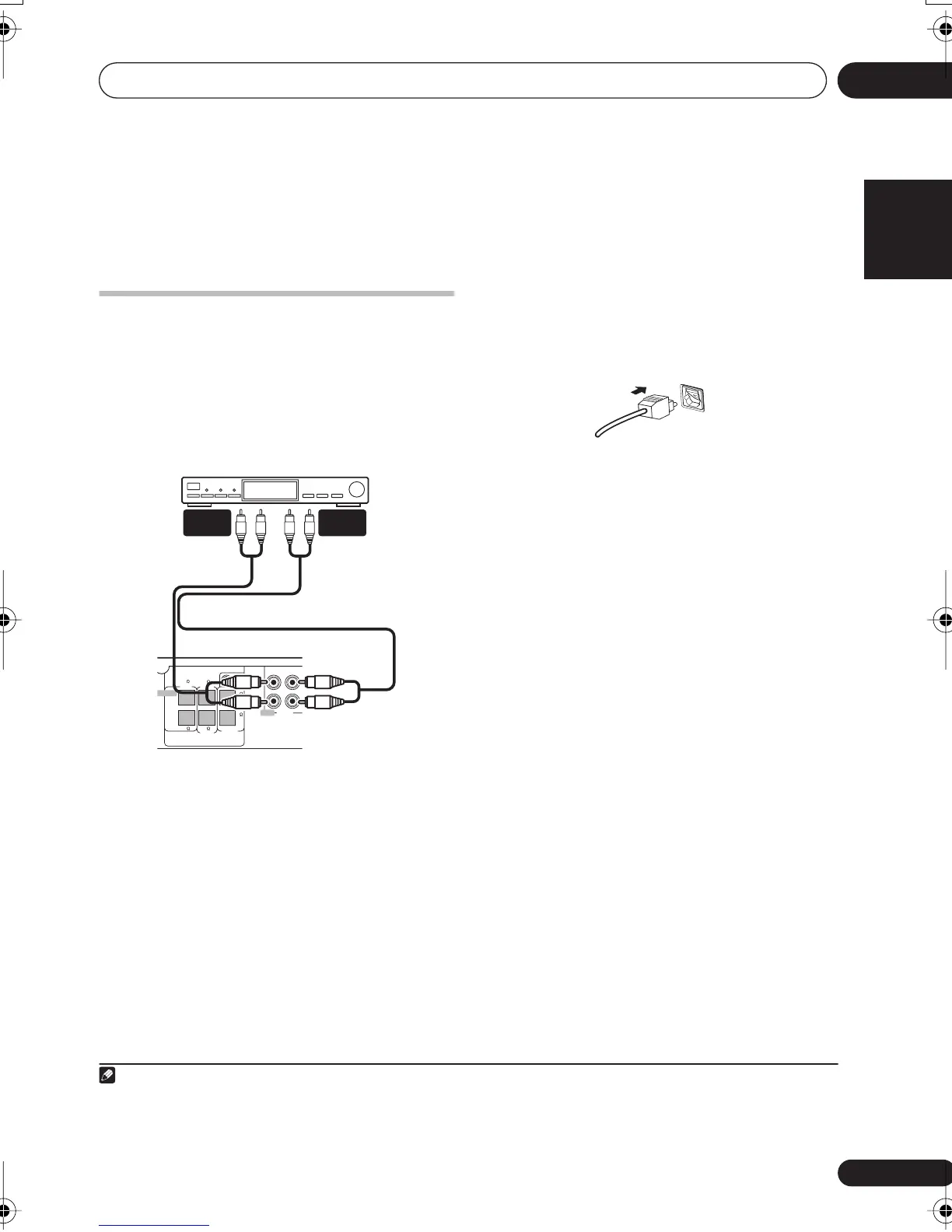
This system has both stereo analog inputs and
outputs, as well as a optical digital input. Use
these to connect external components, such
as your VCR, MD or CD-R recorder.
• Connect the
LINE
1 (IN) jacks to the analog
outputs of an external playback component.
These include components such as a VCR,
cassette deck or your TV. Connect using RCA
pin-plug stereo cables.
• Connect the
LINE
1 (OUT) jacks to the
analog inputs of an external recording
component.
These include components such as a cassette
deck, VCR, MD, or another recorder with
analog inputs. Connect using RCA pin-plug
stereo cables.
• Connect the
LINE
2 (OPTICAL IN) jack on
the rear panel to the optical digital output of
an external playback component.
These include digital components such as an
MD player, digital satellite, or a game system.
Connect using an optical digital cable.
Recording mode
The Recording mode allows you to make
surround-compatible analog recordings from
the
LINE 1 (OUT)
jacks.
1
Dolby multichannel
sources will be downmixed to stereo for
improved playback with systems that can
provide matrix-decoding (like Dolby Pro Logic).
1 Press
SOUND
.
2 Use
/
to select ‘RecMode?’ then press
ENTER
.
3 Use
/
to select ‘RMode On’ or
‘RModeOff’ then press
ENTER
to confirm.
•
RMode On
– A surround-compatible
downmix (left-total/right-total, or Lt/Rt) of
Dolby multichannel sources is output,
(suitable for Dolby Surround Pro Logic or
other matrix decoding).
•
RModeOff
– A simple stereo downmix
(left-only/right-only, or Lo/Ro) is output
(suitable for playback on a two-channel
stereo system or on headphones).
6
6
6 6
6
6
OUTIN
FRONT
CENTER
MCACC
MIC
SURROUND
SUB
WOOFER
RR
L
L
LINE 1
AUDIO
PEAKERS
AUDIO
INPUT
AUDIO
OUTPUT
Tape deck, etc.
XV-DV333/340
Note
1• When Recording mode is on, most sound features cannot be used. The display will briefly blink
RMode On
if you try and
use a prohibited function while Recording mode is on.
• When Recording mode is off, the audio from the analog output may be interrupted, depending on the operation.
• The Recording mode switches off if you change the input function (
DVD
(
CD
),
TUNER
, etc.) or switch the power off.
OPTICAL IN
LINE 2
XV-DV-NEW_WIZ.book 29 ページ 2004年12月22日 水曜日 午後2時41分



 To Next Page