32 M0270 EN
EN
7.4 GETTING STARTED
FOREWORD
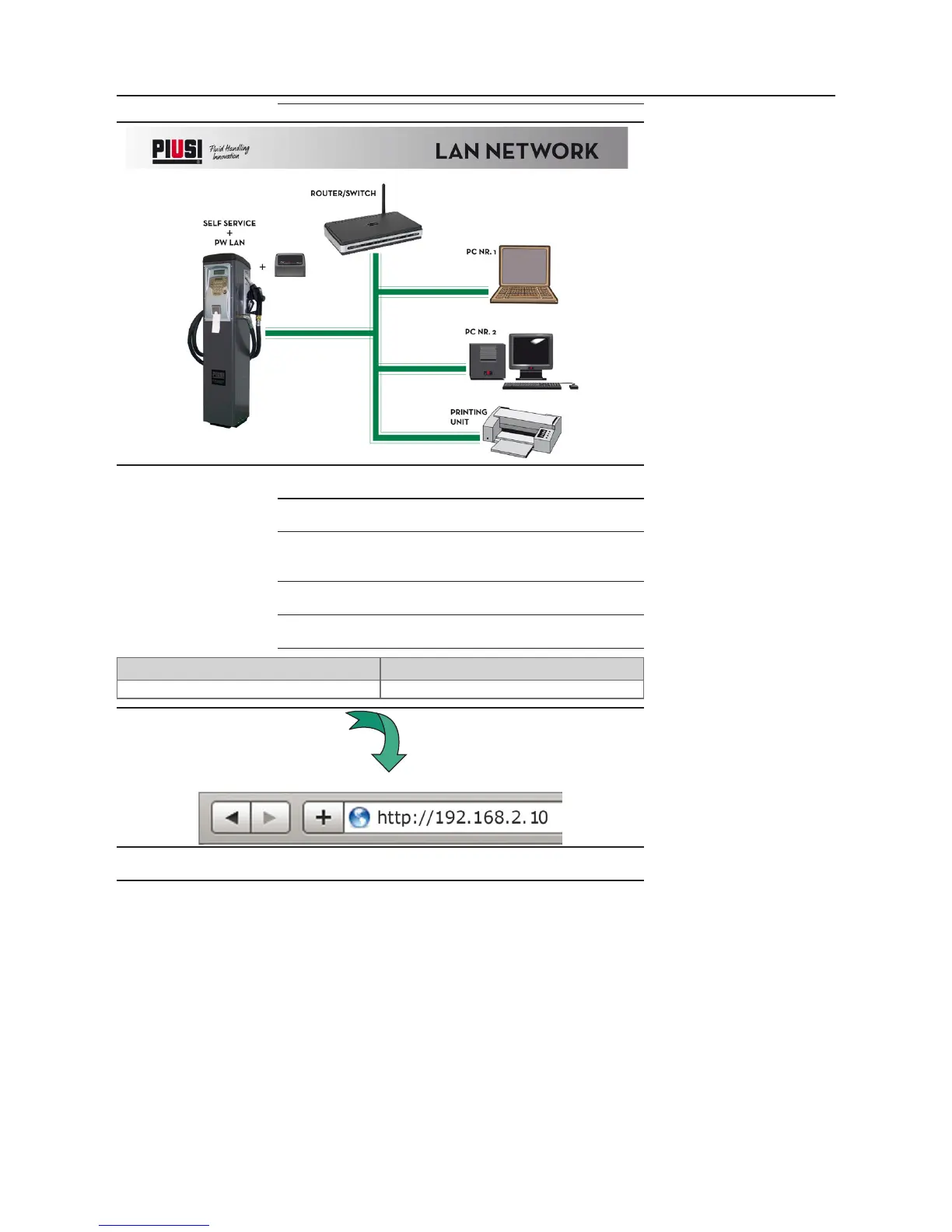
This is the scheme of a typical site structure.
ACCESS To access the PW-LAN Conguration Interface, perform the
following steps
1 Make sure that your host machine is connected via Ethernet to
the Piusi device
2 Congure the Ethernet adapter on your computer with a static
IP address on the 192.168.2.x subnet (for example, IP address:
192.168.2.150 and subnet mask: 255.255.255.0).
3
Congure internet options of your browser WITHOUT proxy
server
4 Launch your Web browser. Enter the default IP address of your
device in the address eld. Press Enter (PC) or Return (Mac).
Device Default IP Address
PW-LAN 192.168.2.10
5 Enter admin in the Username and piusipass in the Pass-
word elds and click Ok.



 To Next Page