34 M0270 EN
EN
7.5 NAVIGATION
FOREWORD
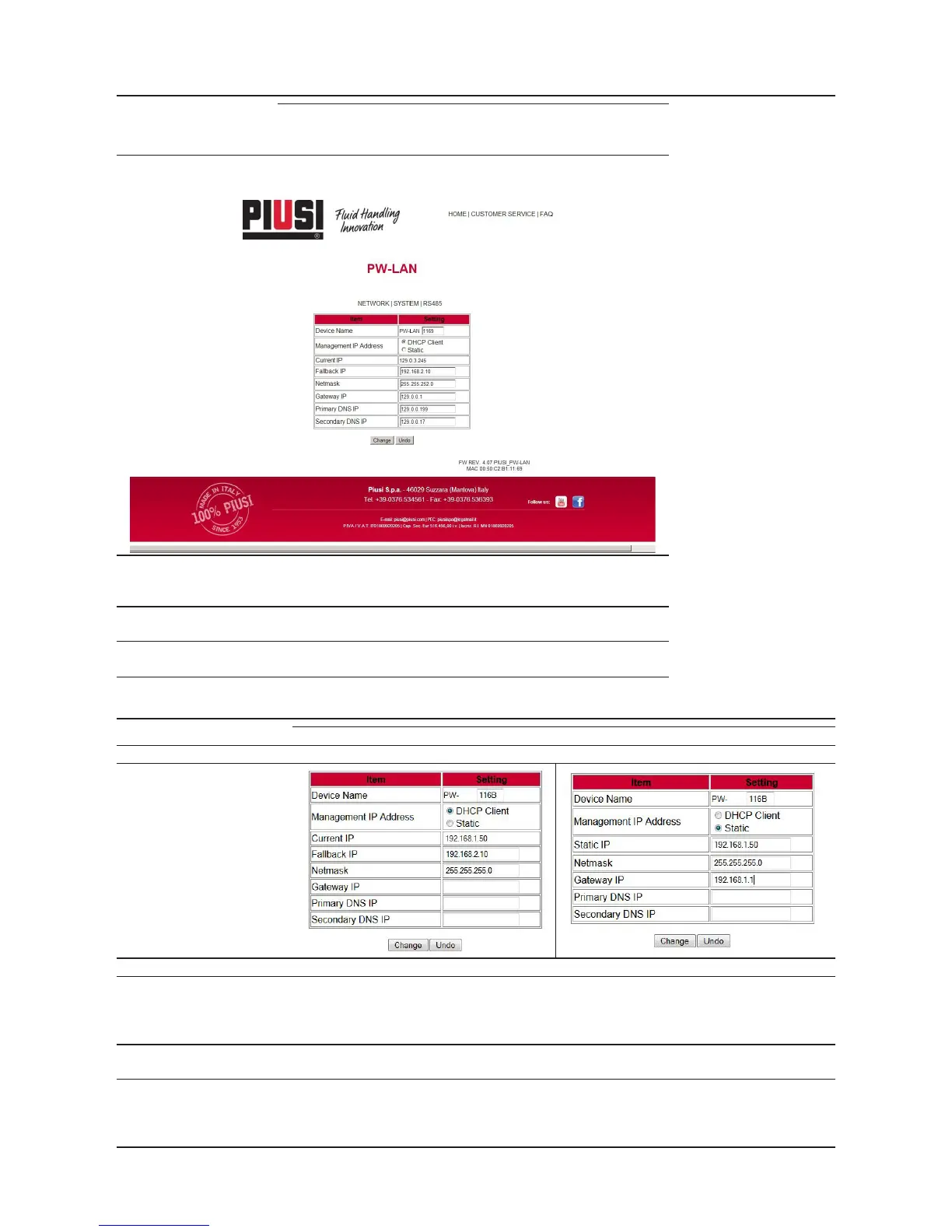
The PW-LAN Configuration Interface contains three main tabs, each of
them provides a Web-based management page to configure a speci-
fic aspect of the Piusi device:
NETWORK
The “Network Tab” configures the network operating mode; Hostname;
Internet Protocol (IP) settings; DHCP; Subnet Mask; Gateway; Primary and
Secondary DNS Server.
SYSTEM The “System Tab” . controls administrator account management,
firmware update, and configuration backup.
RS485 The “RS485 Tab” configures the RS485 conversion system, it is pos-
sibile to choose a Piusi product or to set the parameters manually.
7.6 NETWORK TAB
The Network tab allows to configure TCP/IPv4 parameters.
1) Case DHCP Client 2) Case Static IP
ITEM/
SETTING
DEVICE NAME Specifies the host name
MANAGEMENT IP
ADDRESS
You chooses the formality of management of the IP of the device among 2 options:
- DHCP Client that it means that in the lan network exist a DHCP server that assigns a dynamic
IP to the PW-LAN , an address IP of the Gateway and an address DNS to the device
- Static that means that the administrator of net assigns a fixed static IP to the PW-LAN.
CURRENT IP
it is the dynamic address that is automatically assigned by the DHCP file server of the lan network to
the PW-LAN
FALLBACK IP
it is the address IP that of default is associated to the PW-LAN if these facts happen:
- the PW-LAN is configured as DHCP Client MA
- after a certain time from the turning of the device the DHCP file server has not succeeded in assign-
ing a dynamic IP and then the PW-LAN configure itself with the IP of FallBack



 To Next Page