EasyManua.ls Logo

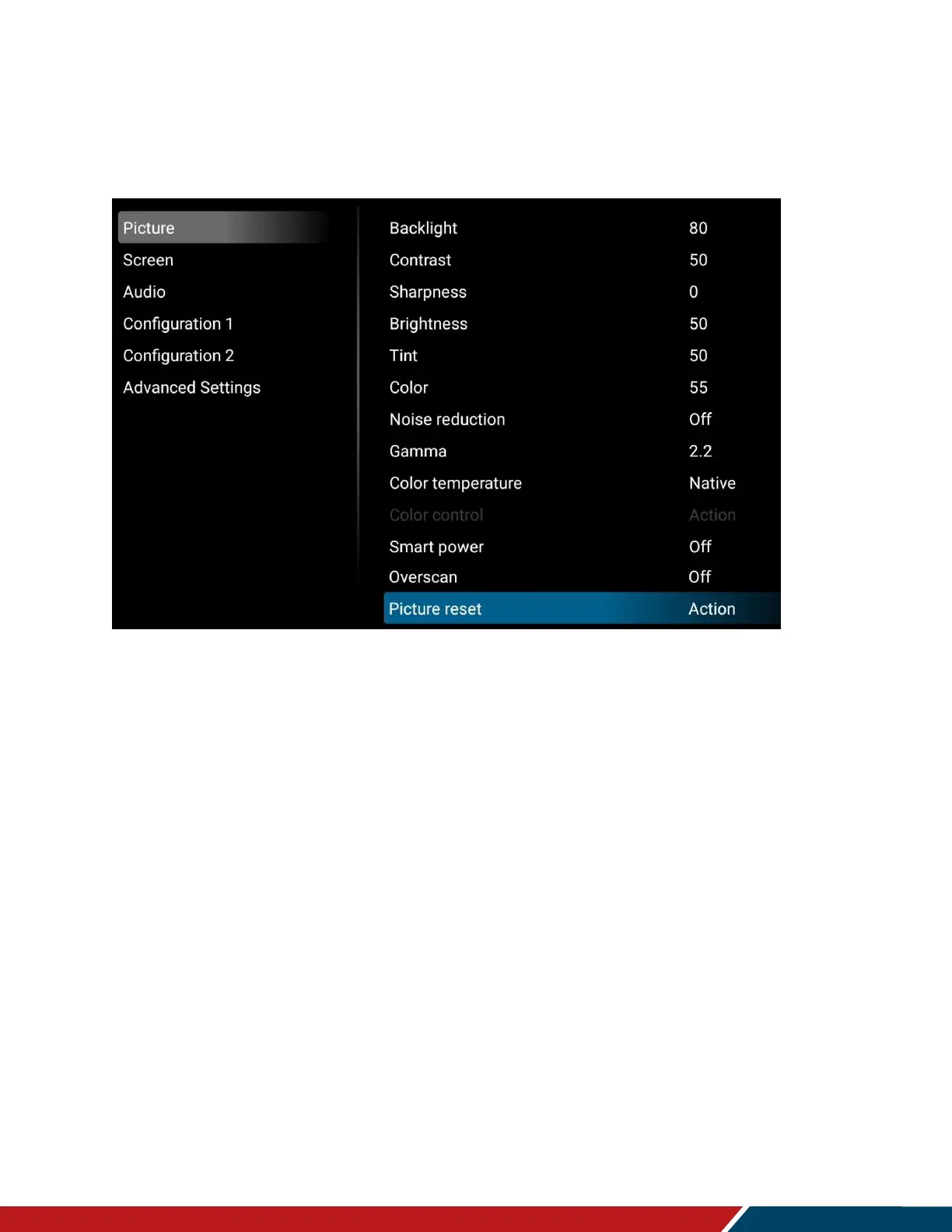
Planar M Series - OSD Main Menu: Picture, Screen, Audio; Picture Settings

Planar M Series
100 pages
Print Icon
To Next Page IconTo Next Page
To Previous Page IconTo Previous Page
Loading...
Operating the Display
Planar Simplicity M Series User Manual
020-1409-00A
Page | 37
18. OSD Main Menu
18.1 Picture
Backlight
Increase or decrease the intensity of the LCD backlight. Press or to select the
desired level.
Range: 0~100
Default: 80
Contrast
Increase or decrease the contrast of the picture. Press or to select the desired
level.
Range: 0~100
Default: 50
Sharpness
Adjust the definition of the picture. Press or to select the desired level.
Range: 0~100
Default: 0
Brightness
Increase or decrease the brightness of the picture. Press or to select the desired
level.
Range: 0~100
Default: 50

Table of Contents

Related product manuals