Operating the Display
Planar Simplicity M Series User Manual
020-1409-00A
Factory Reset
Reset all internal storage to default values
Note: Choosing this option will cause the display to go through initial setup (see
page 31).
Export Signage Display Settings
Write all display settings to a USB storage device or an SD card, excluding the
Signage Display Name field.
This allows the display’s settings to copy to another unit.
Import Signage Display Settings
Read all display settings from a USB storage device or an SD card, excluding the
Signage Display Name field.
This allows the display’s settings to copy from another unit.
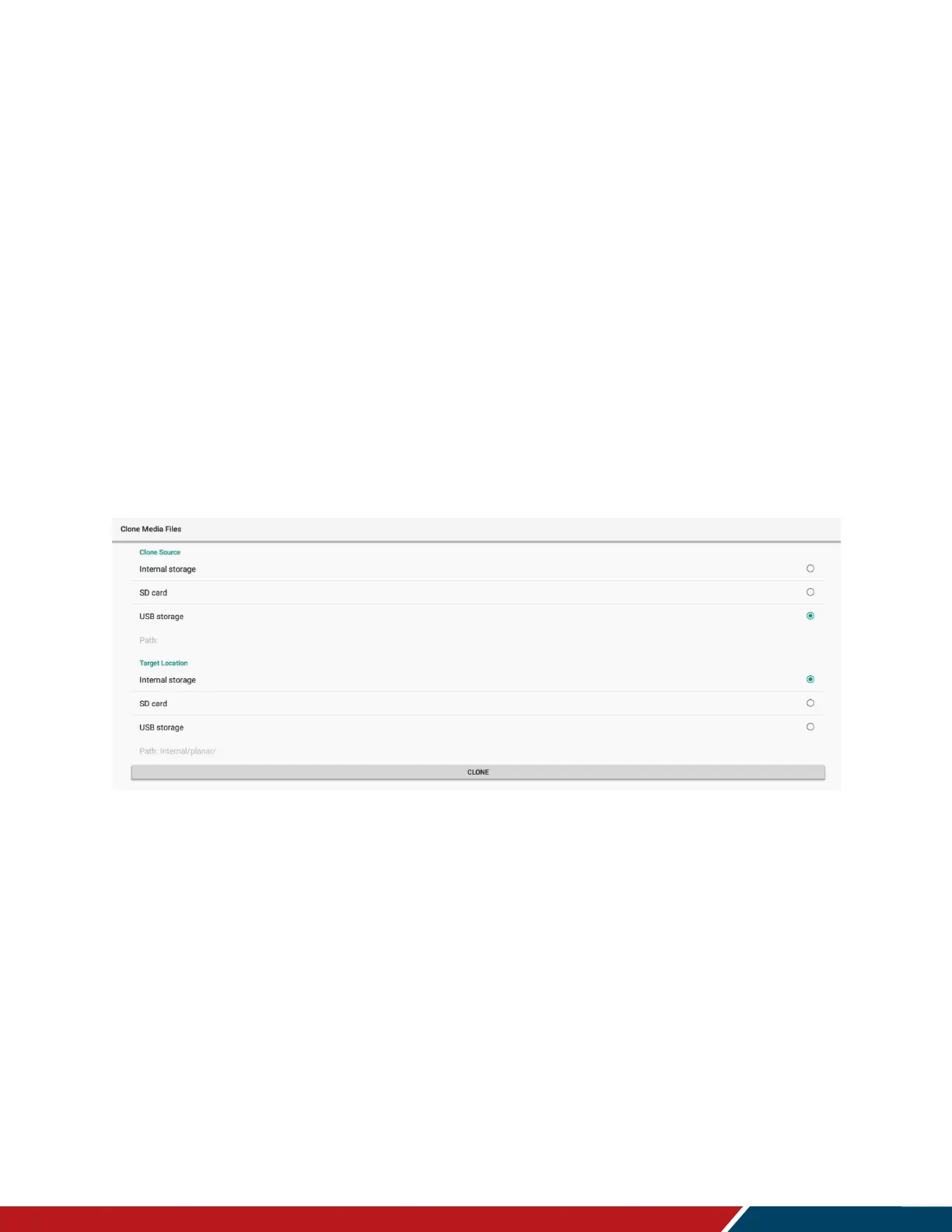
Clone Media Files
This menu allows all media files to copy from the specified location to the selected
destination.
Clone Source
The source location to copy the media files from.
Options: Internal Storage, SD Card, USB Storage
Target Location
The destination to copy the media files to.
Options: Internal Storage, SD Card, USB Storage
Clone
Press to complete the clone operation.
System Updates
Initiates the firmware upgrade process. Refer to the directions in the firmware
upgrade package for more information.


 To Next Page