Etha3 etha3
32 33
BREECH SENSOR ACCESS TOURNAMENT LOCK BUTTON
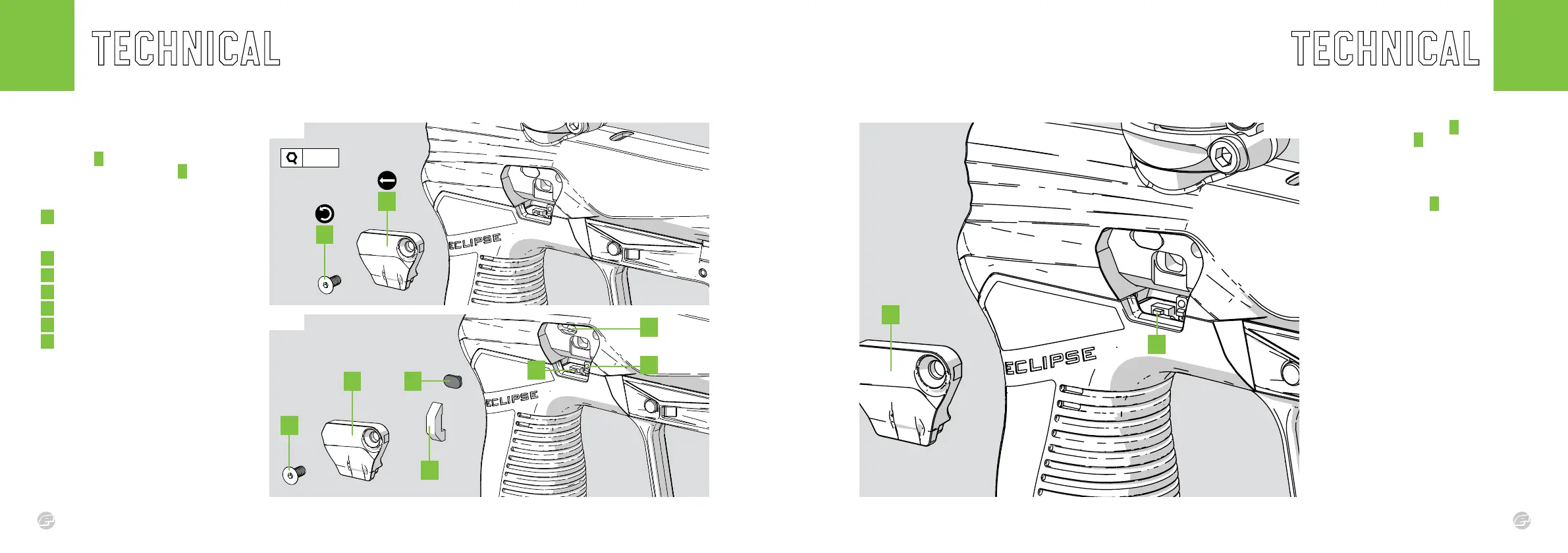
The tournament lock button B sits behind the
breech sensor cover A on the left hand side
of the marker.
FIG-1
To lock/unlock the marker press the
tournament lock button B once and you will
be able to alter/lock the marker settings.
See pages 16-17 for parameter settings and
status indicator.
Fig.1
B
A
FIG.1 (ACCESS)
Use a 5/64” hex key to remove the breech
cover screw A by rotating counter-clockwise.
Then release the breech cover B .
FIG.2 (DETAILS)
A Breech Cover Screw
6-32UNC x 5/16
Countersunk socket screws
B Breech Cover
C Light Pipe
D Rubber Detent
E Detent Recess
F Tournament Lock Button
G Breech Sensor
Fig.1
Fig.2
5/64”
C
G
E
A
A
B
B D
F















 To Next Page