BM-500 Bandwidth Management Gateway User’s Manual
- 13 -
to a static hostname, allowing your device to be more easily accessed by specific name. When this function is
enabled, the IP address in Dynamic DNS Server will be automatically updated with the new IP address
provided by ISP
Logout Administrator logs out the Bandwidth Management Gateway. This function protects your system
while you are away.
Software Update The administrator can update the device’s software with the latest version.
Administrators may visit distributor’s web site to download the latest firmware. Administrators may update
the device firmware to optimize its performance and keep up with the latest fixes for intruding attacks.
4.1.1 Admin
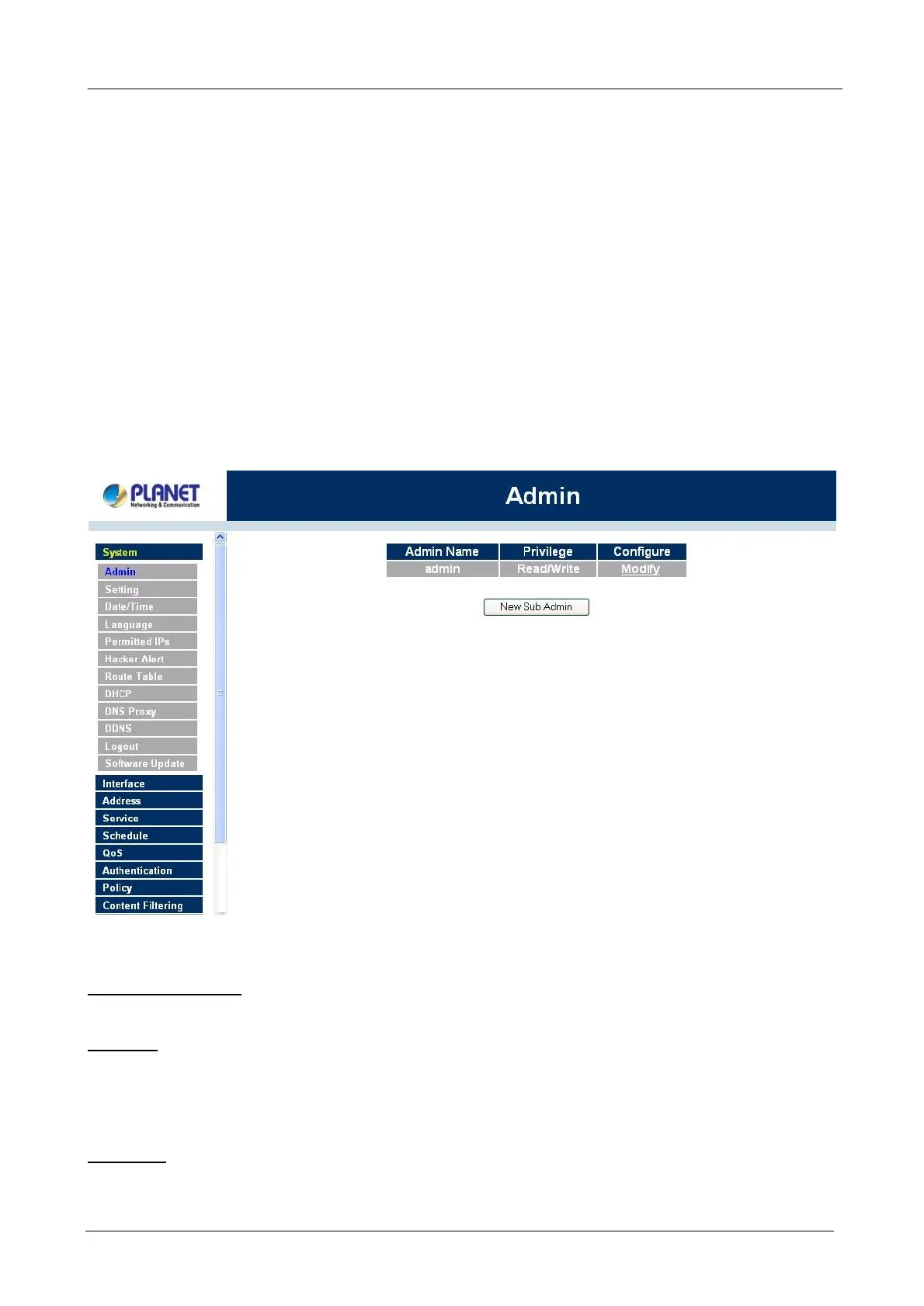
On the left hand menu, click on Setup, and then select Admin below it. The current list of Administrator(s)
shows up.
Settings of the Administration table
Administrator Name: The username of Administrators for the Bandwidth Management Gateway. The user
admin cannot be removed.
Privilege: The privileges of Administrators (Admin or Sub Admin)
The username of the main Administrator is Administrator with read / write privilege.
Sub Admins may be created by the Admin by clicking
New Sub Admin
. Sub Admins have read only
privilege.
Configure: Click Modify to change the “Sub Administrator’s” password and click Remove to delete a “Sub
Administrator.”
çç



 To Next Page