Firewall
5-35
5
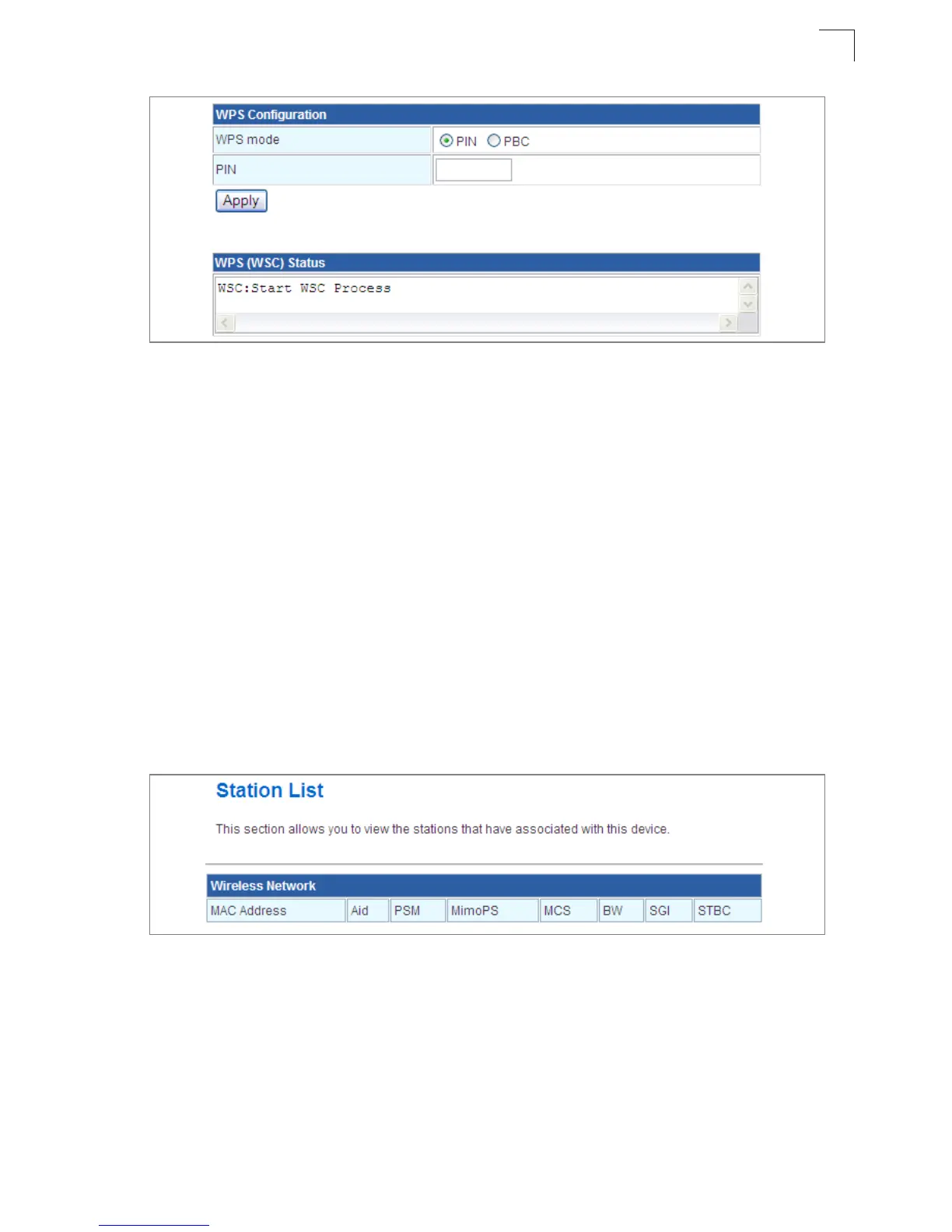
Figure 5-22. WPS Progress Settings
WPS Configuration — Configures WPS settings for the Multimedia Router.
• WPS Mode – Selects between methods of broadcasting the WPS beacon to network
clients wanting to join the network:
- PIN: The Multimedia Router, along with other WPS devices, such as notebook PCs,
cameras, or phones, all come with their own eight-digit PIN code. When one device,
the WPS enrollee, sends a PIN code to the Multimedia Router, it becomes the WPS
registrar. After configuring PIN-Code information you must press “Apply” to send the
beacon, after which you have up to two minutes to activate WPS on devices that need
to join the network.
- PBC: This has the same effect as tapping the WPS button in Tools > Network Setting
> Router Setting On-Screen Display (OSD) menu. After checking this option and
clicking “Apply”, you have up to two minutes to activate WPS on devices that need to
join the network.
Station List
Display the station information which associated to this Multimedia Router.
Figure 5-23. Station List
Firewall
The Multimedia Router provides extensive firewall protection by restricting connection
parameters to limit the risk of intrusion and defending against a wide array of common
hacker attacks.


 To Next Page