System Configuration
5-16
5
-Authenticated successfully: Indicates that the 3G connection has
authenticated successfully.
• Dial Code: A dialled access code that connects the USB device to the service provider.
• APN Service: The name that uniquely identifies the cellular operator, access point
name (APN).
• 3G Username: The username of the account registered with the service provider.
• 3G Password: The password of the account registered with the service provider.
• Connect Type: Selects the connection type as Keep Alive or Auto Connect.
(Default: Auto Connect)
• 3G Max Idle Time: The maximum length of inactive time the unit will stay connected to
the DSL service provider before disconnecting. This feature only works when Connect
Type is set to “Auto-Connect.” (Default: 300 seconds)
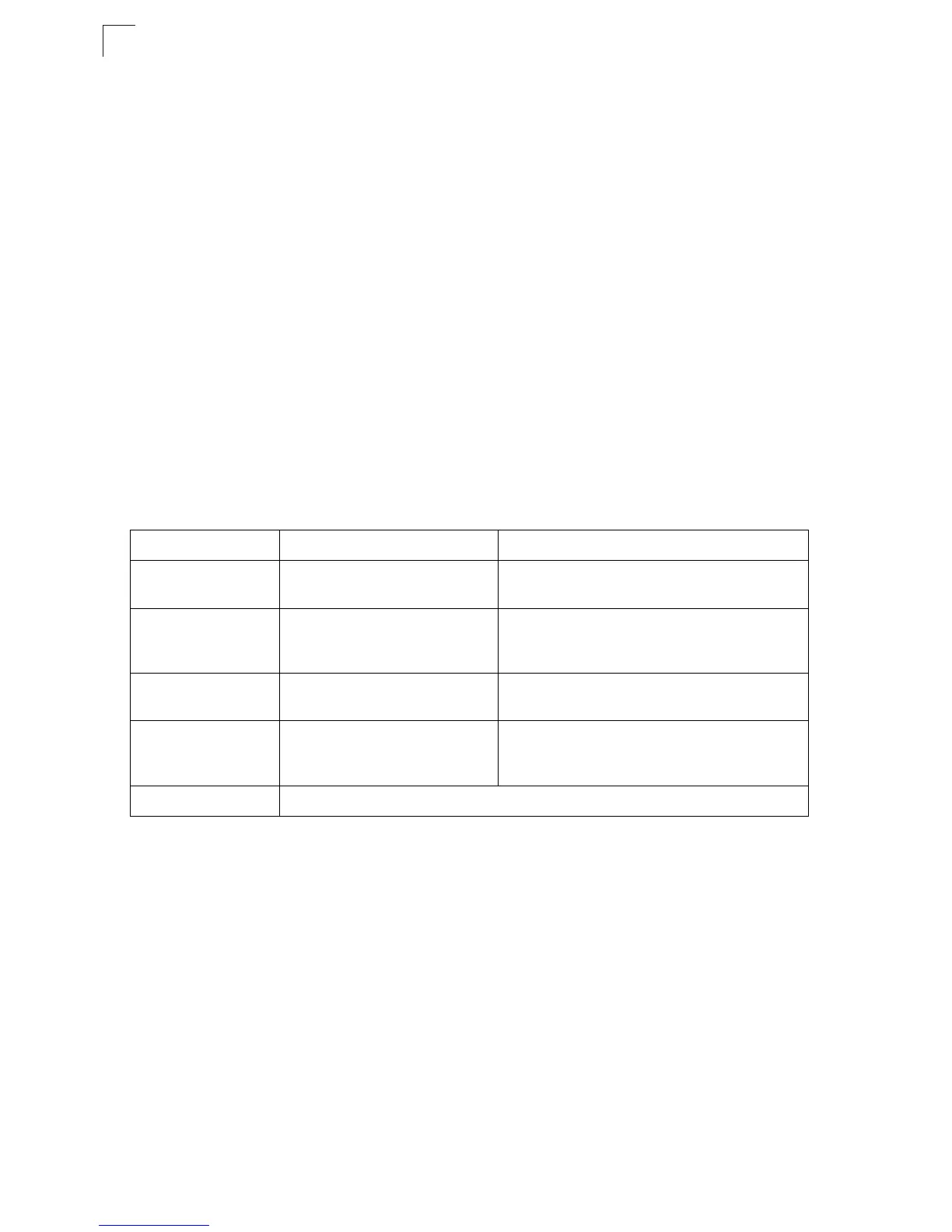
• Budget Control: You can set a monthly limit on time or the total data. For more details,
please refer to the following table.
3. Basic Wireless Settings – Configures the SSID and sets the wireless security
policy. Click Apply after completing the setup.
LAN Setting
The Multimedia Router must have a valid IP address for management using a web
browser and to support other features. The unit has a default IP address of 192.168.2.1.
You can use this IP address or assign another address that is compatible with your
existing local network. Click on “Network Settings” followed by “LAN.”
By Time By Data
Budget Criterion Specify the amount of time (in
hours) that can be used per month
Specify how much Download/Upload data (in
MBytes) can be transmitted per month
Budget Policy Enable or disable the action “Drop
Current Cellular connection” if
over budget
Enable or disable the action “Disallow New
Cellular connection” if over budget
*Trigger by Limit
Budget
Set the specified % of time limit Set the specified % of time limit
Action taken when the
specified % of time or
data limit is exceeded
Send an E-mail alert Recur every certain minutes
Budget Counter Select the date which the AP/Router resets the budget every month


 To Next Page