System Configuration
5-36
5
MAC/IP/Port Filtering
MAC/IP/Port filtering restricts connection parameters to limit the risk of intrusion and
defends against a wide array of common hacker attacks. IP/Port filtering allows the unit to
permit, deny or proxy traffic through its MAC addresses, IP addresses and ports.
The Multimedia Router allows you define a sequential list of permit or deny filtering rules
(up to 32). This device tests ingress packets against the filter rules one by one. A packet
will be accepted as soon as it matches a permit rule, or dropped as soon as it matches a
deny rule. If no rules match, the packet is either accepted or dropped depending on the
default policy setting.
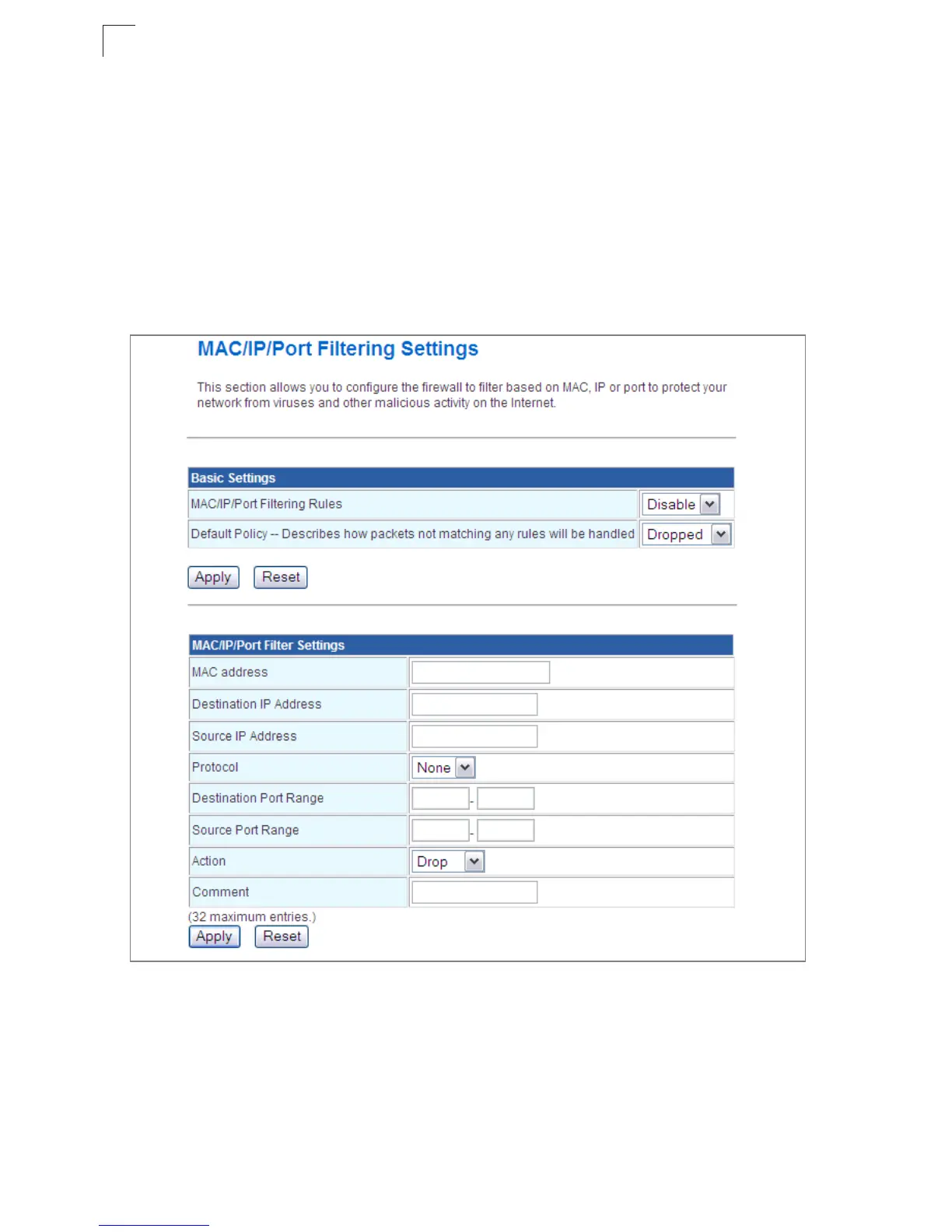
Figure 5-24. MAC/IP/Port Filtering Settings
• MAC/IP/Port Filtering – Enables or disables MAC/IP/Port Filtering. (Default: Disable)
• Default Policy – When MAC/IP/Port Filtering is enabled, the default policy will be
enabled. If you set the default policy to “Dropped”, all incoming packets that don’t match
the rules will be dropped and vise versa. (Default: Disable)
• MAC Address – Specifies the MAC address to block or allow traffic from.


 To Next Page