System Configuration
5-38
5
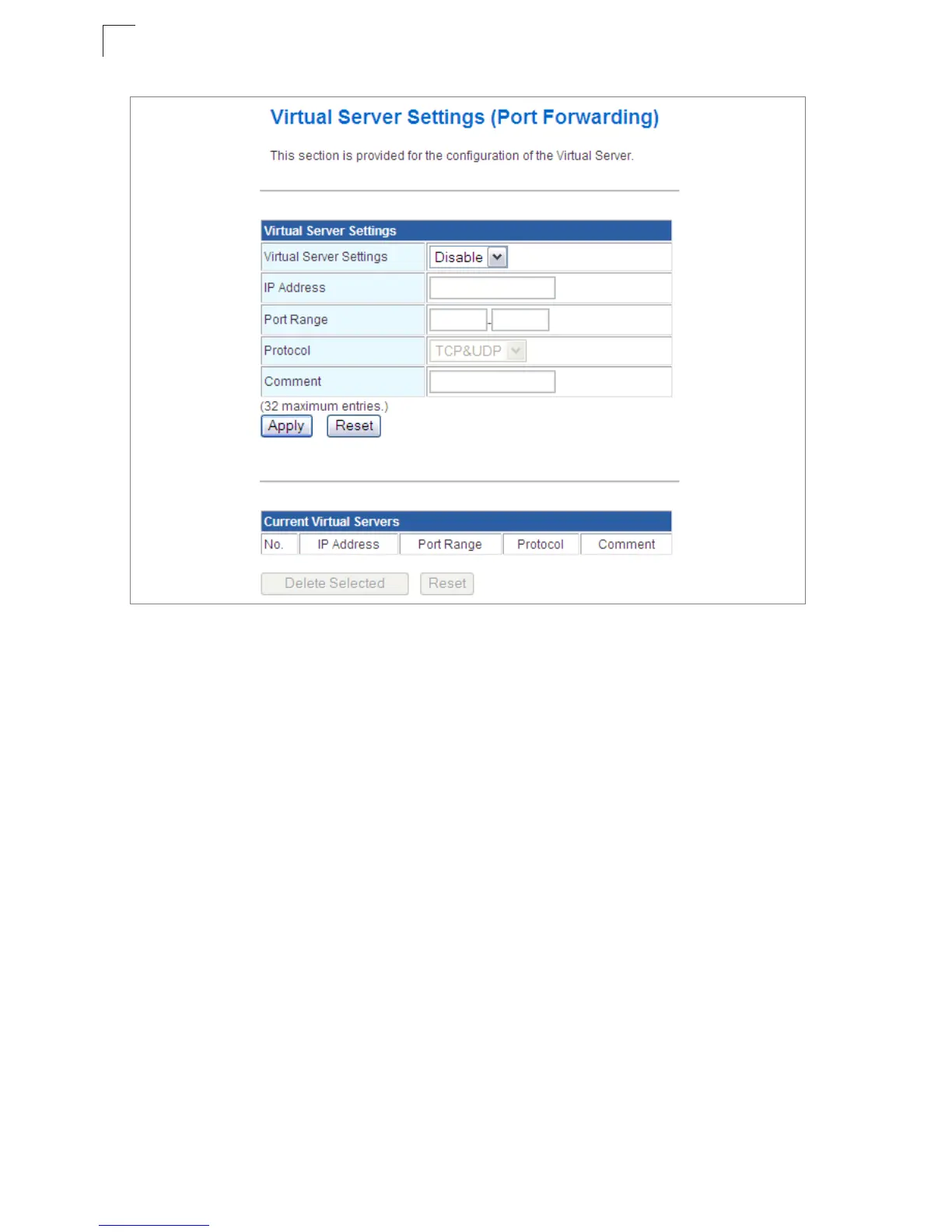
Figure 5-26. Virtual Server Settings (Port Forwarding)
• Virtual Server Setting – Selects between enabling or disabling port forwarding the
virtual server. (Default: Disable)
• IP Address – Specifies the IP address on the local network to allow external access to.
• Port Range – Specifies the port range through which traffic is forwarded.
• Protocol – Specifies a protocol to use for port forwarding, either TCP, UDP or both.
• Comment – Enter a useful comment to help identify the forwarded port service on the
network.
Current Virtual Servers
The Current Virtual Servers displays the entries that are allowed to forward packets
through the Multimedia Router’s firewall.
• Select – Selects an entry in the Current Virtual Servers.
• IP Address – Displays an IP address on the local network to allow external access to.
• Port Range – Displays the local port range.
• Protocol – Displays the protocol used for forwarding of this port.
• Comment – Displays a useful comment to identify the nature of the port to be forwarded.


 To Next Page