Planmeca Intra Mobile base 7/8
Installation instructions
PLANMECA INTRA X-RAY UNIT
TRANSPORTING THE MOBILE INTRA X-RAY UNIT
CAUTION NEVER MOVE THE INTRA MOBILE X-RAY UNIT WITHOUT FIRST SECURING THE
BRACKET ARM TO THE TRANSPORT POSITION.
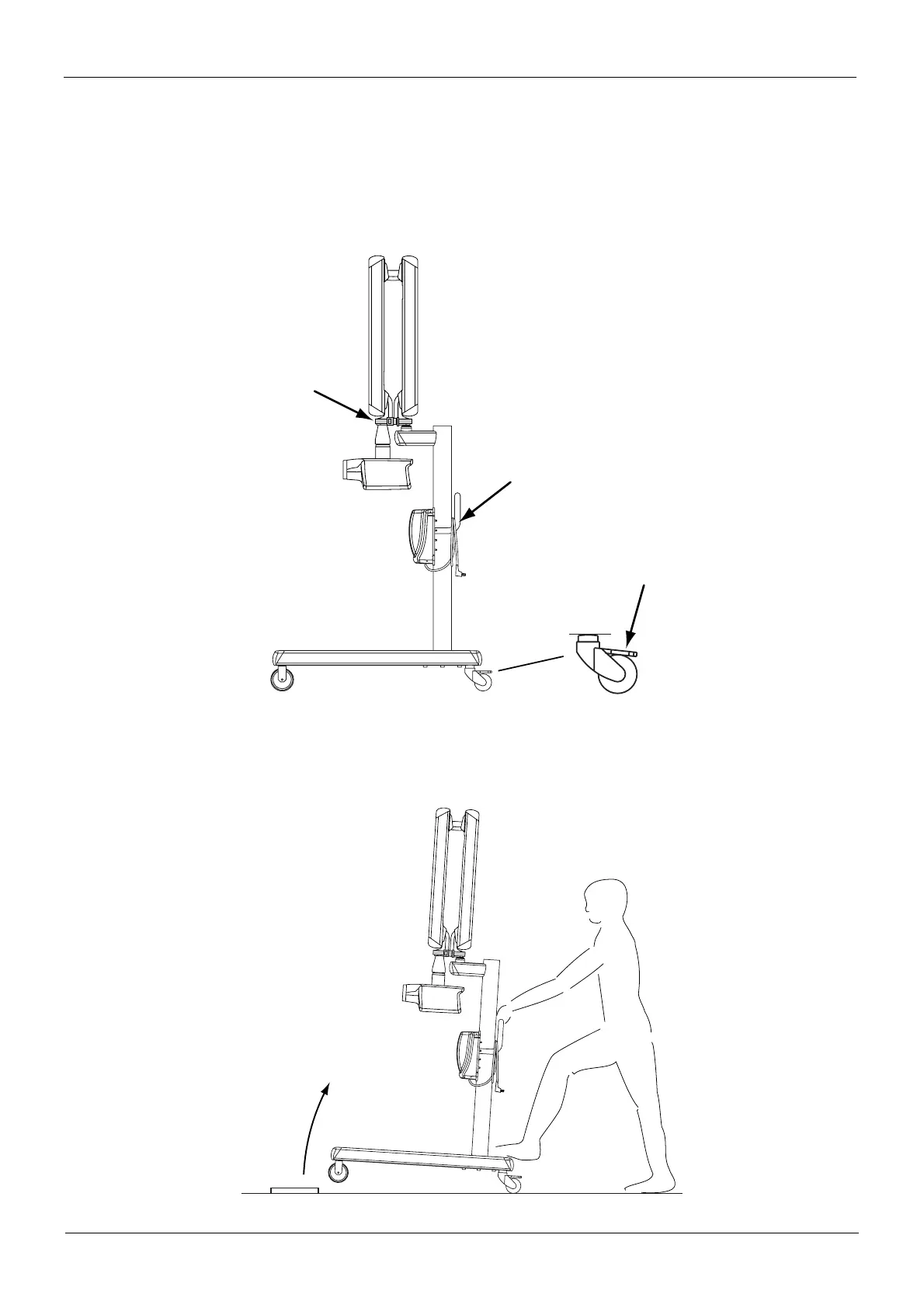
Secure the bracket arm to the transport position with the strap. Disconnect the Planmeca Intra from
the power supply and hang the power supply cable on the handle. Transport the x-ray unit with care.
Do not bump the unit down steps or allow the tube head to hit anything.
The mobile base has mechanical locking levers on the back wheels. Press the locking levers down
to lock the wheels. This will prevent the mobile base from moving.
If you have to move the mobile base over a low obstacle, tilt the base slightly by pressing the back
end of the wheel assembly with your foot.
mobile_intra12.eps
Brake ON
Strap
Power supply cable
mobile_intra14.eps














 To Next Page