
 Need help?
Do you have a question about the Planmeca intra and is the answer not in the manual?
Explains various symbols used in the manual, such as Type B equipment, AC current, attention required, intermediate focal spot, and WEEE symbol.
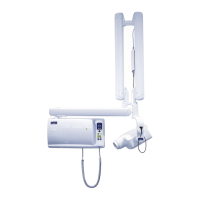
Illustrates and labels the main components of the Planmeca Intra X-ray unit, including the support arm and tube head.
Details the control panel of the X-ray unit, including its connection and a crucial warning about connecting other equipment.
Explains the procedure for powering on the X-ray unit and the automatic self-test sequence.
Guides on how to select and attach the appropriate cone for exposure, emphasizing the use of a long cone for reduced patient dose.
Explains the function of the kV and mA displays on the control panel, including their ranges and selection options.
Details the various keys and indicator lights on the control panel, covering selection, mode, and status indications.
Explains how to use the up/down keys to adjust kV, mA, and exposure time values on the control panel.
Guides on selecting imaging mode, adult/child mode, and molar projection for exposure parameter setup.
Explains how to position the patient and the film/sensor using the paralleling technique for molar exposures.
Details the steps for taking a molar X-ray exposure, including patient stillness and operating the exposure key.
Guides on selecting imaging mode, adult/child mode, and premolar/canine projection for exposure parameter setup.
Explains how to position the patient and the film/sensor using the paralleling technique for premolar/canine exposures.
Details the steps for taking a premolar/canine X-ray exposure, including patient stillness and operating the exposure key.
Guides on selecting imaging mode, adult/child mode, and incisor projection for exposure parameter setup.
Explains how to position the patient and the film/sensor using the paralleling technique for incisor exposures.
Details the steps for taking an incisor X-ray exposure, including patient stillness and operating the exposure key.
Guides on selecting imaging mode, adult/child mode, and occlusal projection for exposure parameter setup.
Explains how to position the patient and the film/sensor for intraoral occlusal exposures.
Details the steps for taking an occlusal X-ray exposure, including patient stillness and operating the exposure key.
Guides on selecting imaging mode, adult/child mode, and bite-wing projection for exposure parameter setup.
Explains how to position the patient and the film/sensor for bite-wing exposures.
Details the steps for taking a bite-wing X-ray exposure, including patient stillness and operating the exposure key.
Explains default exposure values that appear on startup and can be programmed by the user.
Details preprogrammed exposure values for different regions and modes, noting they can be user-programmed.
Guides on how to program default exposure parameters and adjust density values for optimal image quality.
Details how to program custom settings for each exposure region and mode.
Provides instructions on cleaning the exterior surfaces of the X-ray unit safely.
Explains how to clean or sterilize the film holder.
Advises on periodic professional servicing and recalibration for optimal performance and safety.
Presents detailed exposure values (kV, time) for speed F films across various teeth regions and patient modes.
Provides exposure values for Dixi2 V1 digital sensors, specifying use in digital imaging mode.
Presents exposure values for Dixi2 V3 digital sensors, specifying use in digital imaging mode.
Lists detailed technical specifications of the Planmeca Intra X-ray unit, including generator, tube, and output parameters.
Presents detailed dimensional drawings and specifications of the X-ray tube head assembly and arm.
Contains statements regarding radiation leakage factors, filtration, voltage, current, and measurement criteria.
 General
| Manufacturer | Planmeca |
|---|---|
| Model | Planmeca Intra |
| Frequency | 50/60 Hz |
| Tube Voltage | 60-70 kV |
| Tube Current | 7 mA |
| Type | Dental X-ray Unit |
| Voltage | 100-240 V |
| Weight | Varies depending on configuration; refer to specific model documentation |











 To Next Page

