PlexTools® Installation and Operation Manual 44
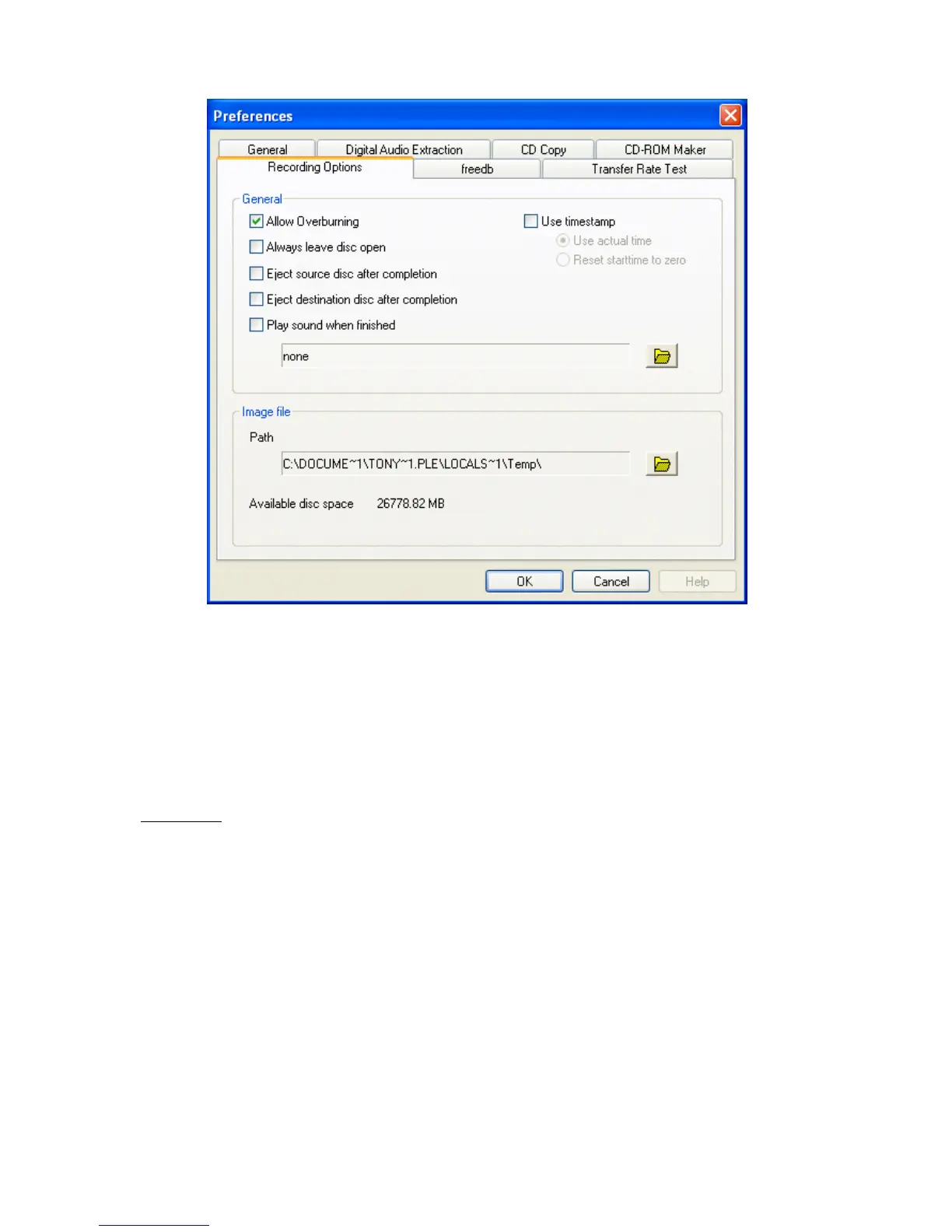
• Allow Overburning: the expression 'overburning' is used for an action where more
data is written on a CD-R than the disc format allows. This will create a non-stan-
dard disc and the result is neither guaranteed nor supported. You may expect irreg-
ular behaviour as a result of an overburned disc, such as reading problems,
program halts on writing, strange or poor drive performance, etc.
• Always leave disc open: if this selection is activated, a new session is automati-
cally created on every copy.
WARNING: THIS WILL CREATE A DISC THAT MAY NOT BE AN EXACT COPY OF THE SOURCE
DISC.
THE CREATED DISC IS MULTISESSION-READY, SO MORE SESSIONS CAN BE ADDED. (USE
OTHER CD-RECORDING SOFTWARE FOR THIS)
• Play a sound when finished: When this option is selected, and you have specified
a *.WAV file, this sound will be played after writing is finished.
• Eject source disc after completion: will eject the source disc after the completed
copy task.
• Eject destination disc after completion: will eject the recorded disc after the com-
pleted copy task.
• Image file: indicates the location of the image file on your harddisk and also the free
space on this device.



 To Next Page