Plinius 8150 instruction manual. Page 8
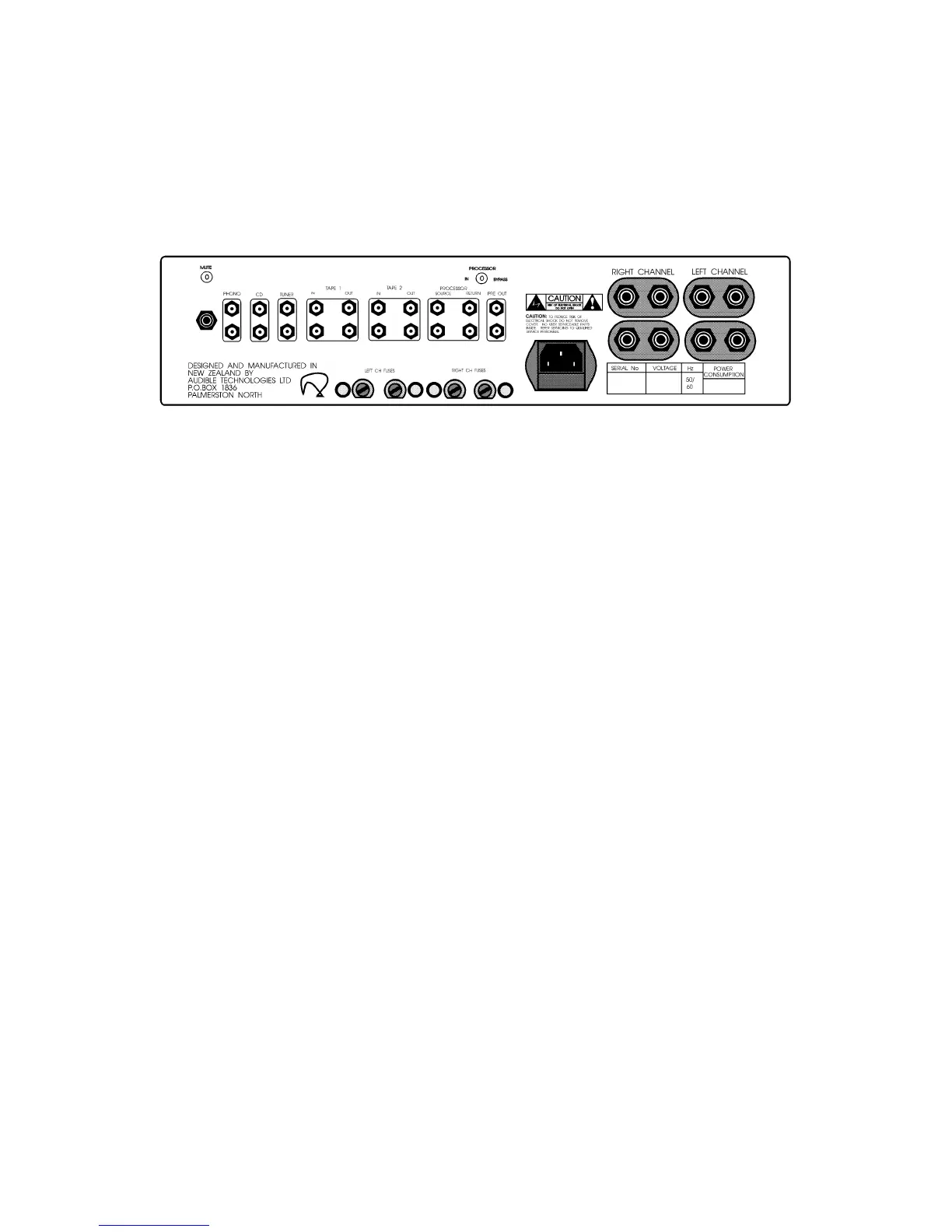
REAR PANEL CONNECTIONS
All input connections are clearly marked
REAR PANEL LAYOUT
TAPE CONNECTIONS AND DUBBING
If two tape decks are fitted to the 8150 it is possible to dub in either direction. Selecting
either Tape Input with the Record Selector automatically sends the tape playback signal to
the other tape deck. eg. Select Tape 1 as a record source and its playback output will go
to Tape 2. Select Tape 2 as a record source and its output will go to Tape 1.
A 'Tape Lock' feature ensures that the machine playing back and selected as a record
source does not get a signal fed to its input sockets , so inadvertently switching it to
record mode will not cause feedback howl. While dubbing, the Source Selector allows
easy monitoring of either tape deck.
MAINS / LINE POWER CONNECTION
MAINS / LINE POWER connection is via the supplied plug-in lead.
The standard IEC socket connects the mains power at the amplifier end while a local mains plug is
required at the wall end. In the event where a "local" plug needs to be fitted to the wall end of the lead,
ensure that the plug is wired correctly by a suitably qualified or experienced person.
The wiring code is;
Green to Earth,
Blue to Neutral,
Brown to Phase or Live.
Ensure the mains switch on the front of the amplifier is OFF before attempting any modification of the
mains connection.



 To Next Page