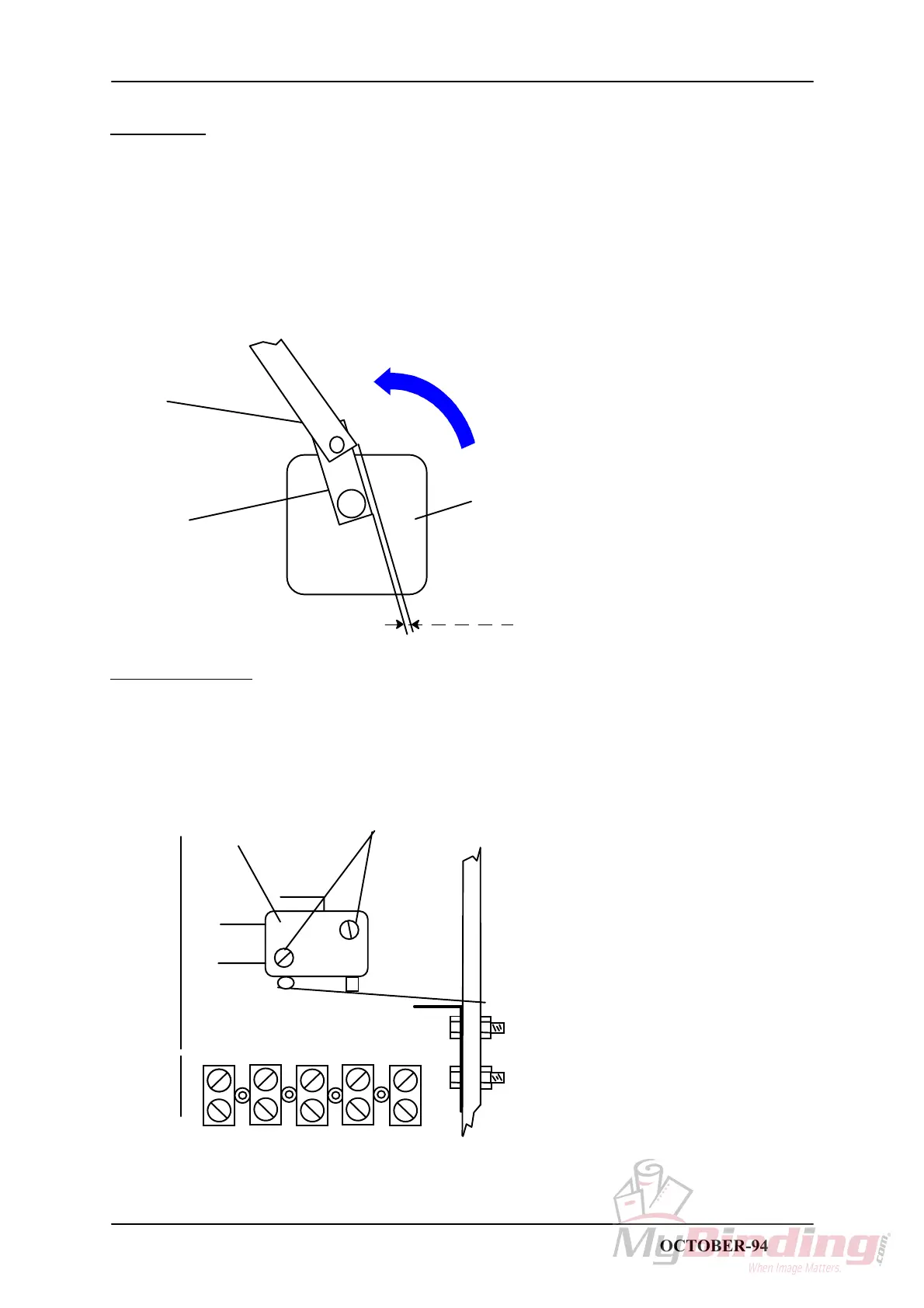
REP 2.10 Home position Stapler motor M1
T08009 TJ
PURPOSE
Switch SW7 stops the Stapler motor at home position.
There are two springs that holds the Stapler yoke in top position when Stapler motor is in home
position.
1. Switch off the main power switch and disconnect the power cord.
2. Remove Front and Infeed cover, CRI 1.1 and 1.2.
3. Empty the Staple magazines.
4. Turn the Stapler motor crank manually and check that Switch SW7 activates 0-1mm before motor
crank arm is aligned with plastic crank arm.
0 -1mm
Stapler motor
Plastic crank
Motor crank
arm
Turn motor in this direction
ADJUSTMENT
Locate Switch SW7 positioned on side frame operator side.
1. Loosen the screws (1).
2. Turn Stapler motor manually and stop when the plastic crank arm on the motor is 1mm
(5 degrees) before top dead centre.
3. Position SW7 so that it activates and tighten the screws (1).
1
SW7
STAPLER FOLDER MODEL 60/61 PAGE 2.10 OCTOBER-94



 To Next Page