48
SPECIAL FEATURES
Treatment Time
The device offers 12 preset times: 5, 10, 15, 20, 25, 30, 35, 40, 45, 50, 55 and 60 minutes.
Time will countdown on the display in 1-minute increments for the duration of your session.
• The device turns off automatically when the treatment time has elapsed.
• The most recently set treatment time is stored.
• If you alter the program mode during your treatment, the treatment time won’t restart, unless you
reset the treatment time.
• The last treatment program you used will appear on the display, when you turn on the device.
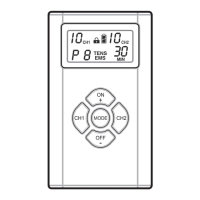
• To change the program, press ON + or OFF – repeatedly until the desired program appears on the
display.
• Press MODE to save your selection. The program you selected will appear on the display the next
time you turn on the program.
Lock Function
Press and hold the ON + and OFF – keys simultaneously for 1 second to lock/unlock the device.
Automatic Shut off
• The device automatically turns off when no button is pressed for 60 seconds.
• The device automatically turns off when the time for your treatment session has elapsed.
Intensity Level Reset
For your safety and comfort, the intensity level will reset to ”0” each time the device turns off,
including after treatment sessions.
The treatment will discontinue if the electrodes are not properly placed well, and/or any entry for
changing the mode setting during treatment session, it shall initiate to lowest intensity level, show-
ing “0” on the screen.
Low Battery Status Indicator
The battery status indicator will light whenever the battery is low. This means that soon you have to
replace the batteries.


 To Next Page