PMDG 737NGX 0.00.119
TUTORIAL #2
For Simulator Use Only DO NOT DUPLICATE 27FEB15 RTM
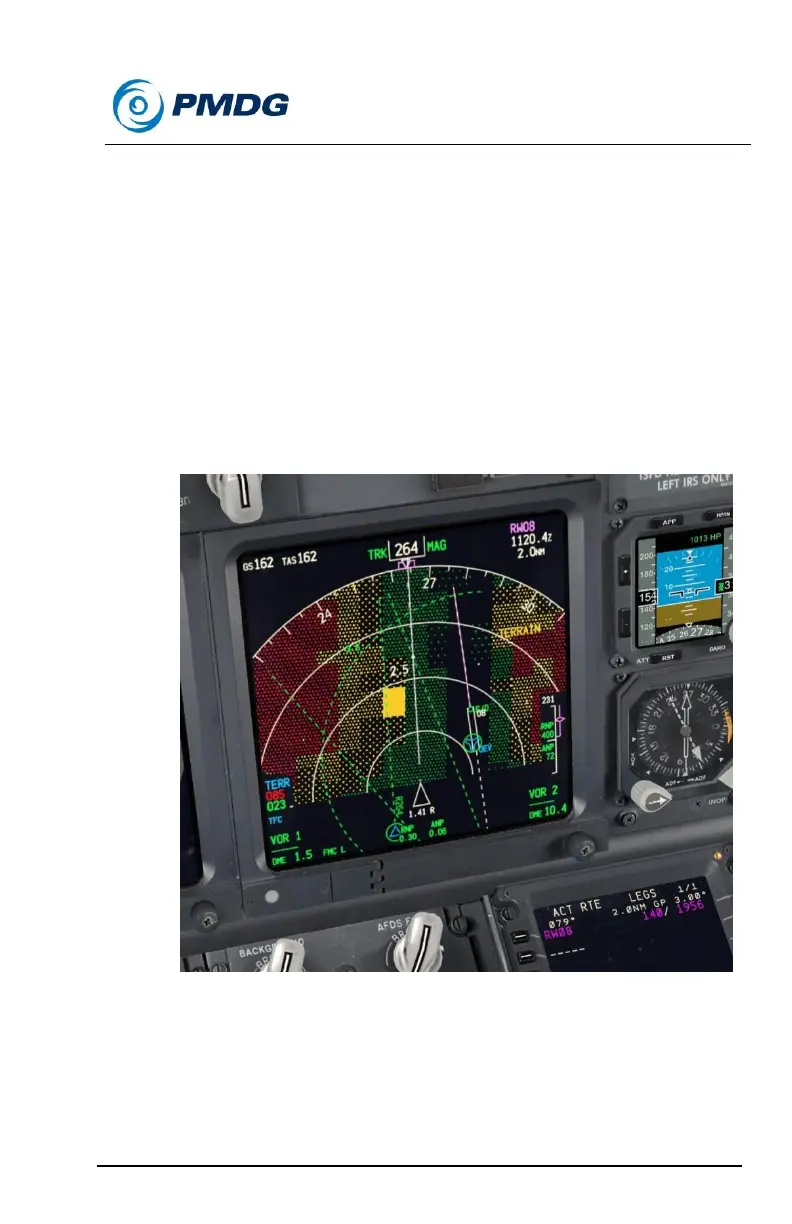
At around 1 mile before INN, turn right with the MCP HEADING
knob to 264. (Use the inner ring of the 5nm ND range setting to
judge this.)
You’ll likely start hearing EGPWS terrain warnings and seeing
solid amber squares on the ND now. Provided you start the turn
early enough (do not wait until overhead INN), there shouldn’t be
a problem. This is a visual approach though and if you’ve
overshot it and things don’t look right, feel free to turn further to
the right to get back on the correct path over the ground.
Ideally you want to be toward the left edge of the green terrain
strip on the ND.
It should be noted though that the terrain display is not to be used
as a primary navigation aid, it is only for situational awareness
and reference.
This will look VERY close to the side of the mountain to the left.
We need to be this close though to give ourselves enough room
to do the 180 degree turn to final. In real life it is not unusual to



 To Next Page