ETD1000 Instruction Manual - 2017-07-01.docx Page 7 of 28 July 1, 2017
1.2 Display Data
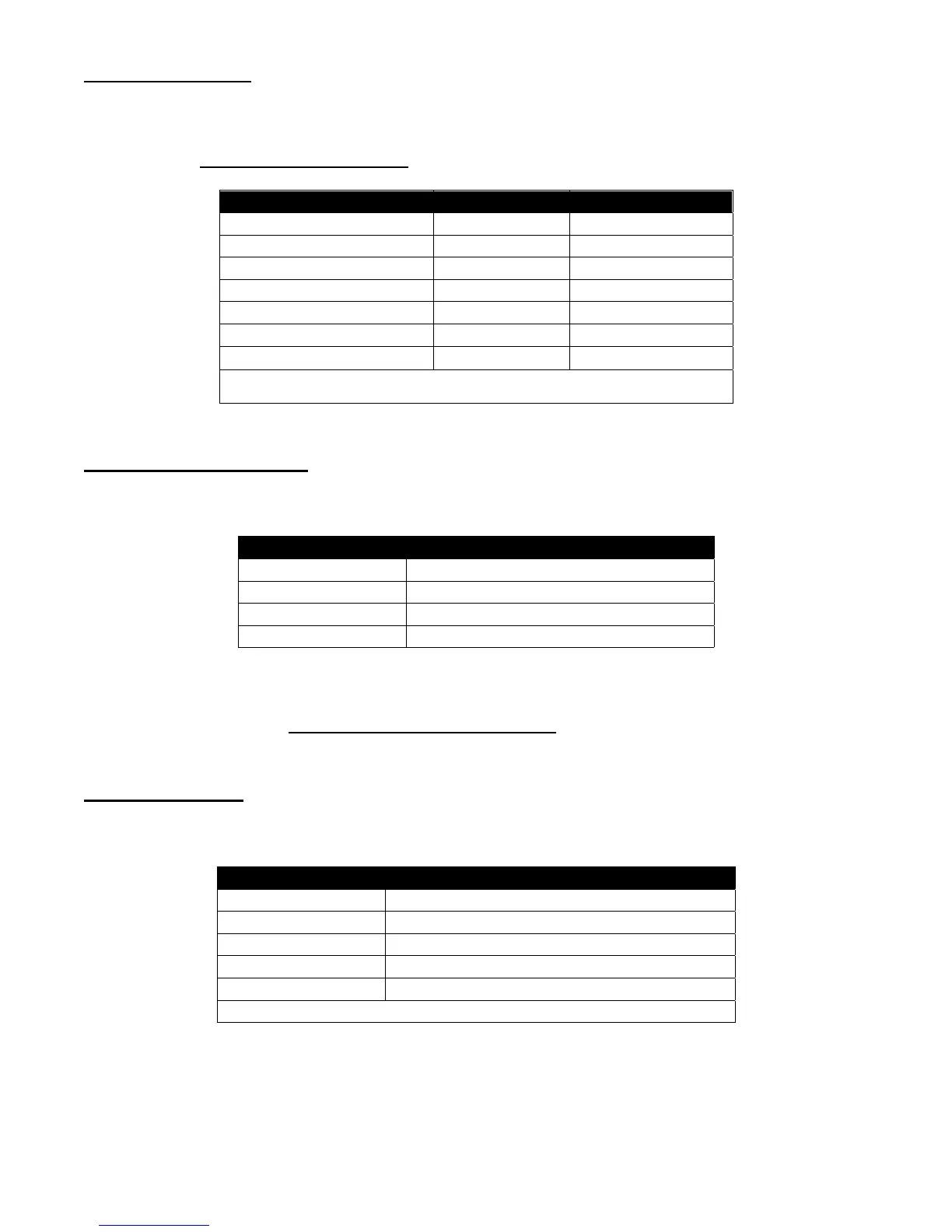
The seven-segment LED display shows the selected Tank ID along with the selected tank data as
defined in the table below. User-selected tanks and display modes may be enabled or disabled. Refer
to Section 3.2 Front Panel Programming for details on this feature.
Displa
Mode Data Format* Displa
Units
Gallons DDDDDDD Gallons
Liters
Net Gallons DDDDDDD Gallons
Liters
Percent Gallons DDD.d % of Capacit
Ulla
e DDDDDDD Gallons
Liters
Product Level DDDD.d Inches
mm
Water Level uDDDD.d Inches
mm
Product Temperature sDDD.d
F (C)
*Where: d = Tenths, s = Signed Data, u = Water Symbol
1.3 Display Messages
The seven-segment display indicates a limited number of messages as follows;
Displa
Messa
e Description
-No data- No communications with TMS
nn Lo Prod Tank level below
au
eable limit
nn ------ Probe timeout or s
nc erro
tank name Use
-selected Tank Name
where nn = Tank ID
The “tank name” message is displayed when the MODE pushbutton is momentarily activated, as
described in Section 4.0 ETD1000 Front Panel Operation
1.4 Alarm LEDs
Alarm LEDs are provided to annunciate tank-related alarms as follows;
Alarm LED Description
Leak In-Tank Leak Test Failure
SP1 Product Setpoint #1
Hi
hHi
h 95%
SP2 Product Setpoint #2
Hi
h 90%
SP3 Product Setpoint #3
Low 20%
Wate
Water Setpoint
bove 2”
51mm
Factor
default values in


 To Next Page