OBSTRUCTION SENSITIVITY SET UP
* Note: Cycle is an open/close input.
Exit is a open only input.
IMPORTANT: For safety reasons the
obstruction setting or stall force on the Polaris
Automatic Gate Operator control board comes
from the factory set at minimum, (turned all
the way counter
-clockwise). In many gate
installations, this setting will need to be
adjusted to overcome the weight and size of the
gates.
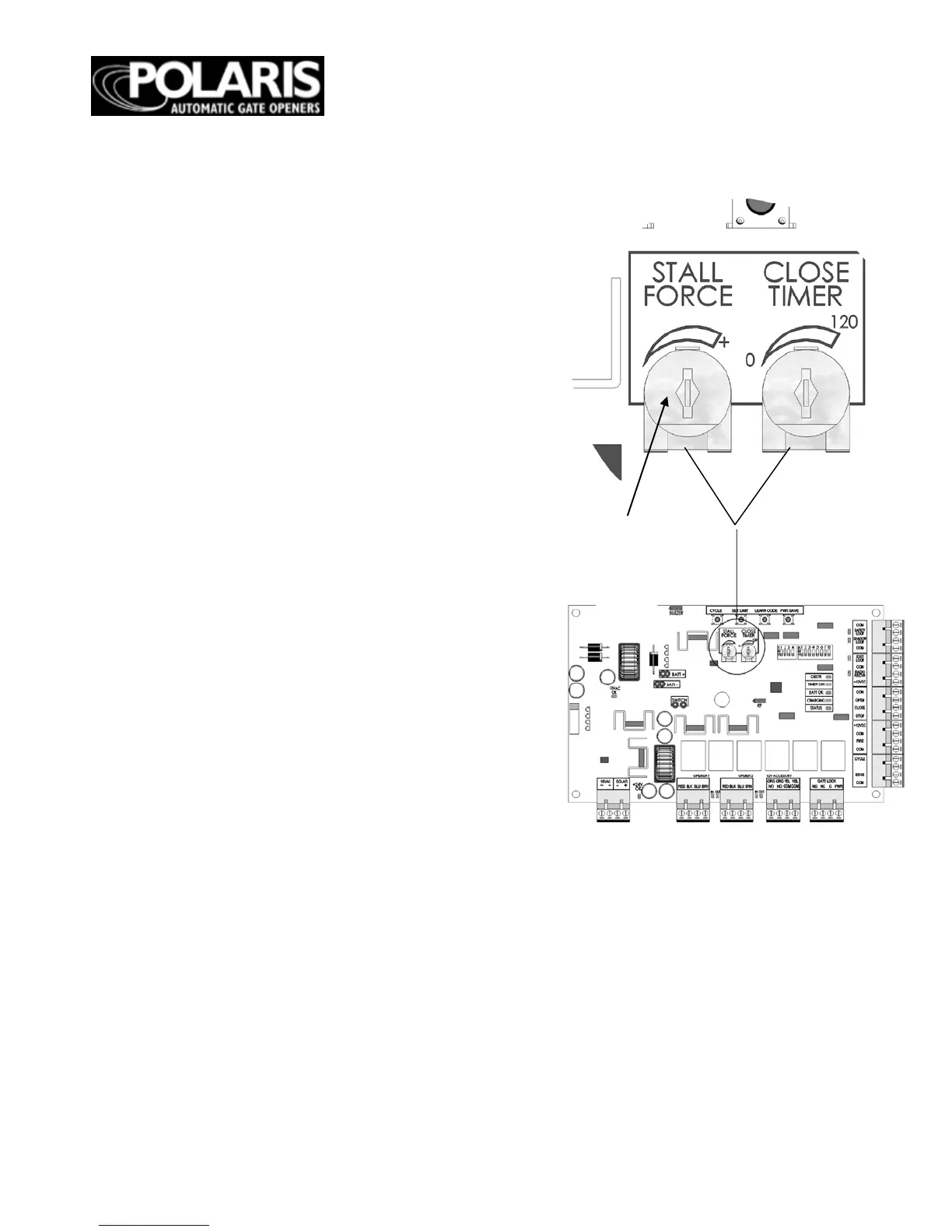
The STALL FORCE potentiometer on the
circuit board controls the obstruction
sensitivity (or the amount of force the operator
will apply to an obstruction) before it
automatically stops and reverses direction of
the gate. Adjust the sensitivity beginning at the
factory default counter-clockwise position.
Continue to incrementally increase the force
until the gate can open and close without
obstructing under its own weight.
NOTE: The stall force may need to be
increased in cold weather due to increased
resistance from gate hinges.
NOTE: The OBSTR LED will light to indicate
an obstruction is sensed.
NOTE: The Stall Force dial in Figure 31
should ideally be at the 10 o’ clock position
instead of the 12 o’ clock position pictured.
Figure 31


 To Next Page