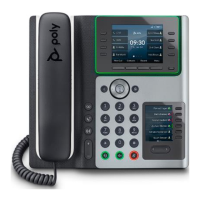
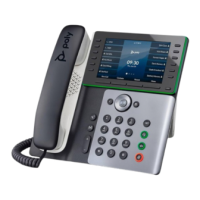
QRG - Poly E500 Desk Phone
Page 2 of 2
Basic Features
Transfer directly to a campus ext (Blind)
• Press the transfer button to the left of the
number keys. Or press the Transfer soft key.
• Enter the extension you want to transfer the
call to.
• Press the Send soft key to complete the
transfer. Or press Cancel to return to the
caller.
Announce a transfer (Consultative)
• Press the transfer button to the left of the
number keys. Or press the Transfer soft key.
• Press the Consultative soft key.
• Enter the extension you want to transfer to.
•
Press the Send soft key to continue the
transfer. Or press Cancel to return to the
caller
.
•
If the call is answered, press the
Transfer soft key to complete the
transfer or the Cancel soft key to cancel
the transfer and return to the original
caller.
•
If the call is not answered, press the
Cancel soft key to return to the original
caller.
Transfer directly to a voicemail box
• Press the More soft key until you see the
T2VM soft key
• Press the T2VM soft key.
• Enter the extension you want to transfer to.
• Press the Enter soft key. The caller has been
transferred to the voicemail of the extension
you entered.
Conference Calling
• While on a call, press the More soft key.
• Then press Conference.
• Enter the campus extension or phone number
that you want to add to the conference call.
• Press the Send soft key.
• When the second call is answered, press the
More soft key and then press the Conference
soft key to connect the calls.
Call Forward
• Press the More soft key.
• Then press the Forward soft key
• Press 1 or the select button to choose
Always.
• Enter the campus extension that you want to
forward your calls to.
• Press the Enable soft key.
To cancel Call Forward:
• Press the More soft key.
• Then press the Forward soft key.
• Press 1 or the select button to choose
Always.
• Press the Disable soft key to turn off call
forwarding.
Accessing Voicemail
• (Option 1) Enter *86 and then press the Dial
soft key to access your voicemail.
• Enter your PIN code followed by #.
• Make your selections from the voicemail main
menu.
• (Option 2) Press the voicemail button.
• Press 1 or the select button to choose
Message Center.
• Press the Select button to choose a line.
• Press Connect to access the voicemail main
menu.
Rebooti
ng your phone
• Press the Home button.
• Then press 9 o
r scroll and select Settings.
• Press 1 or the select button to choose Basic.
• Press 7 or select Reboot Phone and then
press Yes to reboot your phone.
Phone: 888.866.7266
Simplicity@bcntele.com
www.bcntele.com


 To Previous Page
 Loading...