The Poly Edge E 400 is a business-grade IP phone designed for efficient communication in an office environment. It offers a comprehensive set of features for placing, answering, and managing calls, along with options for voicemail and conferencing. The phone's design incorporates both a main display and a secondary screen, providing extensive line key support and easy navigation.
Function Description:
The Poly Edge E 400 serves as a primary communication device for businesses, enabling users to make and receive calls using a handset, headset, or speakerphone. It supports various call management functions such as call waiting, call transfer (blind/unattended), and 3-way conferencing. The phone also integrates with a voicemail system, allowing users to access messages, record greetings, and manage mailbox settings. For uninterrupted work, a Do Not Disturb (DND) feature is included, which automatically rejects incoming calls. The phone is expandable with an optional Poly Edge E Expansion Module (EM) to accommodate additional lines and contacts, making it suitable for users with high call volumes or extensive contact lists.
Important Technical Specifications:
The Poly Edge E 400 features a main display that supports up to 32 lines and a secondary screen that supports up to 12 lines, totaling 44 lines for calls and contacts. The phone includes a dialpad for number entry, dedicated keys for headset and speakerphone functions, and volume controls for ringer, speaker, and handset. Connectivity options on the back of the phone include USB, power, network (LAN and PC), headset, and handset ports. It also features an Electronic Hookswitch (EHS) for compatible headsets and a security slot. The optional Poly Edge E Expansion Module (EM) adds 22 line keys per module, with three pages of lines, providing an additional 66 line keys for BLF contacts, speed dials, or assigned lines. Each EM connects via an Expansion Module Connector and features its own color display and page keys.
Usage Features:
- Home Screen Overview: The Home screen provides a centralized view of call information, line keys, and phone status. Users can place, answer, and manage calls directly from this screen. It also displays status indicators for missed calls, voicemail, and error messages. Softkeys offer quick access to phone features, settings, and information. The pagination key allows users to cycle through multiple pages on the main display to access additional lines or features.
- Adjusting Volume: The phone allows for independent volume adjustments for the ringer, speakerphone, and handset. The ringer volume can be adjusted when the phone is on-hook, speaker volume after the speakerphone is activated, and handset volume when the handset is off-hook.
- Placing Calls: Calls can be placed by picking up the handset and dialing, or by tapping the headset or speakerphone buttons before dialing. Users can also select a number from the list of recently called numbers and press the Dial soft key.
- Ending a Call: An active call can be ended by returning the handset to its cradle, pressing the End Call soft key, or pressing the Speakerphone or Headset key if the call is active on those modes. Held calls can be ended by resuming them first, then ending.
- Answering Incoming Calls: Incoming calls can be answered by lifting the handset, tapping the Answer soft key, or pressing the Headset or Speakerphone key. Options to ignore, forward, or decline calls are also available.
- Do Not Disturb (DND): Activating DND via the softkey automatically rejects incoming calls, providing a recording to callers that the person is unavailable. DND can be turned off to resume receiving calls.
- Blind (Unattended) Transfer: This feature allows users to transfer an active call to another extension or telephone number without first checking if the recipient is available. The transfer is initiated by pressing the Transfer soft key or the dedicated transfer key, entering the number, and then dialing or waiting for an automatic transfer.
- 3-Way Conferencing: To initiate a 3-way conference, users place an active call on hold using the Conference soft key, dial the new party's number, and once the new party answers, press the Conference soft key again to combine the calls.
- Split a 3-Way Conference Call: During an active conference call, users can press the Split soft key to end the conference and place both lines on hold separately. Users can then choose which line to talk to by tapping on the number on the screen and pressing the Resume soft key. The other line remains on hold until it hangs up or is brought back into a call.
- Accessing Voicemail: Voicemail is accessed by pressing the Messages button. Users select "Message Center," choose the message type (urgent, new, or old), and then press the Connect soft key. Voice prompts guide users through options to record names, personal greetings, send messages, manage greetings, mailbox settings, retrieve deleted messages, leave voicemails, and access helpful hints. Detailed instructions are available online.
Maintenance Features:
While the manual does not explicitly detail maintenance features, the presence of a security slot suggests physical security measures can be implemented to prevent theft. The modular design, particularly with the optional Expansion Module, implies ease of adding or replacing components as needed. Firmware updates, typically managed through the network connection, would ensure the phone's software remains current and secure, though this is not explicitly covered in the provided excerpts. The robust construction and clear labeling of ports indicate a design intended for long-term use in a business environment.

 Need help?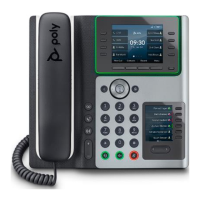

 To Next Page
 General







