Placing Calls
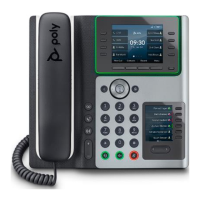
You can place and answer calls on your phone using the handset, headset, or speakerphone, and you can alternate among the three modes
during calls, if available.
1. Pick up the handset and dial the number on the dialpad.
2. Optionally, tap the headset or speakerphone
buttons to make a call using a headset or the speakerphone.
3. Scroll down the list of recently called numbers, tap the number you wish to call, and press the Dial soft key.
Ending a Call
You can end an active call by:
1. Returning the handset to its cradle
2. Pressing the End Call soft key.
3. Pressing the Speakerphone key if on a speakerphone call
4. Press the Headset key, if on a call utilizing a headset.
To end a held call, resume the call and then end it.
Answering an Incoming Call
You have multiple options for answering an incoming call.
1. Lift up the handset.
2. Tap the Answer soft key
3. Press the Headset key
4. Press the Speakerphone key
You may also take the following actions:
• Ignore the call
• Forward the call
• Decline the call


 To Next Page