ZONEMASTER ZONETOUCH V2 ZONE CONTROL SYSTEM - User Manual
3
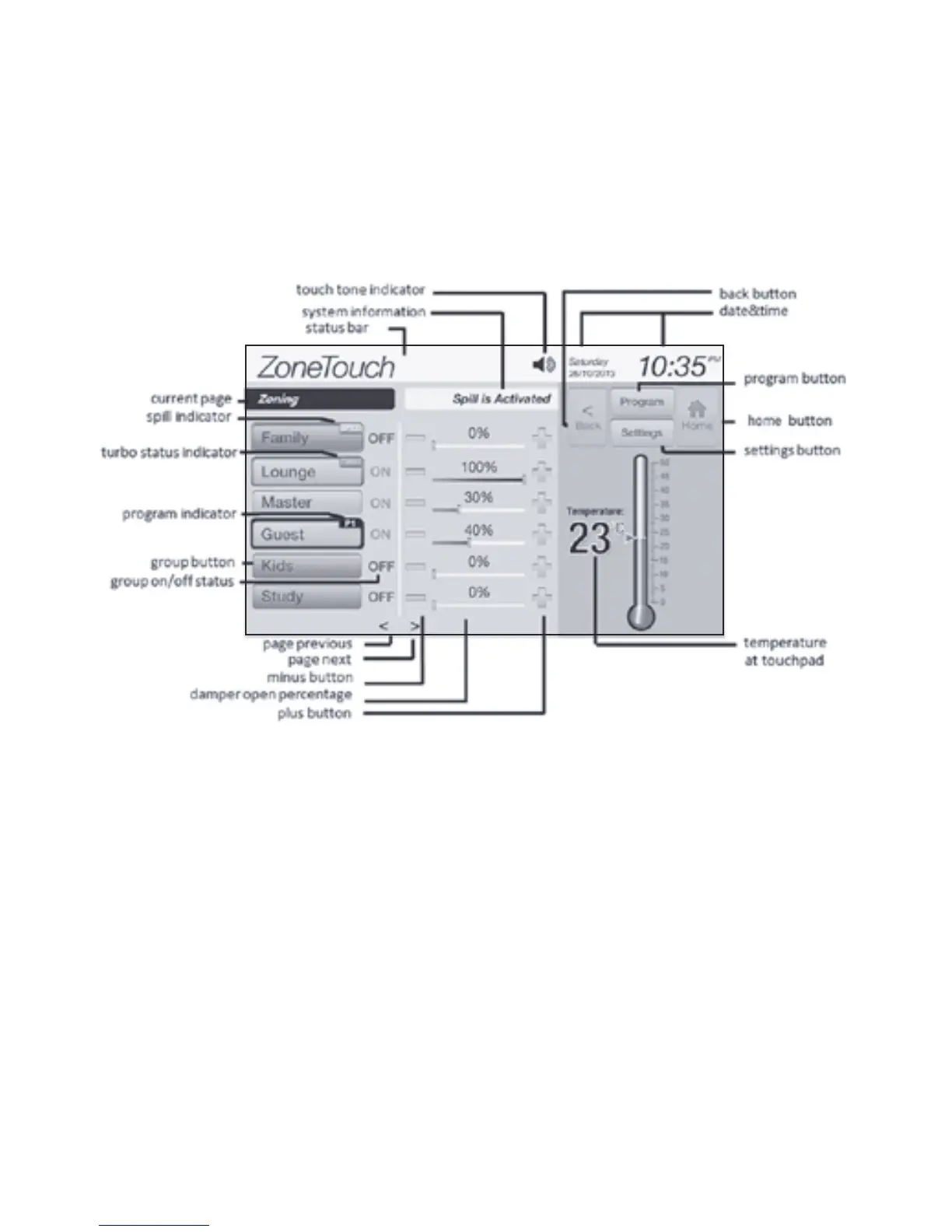
2) Wall Controller Layout (Touch Screen)
The home screen of the system willnormallydisplaygroups’status,dampers’open
percentagewithadjustingbuttons,date,time,roomtemperature,touchtonestatus
andZoneTouchlogoasshowninFigure1.
NOTE:
• The touch screen will go to the sleep mode after 90 seconds of inactivity.
In sleep mode, the screen is blank. Touching any area of the screen will
activate the system.
• To clean the touch screen, use a dry, soft cloth and very gently wipe the
screen. If necessary, dampen the cloth with distilled water or with an
equal ratio of distilled water to white vinegar.
Home Screen (Figure 1)



 To Next Page