ZONEMASTER ZONETOUCH V2 ZONE CONTROL SYSTEM - User Manual
7
Figure 7.
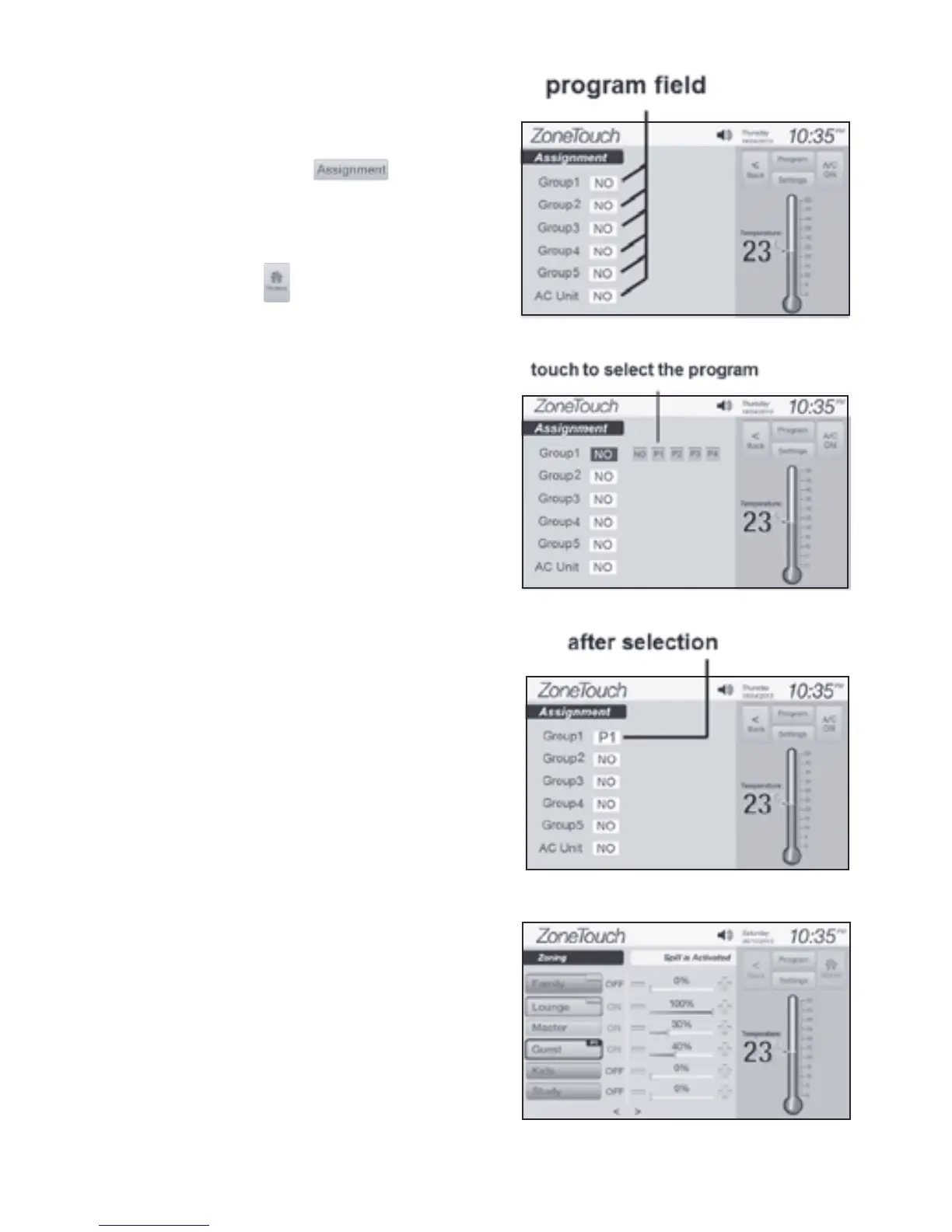
4.2 Select Program for a Group
Enterthe‘Assignment’screen(Figure
7) by touching on
programmingscreen(Figure4).
Assignmentscreenshowsthelistof
the current program of each group.
Touchingbuttonwillgobackto
thehomescreenfromAssignment
page.
Figure 8.
Figure 9.
Figure 10.
Touchtheprogrameldofagroupto
showallprogramoptions(Figure8).
Touchingaprogramoptionwillassign
theprogramtothegroup(Figure9).
Eachgroupcanbeassignedwithone
program from program1 to program4
(‘P1’to‘P4’),andthegroupwillnot
haveaprogramif‘No’isselected.Ifa
program has been assigned to a group,
theprogramindicatorwillappearon
thegroup(Figure10)ifanyofthefour
eventsintheprogramisenabled.
NOTE: Programs cannot be
assigned to a group with turbo
status. Record programs and groups
to ‘Table 5: Programs’ on Page 13



 To Next Page